Table of Contents
This guide covers lenovo ideapad v460 is for office workers with practical context and easy-to-follow details. Use it to understand the subject and apply the information confidently.
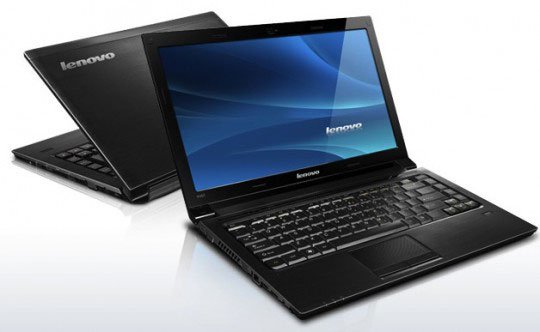 Lenovo IdeaPad V460 is equipped with Intel Core i3 processor.
It can handle graphics-related tasks, using programs such as Photoshop, Corel Draw, Adobe Premiere. NVIDIA GeForce 310M's native 512 MB memory allows support for maximum image resolution up to 2, 560 x 1, 600 pixels on large screens. When playing on a projector, large screen in seminars, the machine gives clear images. Ideapad V460 has been added with Intel GMA HD graphics card. In terms of text editing, web surfing, just use Intel integrated cards to save energy. If you use graphics software, you can switch to NVIDIA card thanks to the switch located at the front edge of the machine. In addition, flexible graphics card conversion and Energy Management software help manage energy efficiently. With 6-cell battery, IdeaPad V460 can operate continuously for four hours on Windows 7 operating system. V460 also has Lenovo Security solution. Fingerprint security function combined with Bio Excess software creates " Gate " for data protection. The Yo-Safe function in Bio Excess allows users to create virtual directories to store important documents. The document will be encrypted, hidden in the machine and only appear when the user has given the correct password or fingerprint registered in advance. Port Locker feature prevents any unauthorized intrusion from strange USB. In addition, OneKey Recovery ensures the security of the data system in the computer by the flexible Backup / Restore method.
FAQ
What should I check before following these steps?
Confirm device and software compatibility, save important data, and make sure you have the required permissions, files, and account access.
Why might the process not work?
Common causes include outdated software, missing permissions, incompatible hardware, an unstable connection, or completing a step in the wrong order.
Can I undo the changes if necessary?
That depends on the tool or setting. Use built-in restore options when available, keep a backup, and record the original configuration first.
Related Articles
 Lenovo Ideapad Gaming 3 Detailed Review: the Perfect Match!13 minutes read
 Lenovo Introduced G Series Laptops and New IdeaPad Z4 minutes read
 Lenovo IdeaPad: Affirm Your Rank7 minutes read
 Lenovo Launched a New Series of Laptops7 minutes read
 Review Lenovo Ideapad L340: the Right Gaming Laptop for9 minutes read
 Review Lenovo Ideapad S540 Laptop: a Safe Option5 minutes read
Reader Comments 0
Sign in with email or Google to join the discussion.