Table of Contents
This guide covers Samsung's ultra-thin laptop costs more than 1,000 usd with practical context and easy-to-follow details. Use it to understand the subject and apply the information confidently.
 X430 is equipped with LED backlight screen of 14 inch size with resolution of 1366 x 768 pixels.
 Outer shell with decorative shell like carbon fiber.
 Chiclet keyboard with large sized keys.
 Power key and speaker system of the machine.
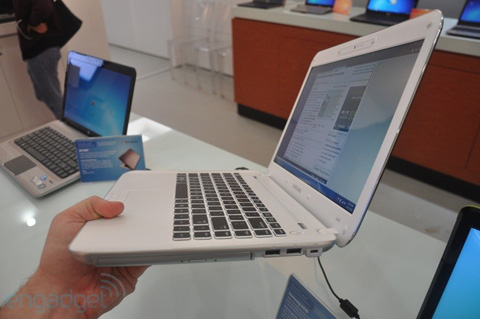 The X430 has a slim design but still comes with an optical drive.
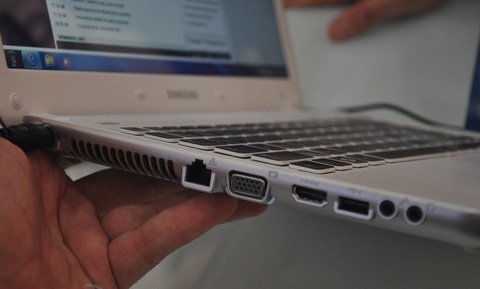 It also possesses full connectivity ports like VGA or HDMI.
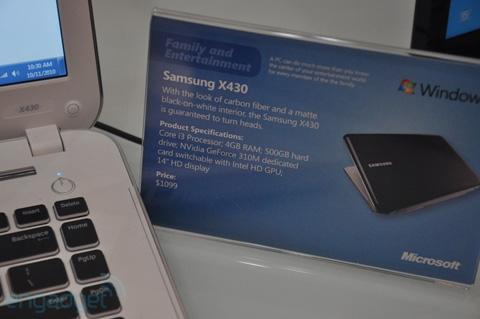 The equipped version includes Intel Core i3 ULV processor, 4GB RAM, 500GB hard drive, NVIDIA GeForce 310M graphics card and Intel HD Graphics graphics chip for conversion costing about $ 1, 099 in the US market.
FAQ
What should I check before following these steps?
Confirm device and software compatibility, save important data, and make sure you have the required permissions, files, and account access.
Why might the process not work?
Common causes include outdated software, missing permissions, incompatible hardware, an unstable connection, or completing a step in the wrong order.
Can I undo the changes if necessary?
That depends on the tool or setting. Use built-in restore options when available, keep a backup, and record the original configuration first.
Related Articles
 New Generation Ultra-thin Laptops Can Be Made of Glass Fiber3 minutes read
 Ultrabook Plastic Shell Costs Only 600 USD3 minutes read
 ASUS UX21 Ultra-thin Laptop Costs Under $$ 1, 0003 minutes read
 Dell Launches an Ultra-thin Laptop4 minutes read
 Samsung's Ultra-thin Laptop Costs from 14 Million VND5 minutes read
 The Best Ultra-thin Laptops4 minutes read
Reader Comments 0
Sign in with email or Google to join the discussion.