Table of Contents
DiffusionGemma is an experimental open-weight text-generation model from Google DeepMind. Instead of committing to one next token at a time, it starts with a block of noisy token positions and repeatedly refines that block. The design explores whether text diffusion can generate output faster on suitable GPUs while allowing information to move in both directions inside the block.
It is not a new version that simply replaces the standard Gemma 4 models. Google presents it as a research-oriented model that trades some output quality for parallel generation speed.
DiffusionGemma specifications
| Base architecture | Gemma 4 26B-A4B Mixture of Experts |
|---|---|
| Parameters | About 26 billion total, with about 4 billion active during inference |
| Generation method | Discrete diffusion over 256-token blocks |
| Input | Text, images, and video |
| Output | Text |
| Status | Experimental open-weight model |
| License | Apache 2.0, according to Google's model card |
The authoritative references are Google's DiffusionGemma overview and model card. The weights are also published in Google's Hugging Face repository.
How ordinary language models generate text
Most general-purpose language models are autoregressive. After reading a prompt, the model predicts a distribution for the next token, chooses one, adds it to the sequence, and repeats. The process is sequential: token 101 cannot be finalized before token 100.
This approach works well, but repeatedly moving model weights through memory for one decoding step at a time can make generation memory-bandwidth-bound. Once an autoregressive model emits a token, it normally cannot revise that token during the same generation pass.
How DiffusionGemma generates a block
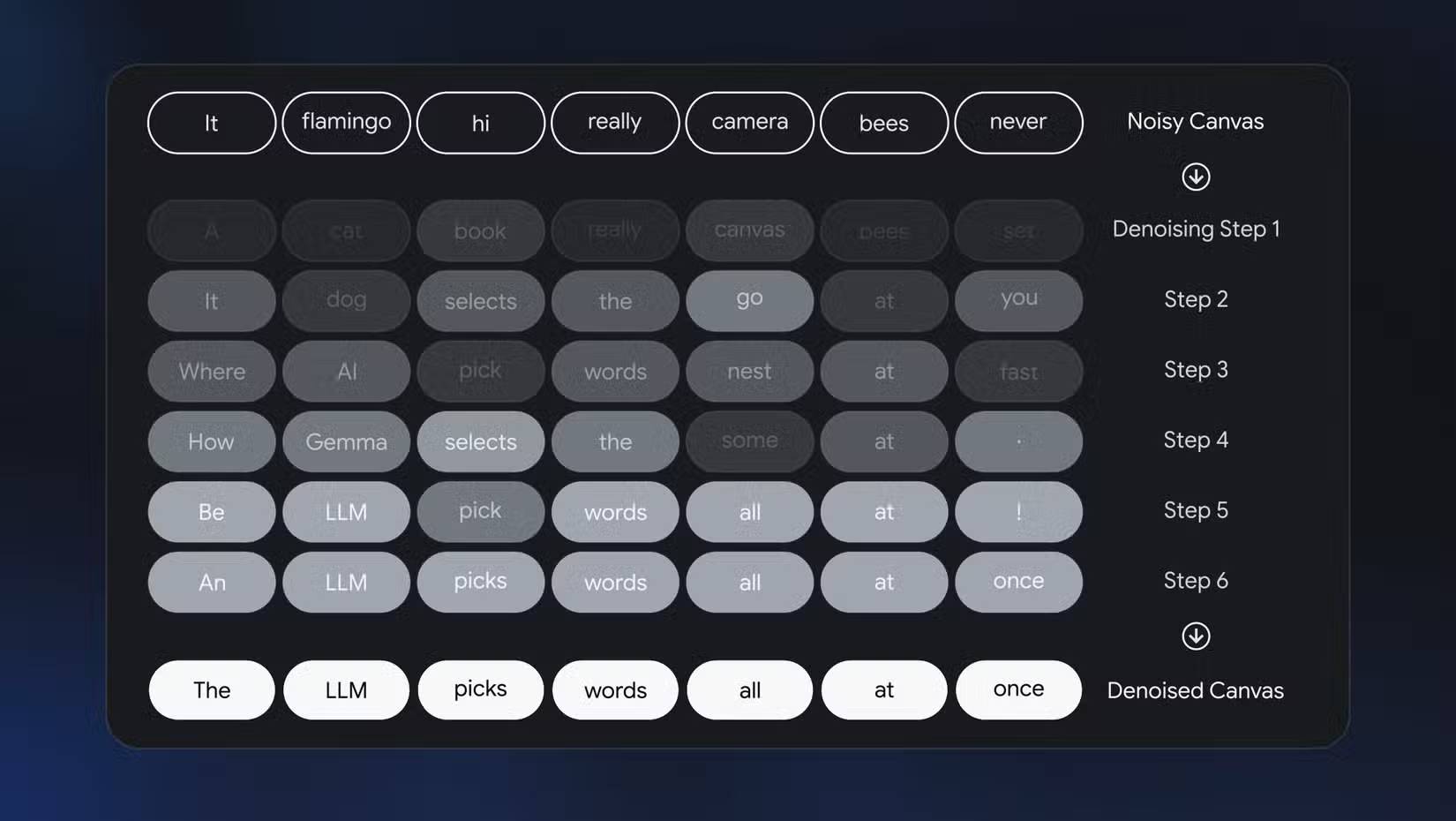
DiffusionGemma works on a 256-position canvas. Those positions begin as noise. During each denoising step, the model predicts cleaner token values for the entire canvas, can re-noise uncertain positions, and repeats until the block stabilizes. A completed block is then appended to the context before the model creates another block.
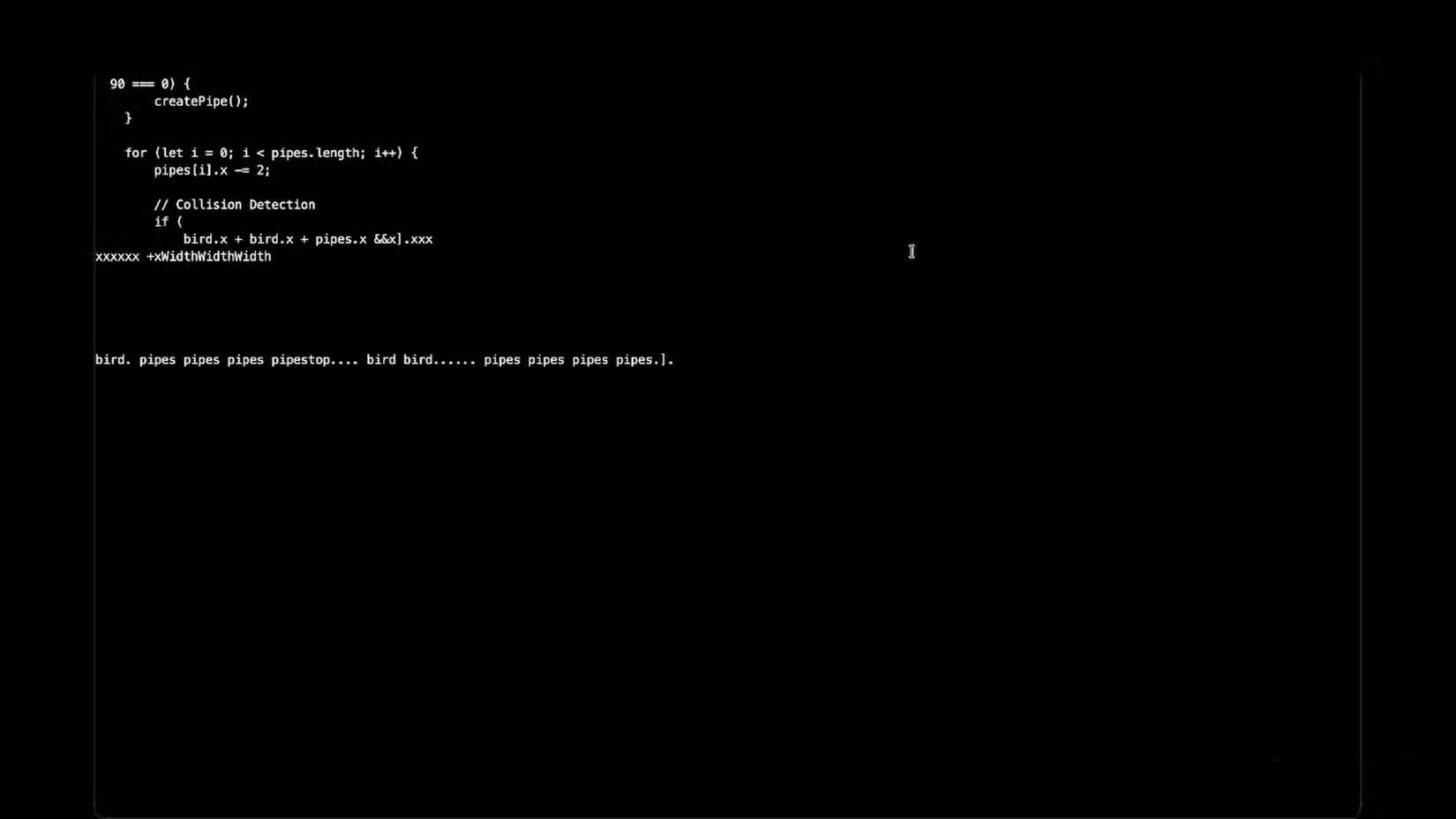
Because attention within the canvas is bidirectional, a later position can influence how an earlier position is refined. In a visual decoder, the result can appear to change in place: fragments emerge across the block, incorrect pieces disappear, and the text gradually becomes coherent. That animation is a visualization of the sampling process, not random editing after a conventional answer has already been written.
Why parallel decoding can be faster
A diffusion step predicts many token positions together. On a powerful dedicated GPU, this shifts more work toward parallel computation and can reduce the number of strictly sequential decoding operations.
Google reports up to four times faster token generation in its test conditions, including more than 1,000 tokens per second on an NVIDIA H100 and more than 700 tokens per second on an RTX 5090. These are vendor results for specific hardware, software, settings, prompts, and output lengths—not a guarantee for every deployment.
Performance can be very different on CPUs, Apple Silicon, older GPUs, small batches, or software paths without optimized kernels. Latency also depends on the number of denoising steps, early stopping, quantization, prompt length, and how full 256-token blocks are counted. Compare time to a usable answer, not a throughput number calculated by a different method.
Does it produce better answers?
Not necessarily. Google's published evaluation shows the standard autoregressive Gemma 4 26B-A4B model ahead on many reasoning, coding, vision, and long-context measures. DiffusionGemma's main contribution is a different decoding method and its potential speed on compatible accelerators.
The model's ability to revise positions within a canvas can help with tasks that benefit from global consistency, but it does not guarantee factual accuracy or correct code. It remains a generative model: outputs can be incomplete, fabricated, unsafe, or inconsistent. Benchmark it on the exact prompts and acceptance criteria of the intended application.
Ways to run DiffusionGemma
Google's model repository documents several supported paths, including Transformers, Google Colab or Kaggle notebooks, vLLM, SGLang, and Docker Model Runner. Third-party quantized builds may also work with specialized forks, but their speed, numerical behavior, and multimodal support can differ from the official implementation.
Before downloading the model, check:
- GPU memory or unified-memory requirements for the chosen precision or quantization;
- whether the runtime implements DiffusionGemma rather than falling back to a slower generic path;
- support for image and video inputs if the application needs them;
- the model license and acceptable-use obligations;
- the required denoising-step, block-size, and early-stopping controls;
- how prompts, outputs, and uploaded media are stored or logged.
How to benchmark it fairly
- Use the same prompts, maximum output length, and stopping criteria for both models.
- Separate time to first useful text, total latency, and sustained throughput.
- Report hardware, runtime, precision, quantization, batch size, and denoising settings.
- Score answer quality, not only tokens per second.
- Run enough samples to account for warm-up and prompt variation.
- Measure peak memory, power, and system responsiveness for local deployment.
DiffusionGemma is most compelling as a concrete demonstration that text generation does not have to remain strictly left-to-right. For production use, its value depends on whether its GPU speed advantage survives the chosen runtime and whether its answer quality meets the application's requirements.
Related Articles
 Learn About Google Fi and How to Sign up3 minutes read
 How to Using Google Classroom to Learn Online3 minutes read
 10 Creative Ways to Use Google Keep Every Day12 minutes read
 Use Google Chrome to Learn Foreign Languages When Browsing the Web6 minutes read
 How to Learn About the New Google Sheets4 minutes read
 Sort and Filter Data: Explained8 minutes read
Reader Comments 0
Sign in with email or Google to join the discussion.