Table of Contents
This guide provides a clearer, better-organized overview of Genmoji: Features and Overview. It focuses on the essential facts, practical steps, and common questions readers are most likely to have.
Among the myriad of Apple Intelligence features, Apple introduced Genmoji on iPhone. Surely you have heard this name before. If you are wondering what the Genmoji feature of iOS 18 is and how to create Genmoji on iPhone, this guide will provide the answer you need.
What Are Genmoji in iOS 18?
Genmoji (Generative + Emoji) is one of the Apple Intelligence features that takes emojis to the next level. It allows creating custom emojis for any occasion on the device using Apple Intelligence. You can create unique Genmoji on iPhone by bringing up an AI prompt and a keyboard to enter a simple description like 't-rex wearing a tutu on a surfboard' or 'relaxing smiley face wearing a cucumber'.
When you provide a description, you'll see your new Genmoji appear with many options to choose from. You can also use photos to create Genmoji for friends and family. If you want to turn your mom into a superhero, now you can.
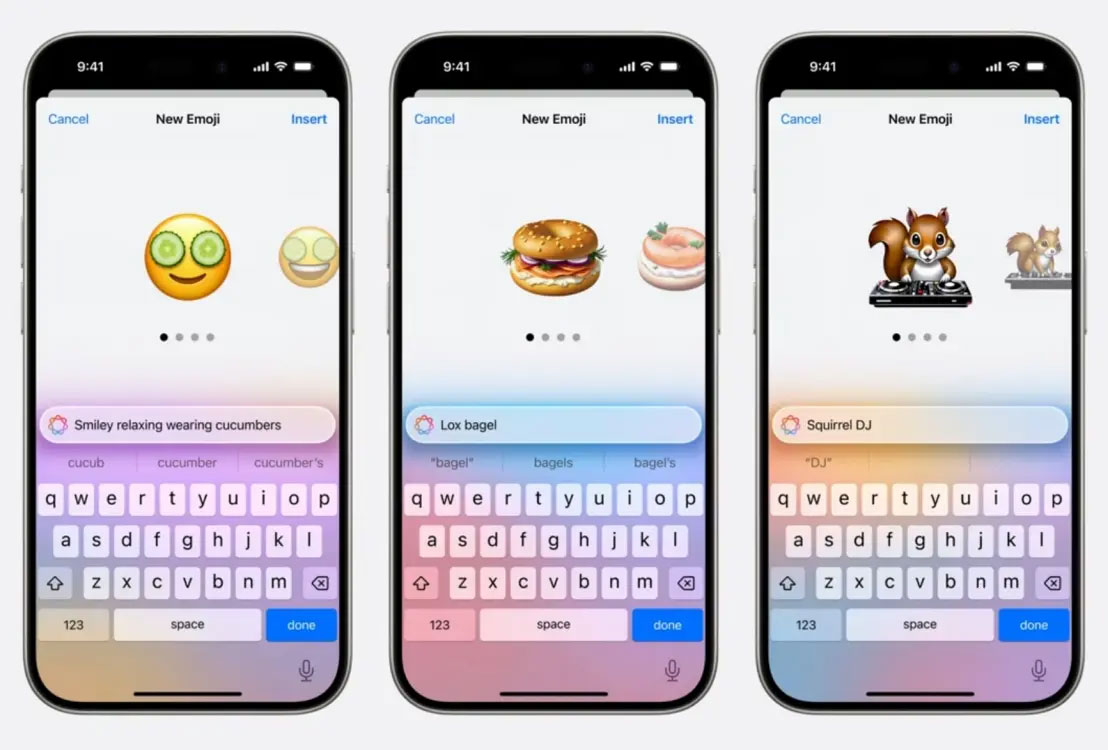
This all-new AI feature on iPhone gives users the freedom to describe how they really feel. Like regular emoji, Genmoji can be added to messages, shared as a sticker, or used as a Tapback reaction in the Messages app.
How to Create Genmoji on iPhone
Genmoji is part of Apple Intelligence features that are not currently available. Currently, you can't create Genmoji on iPhone and will have to wait until Apple Intelligence features appear.
While iPhone XR, XS, XS Max and newer models are available on iOS 18 supported devices, not all of them are compatible with Apple Intelligence features. To use iOS 18's Genmoji feature, an iPhone 15 Pro, 15 Pro Max, M-series iPad, or M-series Mac is required.
It's good to know that no Apple Intelligence features are included in the iOS 18 Developer Beta. Apple Intelligence will be available on iPadOS 18, iPadOS 18, and macOS Sequoia this fall. Additionally, Apple hinted that 'several additional features, languages, and platforms' will be available next year.
FAQ
What is the main point of Genmoji: Features and Overview?
Among the myriad of Apple Intelligence features, Apple introduced Genmoji on iPhone.
Why might the details change over time?
Software versions, prices, policies, services, and product availability can change. Check the official source before making a purchase or changing important settings.
How can I use this information safely?
Follow official instructions, verify downloads and claims, back up important data, and avoid sharing passwords or sensitive account information.
Related Articles
 How Many Red Apples Should You Eat a Day: Main Insights4 minutes read
 How to Use Emoji on Mac3 minutes read
 Interesting Facts About Emoji, Emoticons Are Used Daily on the Internet4 minutes read
 5 Great Benefits from Apples You May Not Know4 minutes read
 After All, Windows 11 Will Have 3D Emoji2 minutes read
 6 Tools to 'Play' with Super-toxic Emoji That You Never Knew5 minutes read
Reader Comments 0
Sign in with email or Google to join the discussion.