Table of Contents
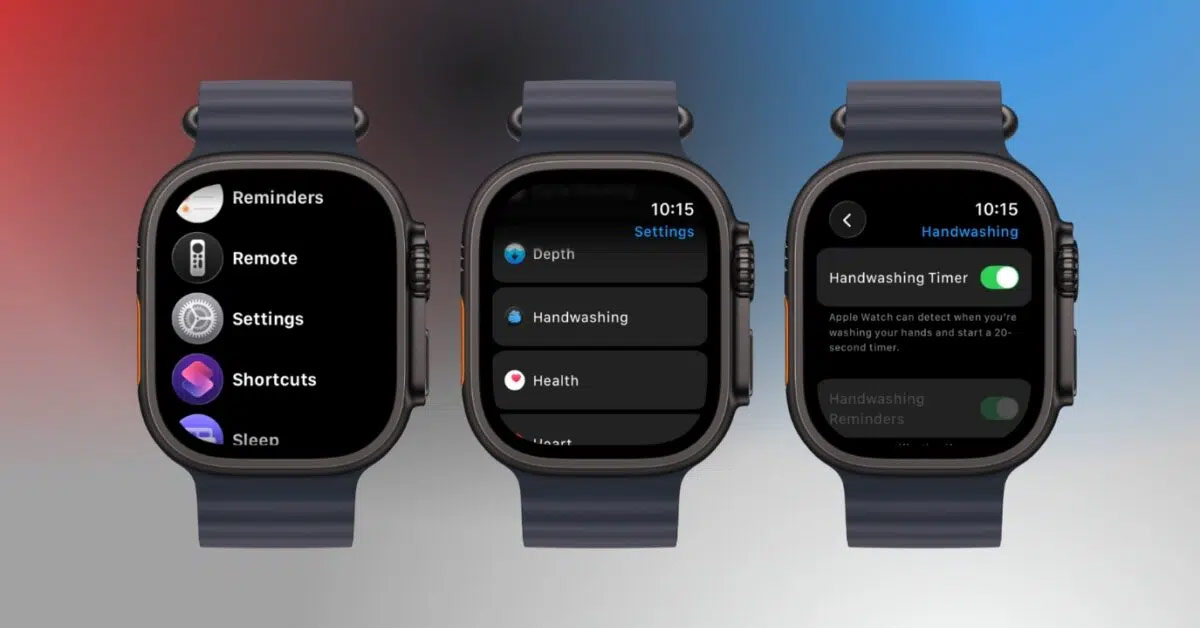
Apple Watch can recognize handwashing movements and sounds, then start a 20-second countdown automatically. To turn it on, open Settings on the watch, tap Handwashing, and enable Handwashing Timer.
How the handwashing timer works
The feature uses the watch's motion sensors and microphone to look for the movements and sounds associated with washing your hands. When it detects that you have started, a 20-second timer appears. If you stop early, the watch prompts you to continue.
Detection is designed to happen automatically, so you do not need to start a timer before touching the faucet. It is an assistive reminder rather than a guarantee that every wash will be recognized.
Turn on Handwashing Timer
- Press the Digital Crown and open Settings.
- Scroll down and tap Handwashing.
- Turn on Handwashing Timer.
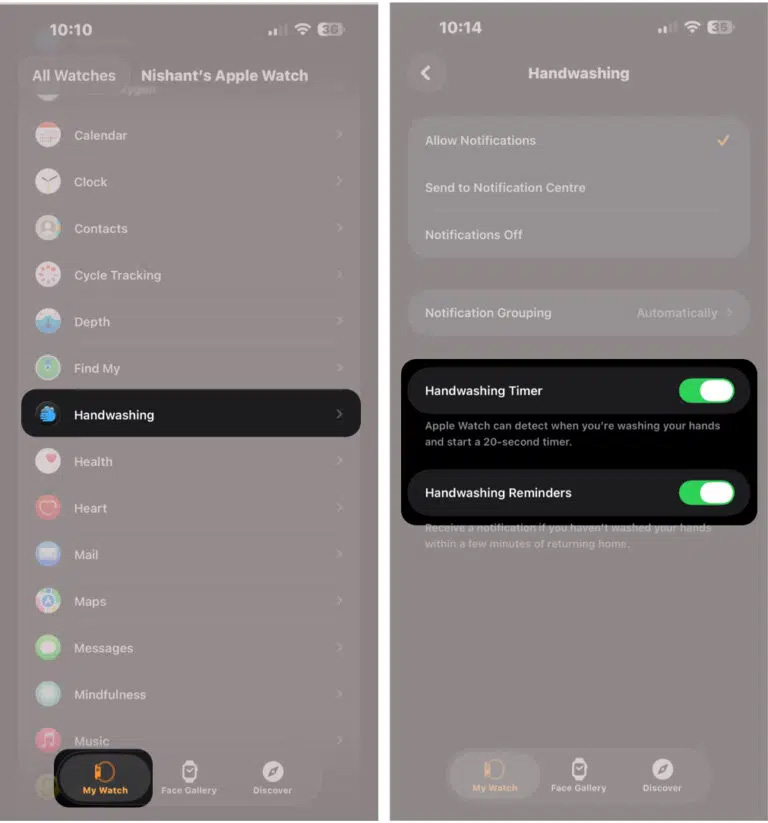
On some watchOS versions, the same setting is also available on the paired iPhone: open the Watch app, select My Watch > Handwashing, and enable the timer.
If the Handwashing menu is not present, update the iPhone and Apple Watch to the latest compatible software. Availability can vary by watch model, software version, and region; an old fixed model list can therefore be misleading.
Use the 20-second countdown
- Begin washing your hands normally while wearing the watch.
- When the countdown appears, keep washing until the timer reaches zero and the watch gives feedback.
- If the watch starts late, continue washing until the displayed countdown finishes rather than stopping at the first alert.
You do not need to place the watch under running water. Keep the watch fitted normally on your wrist and avoid deliberately submerging it just to trigger detection.
Enable handwashing reminders
Depending on the watchOS version, the Handwashing screen may also include Handwashing Reminders. This can remind you to wash after returning home. Reminders may require Location Services and an accurate home address. Watches managed through Family Setup can also expose the reminder setting on the watch.
Review handwashing history
To see recorded sessions on the paired iPhone, open the Health app, tap Browse or Search, choose Other Data, and then select Handwashing. The available chart can help you see whether the watch is detecting sessions consistently.
If handwashing is not detected
- Confirm that Handwashing Timer is still enabled.
- Wear the watch snugly enough for its motion sensors to follow your wrist movement.
- Wash naturally and allow the watch a few seconds to recognize the pattern.
- Make sure a bulky case or debris is not covering the watch's microphone opening.
- Restart the watch and install available watchOS updates if detection repeatedly fails.
Apple provides the current setup steps in its Apple Watch User Guide. Apple Watch health features are not medical devices and should not replace public-health guidance.
After setting up the timer, you can further personalize the watch with useful Apple Watch complications or review other practical Apple Watch features.
Related Articles
 How to Unpair Your Apple Watch5 minutes read
 How to Take a Screenshot on Apple Watch3 minutes read
 The Apple Watch Has an Extra Sleep Tracking Feature3 minutes read
 How to Set Up Your Apple Watch for Emergencies5 minutes read
 How to Change Apple Watch Name4 minutes read
 Ways to Fix Apple Watch Not Receiving Notifications5 minutes read
Reader Comments 0
Sign in with email or Google to join the discussion.