Table of Contents
Learn how to customize your Apple Watch face to display all the necessary information and easily monitor it at any time.
In particular, users can fully customize this information to a certain extent. With this customization capability, users can design a watch face that suits their habits and needs.
How to customize the watch face in the Watch app
The Watch app on iPhone offers users several options to customize what the watch face displays. Information such as weather, calendar, and health data can all appear on the same screen; however, users may have to forgo preferred features like the time, font color, and background color. To customize your Apple Watch face, follow the steps below.
Step 1: Open the Watch app, select the Watch Faces tab, and choose a watch face style. In this guide, we'll choose Info Module , a simple watch face that lets users combine multiple features.
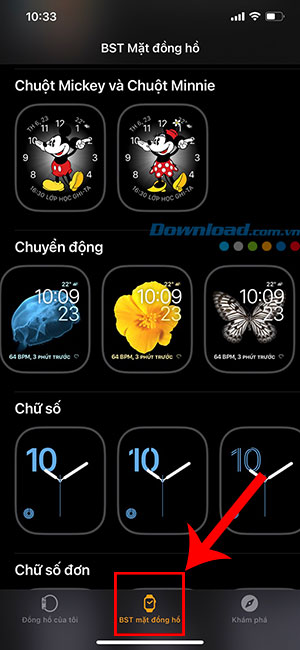
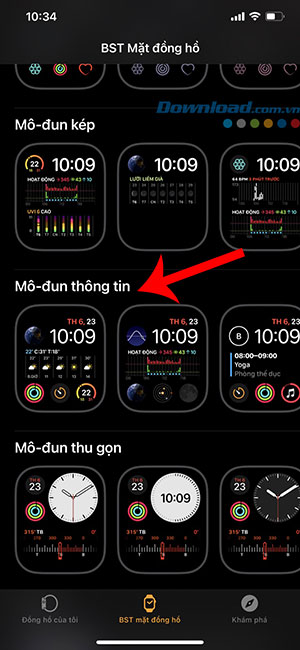
Step 2 : Now, choose a color from the list according to your preference. Note that you should choose a striking color so that the information is clearly visible.
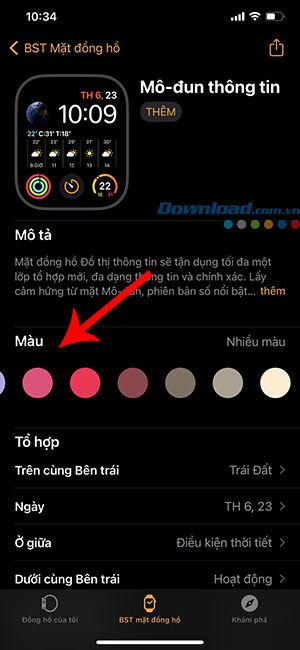
Step 3 : Tap one of the options in the Combinations section. For example, the user can tap Top Left to change from Earth to Blood Oxygen .
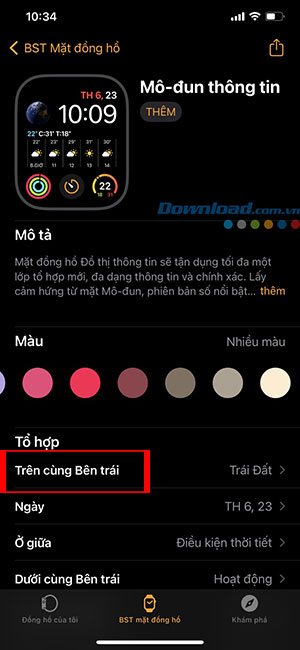
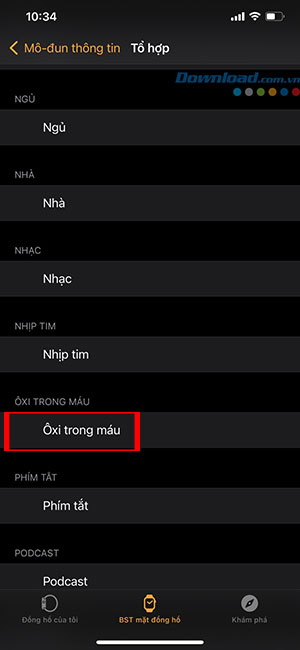
This watch face can be customized in different areas of the screen, such as the middle , bottom left , etc., with a diverse range of features.
Step 4 : After you have finished customizing the watch face to your habits and needs, simply press Back > Add to add it to your Watch Face Collection.
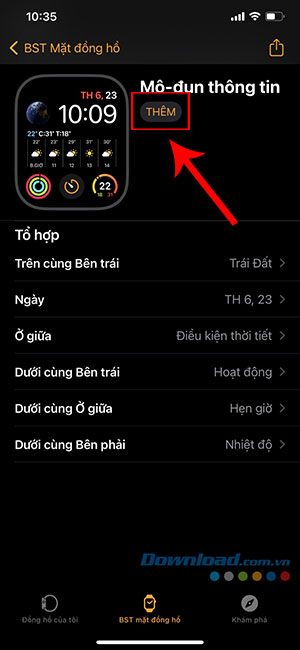
So, with just a few simple steps, everyone can create their own Apple Watch face and have it instantly synced.
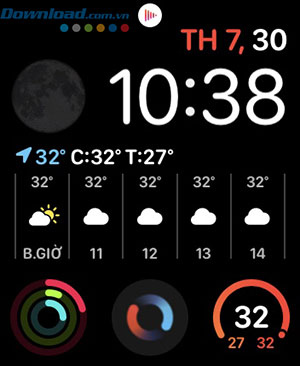
The best part about this integration method is that users can experiment with Shortcuts and create their own smart shortcuts, adding them as combinations on their watch.
FAQ
How can you create Custom Apple Watch Faces?
Learn how to customize your Apple Watch face to display all the necessary information and easily monitor it at any time.
How can you customize the watch face in the Watch app?
The Watch app on iPhone offers users several options to customize what the watch face displays.
Do the steps or features vary by device or software version?
They can. Menu names, available settings, and compatibility may differ by device, region, account type, or software version, so check the options shown on your own screen.
Related Articles
 How to Rearrange the Order of the Watch Faces on Apple Watch5 minutes read
 14 Best Free Apple Watch Faces14 minutes read
 Ways to Fix Apple Watch Not Receiving Notifications5 minutes read
 How to Set the Moving Astronaut Wallpaper on Your Apple Watch3 minutes read
 Basic Apple Watch Operations Users Need to Know5 minutes read
 How to Unpair Your Apple Watch5 minutes read
Reader Comments 0
Sign in with email or Google to join the discussion.