Table of Contents
Laravel is a PHP framework for building web applications. For a current Laravel 13 project, you need PHP 8.3 or later, Composer, and either Node.js with npm or Bun for frontend assets. The quickest setup is Laravel Herd on Windows or macOS; Docker users can use Laravel Sail. After the prerequisites are installed, the core workflow is to install the Laravel command-line tool, create a project, build its assets, and start the local development services.

Choose a local Laravel environment
You do not need WampServer or XAMPP just to run Laravel. Those packages can still host PHP applications, but the old graphical Composer workflow shown in the original guide is no longer the clearest route for a new project.
Option 1: Laravel Herd for Windows or macOS
Laravel Herd is the simplest choice for many desktop users because it bundles the services and command-line tools Laravel development needs. The Windows version requires Windows 10 or later and administrator access. Install Herd from its official site, open a new terminal, and verify the tools:
php -v
composer --version
laravel --version
node --version
npm --version
If every command prints a version, you can proceed to project creation.
Option 2: Laravel Sail with Docker
Laravel Sail provides a Docker-based development environment. It is useful when a team wants consistent PHP, database, cache, and mail services across computers. Sail supports macOS and Linux; on Windows it runs through WSL2. This route requires Docker and is heavier than Herd, but it keeps most project services isolated in containers.
Option 3: Install the tools separately
If you already maintain a PHP environment, install PHP 8.3 or later, Composer, and Node.js with npm through trusted packages for your operating system. Check that the PHP command used by the terminal is the intended version:
php -v
php --ini
php -m
composer --version
node --version
npm --version
The list of required PHP extensions can change with framework dependencies, so use the current Laravel installation documentation and Composer's error output rather than copying an old extension list.
Install the Laravel command-line tool
Once PHP and Composer work in the terminal, install Laravel's project installer:
composer global require laravel/installerClose and reopen the terminal, then run:
laravel --versionIf the command is not found, locate Composer's global executable directory:
composer global config bin-dir --absoluteAdd that directory to your user PATH, open a fresh terminal, and check the command again. Do not edit Composer package files to solve a PATH problem.
Create a Laravel project
Choose a normal development folder, not a protected system directory, and run:
laravel new example-app
cd example-app
Replace example-app with a short project name containing no spaces. The installer may ask you to select a starter kit, testing framework, and database. Choose only the components you intend to use; they can affect the files and dependencies created for the project.
If you are new to development, TipsMake's guide to starting computer programming can help you organize the fundamentals before working through a full framework. The collection of free programming learning websites also provides places to practise PHP, HTML, CSS, and JavaScript alongside Laravel.
Install frontend packages and run the app
From the project directory, install the JavaScript dependencies and build the frontend assets:
npm install
npm run build
Then start Laravel's local development processes:
composer run devOpen http://localhost:8000 in your browser. Keep the terminal open while you work, and press Ctrl+C when you want to stop the processes.
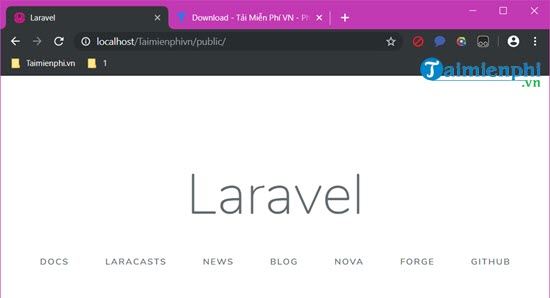
A Laravel welcome page confirms that the application can boot. It does not by itself confirm that a database, mail service, or production web server is configured.
Check the environment and database
Laravel stores project-specific settings in the .env file. The installer normally creates this file and generates an application key. Check the application status with:
php artisan aboutIf the project uses a database, review the DB_* values in .env before running migrations. Then create the application's tables:
php artisan migrateLaravel can use SQLite for a small local project or connect to another supported database. Never commit .env to a public repository because it can contain credentials and other secrets.
Run the tests
A fresh Laravel project includes an automated test setup. Run it before making large changes and again after installing packages:
php artisan testA passing starter test shows that the test runner can boot the application. Add tests for the routes and behavior you implement rather than relying only on the default sample.
Common installation problems
Composer reports an incompatible PHP version or missing extension
Run php -v and php -m in the same terminal where Composer failed. On a computer with multiple PHP installations, the terminal may be using a different executable from the one configured in a desktop web server. Inside the project, this command provides another useful check:
composer check-platform-reqsThe laravel command is not recognized
Use composer global config bin-dir --absolute, add the returned directory to PATH, and restart the terminal. Reinstalling WampServer or changing Laravel source files will not fix a missing global PATH entry.
The page loads but CSS or JavaScript is missing
Install and build the frontend packages again:
npm install
npm run build
During active frontend development, npm run dev can keep Vite watching for changes. Run it in a separate terminal if you are not using the combined composer run dev workflow.
Laravel cannot write cache or log files
On Linux or macOS, ensure the account running PHP can write to storage and bootstrap/cache. Fix ownership and narrowly scoped permissions for those directories. Avoid chmod -R 777, which grants unnecessary write access.
Local development is not production deployment
The local development server is intended for coding and testing. For deployment, follow Laravel's production deployment guidance, install production dependencies appropriately, protect environment secrets, and configure a supported web server. The web server's document root must point to Laravel's public directory; serving the project root can expose sensitive files.
Related Articles
 How to Install Laravel Framework on Ubuntu5 minutes read
 Composer: How to Install Laravel Framework in Windows6 minutes read
 How to Install Microweber CMS on CentOS and Rocky Linux8 minutes read
 Steps to Install and Setup Rider: Powerful C#, .Net7 minutes read
 Microsoft Is About to Stop Supporting PHP on Windows3 minutes read
 TOP 9 Websites That Support Online C/c++ Programming Compilation7 minutes read
Reader Comments 0
Sign in with email or Google to join the discussion.