Table of Contents
A SQL JOIN combines rows from two table sources according to a relationship expressed in an ON clause. Use INNER JOIN when you need matched rows only, or an outer join when unmatched rows from one or both sides must remain in the result.
The examples below use SQL Server’s modern SQL-92 join syntax. It is clearer and safer than listing multiple tables with commas and placing the relationship in WHERE.

Example tables and relationship
Assume dbo.Product has one row per product and dbo.OrderItem has one row per product included in an order. The shared key is ProductId.
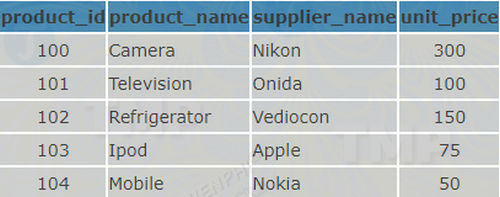
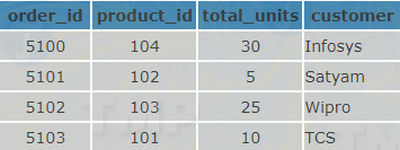
INNER JOIN: return matched rows
SELECT
    oi.OrderId,
    p.ProductName,
    p.UnitPrice,
    oi.Quantity
FROM dbo.OrderItem AS oi
INNER JOIN dbo.Product AS p
    ON p.ProductId = oi.ProductId;
Only order items with a matching product appear. If one product occurs in ten order-item rows, the product details appear ten times; that is the expected result of a one-to-many relationship, not automatically a duplicate-data error.
LEFT JOIN: keep every row from the left table
To list every product, including products that have never been ordered, place Product on the left:
SELECT
    p.ProductId,
    p.ProductName,
    oi.OrderId,
    oi.Quantity
FROM dbo.Product AS p
LEFT JOIN dbo.OrderItem AS oi
    ON oi.ProductId = p.ProductId;
For an unmatched product, columns from OrderItem contain NULL. The word OUTER is optional, so LEFT JOIN and LEFT OUTER JOIN mean the same thing.
Keep right-side filters in ON when unmatched rows matter
This query keeps every product while joining only order items from 2026:
SELECT p.ProductName, oi.OrderId
FROM dbo.Product AS p
LEFT JOIN dbo.OrderItem AS oi
    ON oi.ProductId = p.ProductId
   AND oi.OrderDate >= '2026-01-01'
   AND oi.OrderDate <  '2027-01-01';
Moving the date test to WHERE would reject the NULL-extended rows and can make the outer join behave like an inner join. Put conditions in WHERE only when you intend to filter the completed join result.
RIGHT JOIN: keep every row from the right table
RIGHT JOIN preserves unmatched rows from its right input. Most queries are easier to read when the tables are swapped and written as a LEFT JOIN, but both forms are supported by SQL Server.
FULL OUTER JOIN: keep unmatched rows from both sides
SELECT
    p.ProductId,
    p.ProductName,
    oi.OrderId
FROM dbo.Product AS p
FULL OUTER JOIN dbo.OrderItem AS oi
    ON oi.ProductId = p.ProductId;
The result includes matches, products with no order item, and order items with no matching product. A properly enforced foreign key normally prevents the last case, but a full join can help compare independently maintained datasets.
CROSS JOIN: return every combination
SELECT c.ColorName, s.SizeName
FROM dbo.Color AS c
CROSS JOIN dbo.Size AS s;
If Color has 4 rows and Size has 5, the result has 20 combinations. That Cartesian product is useful when it is deliberate, but it can become enormous. Use explicit CROSS JOIN so the intent is visible.
Self join: join a table to itself
A self join is not a separate join type. It uses two aliases for the same table. For example, an employee row can reference another employee as its manager:
SELECT
    e.EmployeeName,
    m.EmployeeName AS ManagerName
FROM dbo.Employee AS e
LEFT JOIN dbo.Employee AS m
    ON m.EmployeeId = e.ManagerId;
The left join keeps top-level employees whose ManagerId is NULL.
Non-equality join
A join condition can use a range or another comparison instead of equality. This query assigns each product to a non-overlapping price band:
SELECT p.ProductName, b.BandName
FROM dbo.Product AS p
INNER JOIN dbo.PriceBand AS b
    ON p.UnitPrice >= b.MinimumPrice
   AND p.UnitPrice <  b.MaximumPrice;
The price-band ranges must not overlap unless multiple matches are intentional. A query that filters one table with WHERE Subject <> 'Economics' is not a non-equality join because it has only one table source.
Join types at a glance
| Join | Rows returned |
|---|---|
INNER JOIN | Rows that satisfy the join condition on both sides. |
LEFT JOIN | All left rows plus matching right rows. |
RIGHT JOIN | All right rows plus matching left rows. |
FULL OUTER JOIN | Matches and unmatched rows from both sides. |
CROSS JOIN | Every combination of left and right rows. |
Microsoft’s FROM and JOIN reference documents these logical join forms. SQL Server’s optimizer then chooses a physical strategy such as nested loops, merge, or hash join; see the official join performance guide.
Practical checks for a join query
- Qualify shared column names with table aliases.
- Confirm whether the relationship is one-to-one, one-to-many, or many-to-many before judging the row count.
- Check whether nullable join keys should match; ordinary equality does not match NULL to NULL.
- Select only needed columns instead of using
SELECT *across several tables. - Index frequently joined keys when the workload and execution plan justify it.
- Inspect the actual execution plan and row estimates before forcing a join hint.
Build the sample tables with CREATE TABLE and appropriate keys. To filter the joined result, use the patterns in TipsMake’s WHERE predicate guide.
Related Articles
 Del Command in Windows: Tips and Examples5 minutes read
 How to Use the Net Use Command in Windows11 minutes read
 Ces 2020 Is Hotter Than Ever with the First Appearance of Apple3 minutes read
 How to Use the Command History Function in Command Prompt9 minutes read
 Set Command in Windows: Explained9 minutes read
 Cmd Command in Windows: Tips and Examples9 minutes read
Reader Comments 0
Sign in with email or Google to join the discussion.