Table of Contents
This guide provides a practical overview of Microsoft Is About to Stop Supporting PHP on Windows, including its main features, benefits, limitations, and important considerations.
Talking about this new decision, Dale Hirt, Microsoft PHP project manager, said:
"Traditionally, Microsoft's support circuit for new PHP versions is 2 years from the release date to fix general system errors and 1 year later to fix security holes. This means that PHP 7.2 will be officially out of support in November. PHP 7.3 will also be moved to the security fix mode only in that month PHP 7.4 will continue to have 1 year of fixing the system error and then 1 year. We are committed to maintaining and developing PHP on Windows for versions 7.2, 7.3 and 7.4 as long as they are officially supported. stop PHP support on Windows environments starting with version 8.0 or higher " .
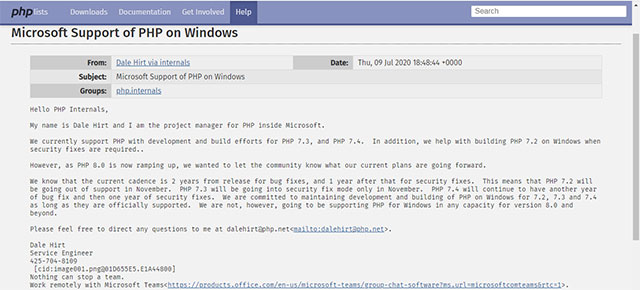 Notice from Microsoft
So in the future, if you want to run the latest version of PHP on Windows, you need to use WSL and run PHP in a Linux environment.
PHP (Hypertext Preprocessor) is a scripting language or type of code used primarily to develop server-based, open-source, open-source, general-purpose applications that can be embedded in HTML. The strength of PHP lies in its ease of use and high flexibility in many situations. However, this language also contains two major drawbacks, that is not easy to maintain the system and not high performance.
FAQ
What should I know about Microsoft Is About to Stop Supporting PHP on Windows?
Focus on the key features, requirements, limitations, and practical use cases explained in this guide.
How do I get the best results with Microsoft Is About to Stop Supporting PHP on Windows?
Follow the recommended steps, use current software or information, confirm compatibility, and review settings before major changes.
Are there any risks or limitations?
Potential limitations depend on compatibility, data quality, cost, privacy, support, and how the product or method is used.
Related Articles
 Microsoft Set a Time to Stop Supporting Windows Thin PC3 minutes read
 Microsoft Teams App Will Stop Supporting iOS 13 from October3 minutes read
 Microsoft Stopped Supporting SQL Server 2008 and Windows Server 20084 minutes read
 It's Time to Say a Real Goodbye to Windows XP!7 minutes read
 Microsoft Will End Support for Windows 10 in 20253 minutes read
 Microsoft Will Officially Stop Supporting Windows Phone, and Check Your Device Deadline3 minutes read
Reader Comments 0
Sign in with email or Google to join the discussion.