Table of Contents
LIKE, IN, BETWEEN, and IS NULL solve four different filtering problems in a SQL WHERE clause: matching a text pattern, checking a list of values, testing an inclusive range, and finding missing values. The examples below use a table named student_details and work as Transact-SQL in SQL Server.

LIKE: match a text pattern
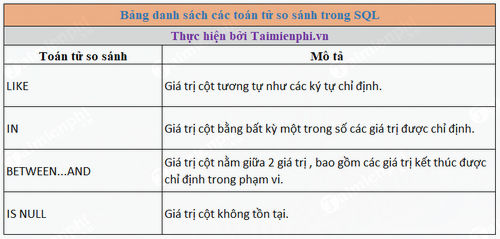
LIKE compares character data with a pattern. In a standard SQL pattern, a percent sign (%) matches zero or more characters, while an underscore (_) matches exactly one character.
SELECT first_name, last_name
FROM student_details
WHERE first_name LIKE 'S%';
This returns names that begin with S, including a one-letter name such as S. To find names whose second character is a, use:
SELECT first_name, last_name
FROM student_details
WHERE first_name LIKE '_a%';
The leading underscore is important: _a% does not mean “starts with a.” It requires one character before a. For a literal percent sign or underscore, use the escaping method supported by your database. SQL Server documents its pattern rules in the LIKE reference.

Case sensitivity depends on the database
Do not assume that LIKE is always case-sensitive or always case-insensitive. In SQL Server, comparison behavior normally follows the expression’s collation. Other database engines have their own rules and may provide separate operators, such as PostgreSQL ILIKE.
IN: compare with a list
IN is a compact way to test whether an expression equals any item in a list:
SELECT first_name, last_name, subject
FROM student_details
WHERE subject IN ('Maths', 'Science');
For non-NULL values, this expresses the same intent as subject = 'Maths' OR subject = 'Science'. The list can also be produced by a subquery.
Be careful with NOT IN when the list or subquery can contain NULL. SQL uses three-valued logic, so a NULL item can make the predicate evaluate to UNKNOWN and return no rows you expected. Filter NULLs from the subquery or use an appropriate NOT EXISTS query. See Microsoft’s IN documentation.
BETWEEN: test an inclusive range
BETWEEN includes both boundary values. The following query returns ages from 10 through 15:
SELECT first_name, last_name, age
FROM student_details
WHERE age BETWEEN 10 AND 15;
For non-NULL values, this is equivalent to age >= 10 AND age <= 15. Use > and < when the boundaries must be excluded.

Date ranges need extra care when a column includes a time. Instead of BETWEEN with an end date at midnight, a half-open range is often clearer:
WHERE created_at >= '2026-01-01'
  AND created_at <  '2026-02-01'
This includes every timestamp in January without relying on a particular fractional-second precision. Microsoft confirms the inclusive behavior in its BETWEEN reference.
IS NULL: find a missing or unknown value
NULL is not an empty string or zero; it represents a missing or unknown value. Use IS NULL, not = NULL:
SELECT first_name, last_name
FROM student_details
WHERE games IS NULL;
To return rows that do have a value, use IS NOT NULL. An ordinary comparison involving NULL generally evaluates to UNKNOWN, which a WHERE clause does not select. Microsoft’s NULL and UNKNOWN guide explains this behavior.
Which predicate should you use?
| Requirement | Predicate | Example |
|---|---|---|
| Text follows a pattern | LIKE | name LIKE 'S%' |
| Value is one of several choices | IN | status IN ('Open', 'New') |
| Value is inside an inclusive range | BETWEEN | score BETWEEN 70 AND 100 |
| Value is missing | IS NULL | closed_at IS NULL |

You can practice these queries after following the SQL Server on Ubuntu installation guide. For a broader comparison of database models, see SQL and NoSQL explained.
Related Articles
 MS SQL Server: Comparison Operators in SQL Server3 minutes read
 Arithmetic Operators: Operator in C ++3 minutes read
 Stack Operator in Python8 minutes read
 Boolean Operators and or in SQL5 minutes read
 !! == and! ==== What Is the Difference in Javascript?2 minutes read
 Arithmetic Operators in Unix // Linux: C Shell Operators4 minutes read
Reader Comments 0
Sign in with email or Google to join the discussion.