Table of Contents
Download UniKey from its official site, choose the correct Windows build, extract the ZIP file, select Telex or VNI, and enable startup if needed.
Download safely: The developer states that unikey.org is the only official UniKey website. Choose the build that matches your PC, extract the ZIP archive, and avoid repackaged installers from unrelated download sites.
UniKey is a free, open-source software used for typing Vietnamese on computers. Essentially, it's an Input Method Editor (IME) that translates standard key combinations into correctly diacritical Vietnamese words.
Key features of UniKey:
- Typing methods: Supports the most popular Vietnamese typing methods such as TELEX, VNI, and VIQR.
- Character encoding: Supports various character sets, including Unicode, TCVN3, VIQR, and VNI.
- Advanced tools: Includes features to define custom text shortcuts (macro extensions), switch between different text encodings, and change font styles (uppercase/lowercase).
- Low size: This is a very compact, fast, and reliable program that requires minimal system resources.
You can use UniKey on:
- Windows: UniKey is the most popular Vietnamese typing software for Microsoft Windows computers.
- macOS & iOS: UniKey's core tools are integrated directly into Apple's operating system, powering the native Vietnamese keyboard.
- iPhone, iPad, and Mac computers. Linux: It is widely used for Linux distributions (often named ibus-unikey).
How to download and install UniKey
Step 1:
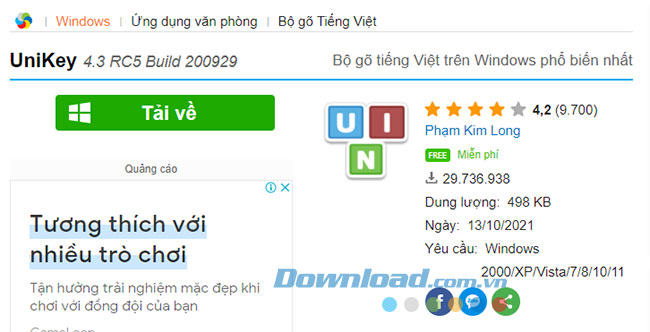
Access the link above and click Download to download the UniKey software installation file to your computer.
Step 2:
From the downloaded compressed file, we will proceed to extract it using Winrar or 7-Zip software.
After extracting the files, copy the UniKey file to your desktop for easy access.
So now you can use UniKey to type Vietnamese.
How to set UniKey to start with Windows
Step 1:
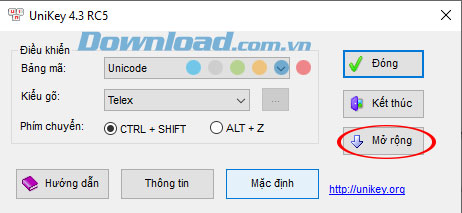
Open the UniKey application and click the Expand button.
Step 2:
Other settings in UniKey will appear; under System, check the box next to Start with Windows.
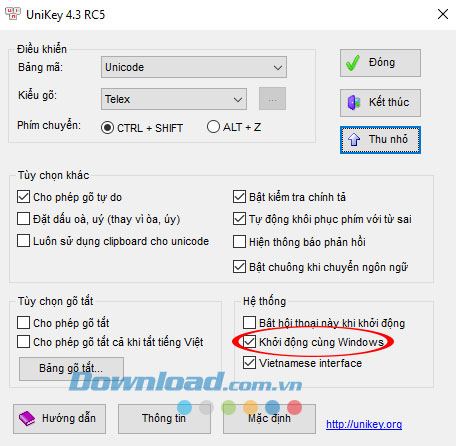
So from now on, UniKey will be enabled by default when you start your computer.
221
Frequently Asked Questions about UniKey
What is UniKey?
UniKey is currently the most popular, lightweight, and free Vietnamese typing software, supporting most character encodings and applications on Windows computers.
Where can I download UniKey safely?
- You can download UniKey from the official website or the download link provided in this guide to avoid accidentally installing malware.
Does UniKey require installation?
There are two versions:
- Portable version (no installation required): simply download and open to use.
- The installer version allows the setup to run with Windows and is easier to manage.
Is UniKey compatible with all software?
- Most applications are compatible with UniKey, from Word and Excel to web browsers, chat software, and graphic design programs.
Is UniKey free?
- Yes, UniKey is completely free and does not require a license.
What should I do if UniKey can't type Vietnamese?
You can try:
- Check if UniKey is enabled.
- Make sure you select the correct Unicode character encoding and Telex/VNI typing method.
- Restart UniKey or your computer if it still doesn't work.
Related Articles
 Instructions for Typing French on a Computer with Unikey6 minutes read
 Link Download Unikey 4.3 RC5 Build 2009294 minutes read
 Unikey Disappeared on His Own, How to Fix It?6 minutes read
 How to Install and Use Unikey for New Users5 minutes read
 Install Unikey, Vietkey Is Not Properly Threatening Computer4 minutes read
 A Combination of Commonly Used Shortcuts on Unikey4 minutes read
Reader Comments 0
Sign in with email or Google to join the discussion.