Table of Contents
This guide provides a practical overview of unikey disappeared on his own, how to fix it with clear explanations and useful details. It focuses on the information users are most likely to need.
You still use Unikey as usual then suddenly one day Unikey disappears by himself, so what is the error and how to fix it? Unikey status automatically deletes happened in many computers. The cause of this situation may be the faulty software or the 'eat' Uninkey virus, or simply the Unikey icon lost in the Taskbar, causing users to mistake Unikey for deleting itself. To solve the error Unikey naturally disappears there are many different ways. Readers can refer to the following ways that the Network Administrator has compiled.
- A combination of commonly used shortcuts on Unikey
- How to use the new EVKey Vietnamese keyboard
- Top 7 Vietnamese computer typing software on the most effective and download link
Instructions for fixing Unikey errors deleted on Windows
1. Lost Unikey icon at Taskbar
Because of the reason that the Unikey icon does not appear in the Taskbar, users thinks the app is deleted from the computer. To fix this, we just need to reset the Taskbar to show the Unikey icon.
Read the reference on how to do it in the Unikey Error Fix section, which does not show the icon on the Taskbar.
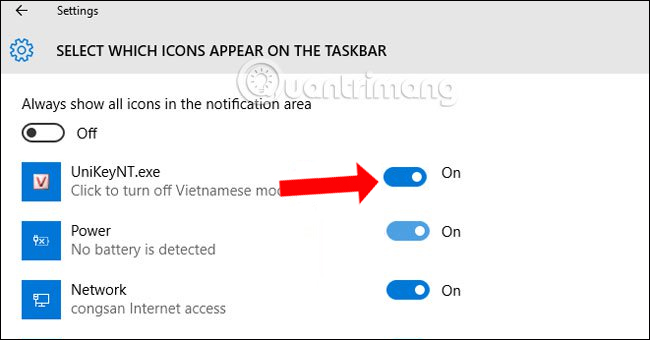
2. Error deleting file Unikey virus
Usually, a computer with a virus will run very slowly or have a different change when you use it, such as disappearing Unikey for unknown reasons. If so, use antivirus software to scan your computer. Then then reinstall Win to resolve this error.
- Things you need to know about how to install Windows today
There are many antivirus software on your computer. Readers can refer to the articles below.
- Kill viruses, Windows 7 trojans without downloading software
- What to do if your computer has a virus?
- How to kill viruses with Windows Defender Offline on Windows 10 Creators
You have now removed the virus to remove Unikey and then then reinstall Unikey.
3. Remove malicious code from Unikey
A malicious code has a similar way of spreading to WannaCry, taking advantage of the MS17-010 vulnerability to remove Unikey on the computer. In this case, users can refer to the article below.
- How to kill virus automatically delete Unikey, Vietkey, Zalo on computer
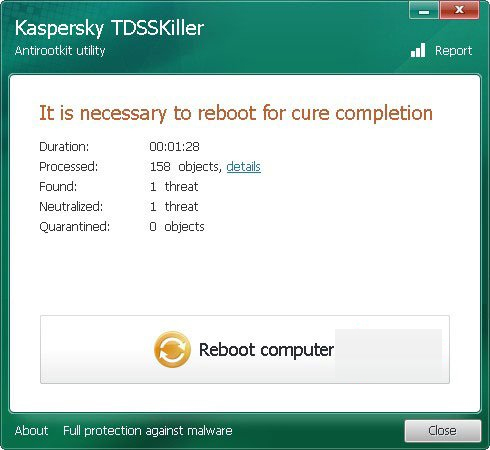
4. Error erased by antivirus software
- Download Unikey software
Some computers installed the old version of Unikey If of being removed by antivirus software by mistakenly receiving the virus infected file. If so, we need to update Unikey to the latest version containing the digital signature to fix.
- Please update Unikey 4.3 RC3: Fix Vietnamese typing errors on Chrome and Edge
Besides, we can also put Unikey on the white list of antivirus software on the computer, the list of trusted software.
- How to protect files from being mistakenly deleted by Windows Defender
5. Error downloading Unikey
There are many websites that download software but not from the original source, causing users to download fake software, thereby causing software errors or system errors if the file has a virus. So you need to check Unikey before downloading, look for sites that download safe software to download files.
- How to distinguish UniKey from owner and fake
The above are the causes of error Unikey itself disappeared as well as how to fix errors in each different case. Thereby users need to download Unikey in safe sources, avoid Unikey fake. Also use anti-virus software to limit the case of virus deleting Unikey.
- How to fix errors cannot type Vietnamese on MISA
- Fix errors not typing Vietnamese on Chrome
- Fix the error Unikey can't type Vietnamese
Hope this article is useful to you!
FAQ
What is the main benefit of unikey disappeared on his own, how to fix it?
The main benefit is a clearer understanding of the topic and a practical way to apply the information covered in this guide.
What should I check before using unikey disappeared on his own, how to fix it?
Confirm compatibility, review the required settings, protect important data, and use the latest supported version whenever possible.
What should I do if the result is different?
Repeat the steps carefully, verify permissions and version differences, and consult the product's official support documentation for changes not shown in the article.
Related Articles
 Link Download Unikey 4.3 RC5 Build 2009294 minutes read
 A Combination of Commonly Used Shortcuts on Unikey4 minutes read
 Fix Error Unikey Does Not Show Icon on Taskbar5 minutes read
 How to Download and Install Unikey on Your Computer4 minutes read
 How to Distinguish Unikey from Owner and Fake7 minutes read
 Fix the Error Unikey Can't Type Vietnamese6 minutes read
Reader Comments 0
Sign in with email or Google to join the discussion.