Table of Contents
This guide covers hp introduced a cheap version of the g62 with practical context and easy-to-follow details. Use it to understand the subject and apply the information confidently.
Like the G62, G62m is equipped with LED backlight screen size of 15. 6 inches with a resolution of 1, 366 x 768 pixels with a slight change in hardware including the use of Intel Celeron processor and Intel Graphics integrated graphics chip. Media Accelerator 4500M.
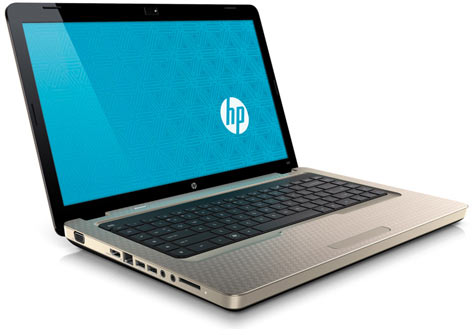 HP G62m.
HP G62m has processor options including Celeron 900 2. 2 GHz speed, 2 GHz T3300 and 2. 1 GHz T3500. All three chips have 800MHz FSB and 1MB of L2 cache. In addition, it also has 4GB DDR3 RAM (up to 8GB upgrade) and a 500GB hard drive.
The new model of HP is still fully equipped with connectivity ports like the G62 version including HDMI, VGA, 5-type memory card reader, 3 USB ports, standard Wi-Fi and webcam.
HP G62m has a weight of 2. 5 kg with 6 cell battery included. Battery life is about 5. 5 hours according to the manufacturer.
The device is pre-installed with Windows 7 Home Premium 64-bit operating system and priced at around 430 USD (reference price in the US market).
FAQ
What should I check before following these steps?
Confirm device and software compatibility, save important data, and make sure you have the required permissions, files, and account access.
Why might the process not work?
Common causes include outdated software, missing permissions, incompatible hardware, an unstable connection, or completing a step in the wrong order.
Can I undo the changes if necessary?
That depends on the tool or setting. Use built-in restore options when available, keep a backup, and record the original configuration first.
Related Articles
 iOS 14 Confirms That Apple Is Developing a Cheap 5.5-inch4 minutes read
 Nintendo Unexpectedly Launched a New Version of Nintendo Switch3 minutes read
 Review on Hand Oneplus 10 Pro: ''extreme'' Cheap as Three Nokia G50s4 minutes read
 Asus Introduced a New Version of the Eee PC Mini Laptop3 minutes read
 5 Reasons Why Cheap Smartphones Are Increasingly Worth Buying6 minutes read
 ASUS N20A, Cheap Ultraportable Laptop3 minutes read
Reader Comments 0
Sign in with email or Google to join the discussion.