Table of Contents
This guide covers hp chromebook 11 was withdrawn in bulk with practical context and easy-to-follow details. Use it to understand the subject and apply the information confidently.
The entire HP Chromebook 11 on the market has been withdrawn following the problem of overcharging the battery charger.
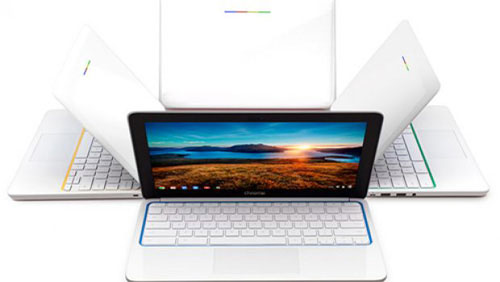 HP Chromebook 11 has a battery charging error that caused HP - Google to temporarily withdraw the product from the market
At the same time, both HP and Google issued a warning warning users not to use the charging device.
Instead, people using the HP Chromebook 11 should use a battery charger provided by a third party.
According to the BBC, US retailer Best Buy Has removed the device from its online shopping list, and the HP Chromebook 11 also disappeared from online stores of Google, HP and Amazon.
Previously, the HP Chromebook 11 was offered in early October 2013 with a very convincing price of $ 279.
FAQ
What should I check before following these steps?
Confirm device and software compatibility, save important data, and make sure you have the required permissions, files, and account access.
Why might the process not work?
Common causes include outdated software, missing permissions, incompatible hardware, an unstable connection, or completing a step in the wrong order.
Can I undo the changes if necessary?
That depends on the tool or setting. Use built-in restore options when available, keep a backup, and record the original configuration first.
Related Articles
 The Best Chromebook Models in 20146 minutes read
 HP Chromebook 11 Supports LTE 4G3 minutes read
 What Is a Chromebook and How Is It Different from a Laptop?7 minutes read
 Samsung Updates Chromebook3 minutes read
 How to View Your Chromebook's CPU Information4 minutes read
 The First Chromebook Uses a 15. 6-inch Screen3 minutes read
Reader Comments 0
Sign in with email or Google to join the discussion.