Table of Contents
This guide covers the first chromebook uses a 15. 6-inch screen with practical context and easy-to-follow details. Use it to understand the subject and apply the information confidently.
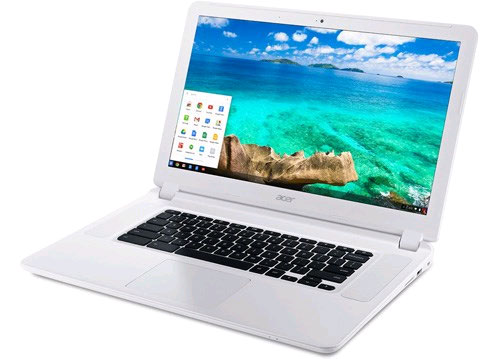 The first Chromebook model uses a 15. 6-inch screen
According to SlashGear, The new model called Chromebook 15 uses a configuration that includes: a 15. 6-inch screen with Full-HD standard, internal memory of 16 or 32 GB, 2 or 4 GB RAM, Intel Core i3 processor and time Continuous battery usage on the device can be up to 8 hours.
The remaining parameters of the device include: a USB 3. 0 port, a USB 2. 0 port, HDMI port, SD memory card reader, Wi-Fi connection support. The important thing, the price of this model is very attractive. Lead, 250 USD.
Reportedly, Chromebook laptops are pre-installed Chrome OS operating system developed by Google. This is the operating system built from the Chromium open source platform based on web and cloud computing.
The unique feature of Chrome OS is the ability to boot only about three seconds to access the system, thanks to the exploitation of web-based apps, not to download services, hardware drivers or heavy software programs when booting.
FAQ
What should I check before following these steps?
Confirm device and software compatibility, save important data, and make sure you have the required permissions, files, and account access.
Why might the process not work?
Common causes include outdated software, missing permissions, incompatible hardware, an unstable connection, or completing a step in the wrong order.
Can I undo the changes if necessary?
That depends on the tool or setting. Use built-in restore options when available, keep a backup, and record the original configuration first.
Related Articles
 HP Chromebook 14 Is Colorful, Priced from $$ 2994 minutes read
 Toshiba Chromebook 13. 3 Inch Officially Launched3 minutes read
 Acer Announced Two New 12-inch Chromebook Models, Primarily for Learning and Research5 minutes read
 Learn About 100 Inch, 120 Inch, 150 Inch Projection Screens10 minutes read
 How to Fix When Chromebook Touch Screen Is Not Working6 minutes read
 How to Record Screen Video on Chromebook5 minutes read
Reader Comments 0
Sign in with email or Google to join the discussion.