Table of Contents
Arch Linux reads repository servers from /etc/pacman.d/mirrorlist in order. If the first enabled mirrors are slow, unreachable, or out of sync, package downloads may stall or fail. You can generate a better list with Reflector, but back up the current file and verify the result before replacing it.
What the Arch mirrorlist controls
A mirror hosts a copy of the official Arch repositories. Pacman expands the $repo and $arch variables in each enabled Server line, then tries servers in the order listed. Geographic proximity can help, but synchronization status and network routing matter more than distance alone.
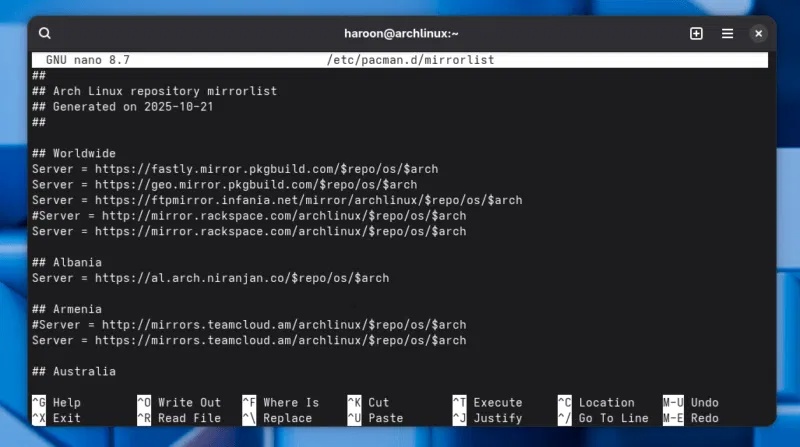
The pacman-mirrorlist package supplies the standard list. A package update may also create /etc/pacman.d/mirrorlist.pacnew instead of overwriting local changes, so check for that file during routine maintenance.
Method 1: Generate a list with Reflector
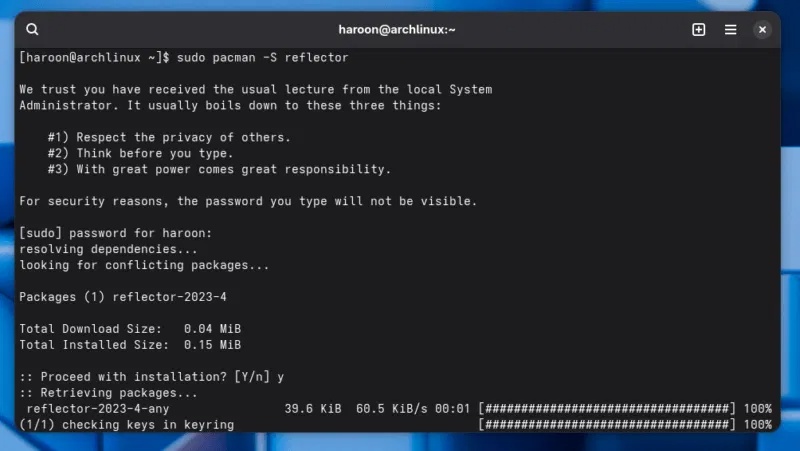
Install Reflector from the official repositories. If a full upgrade is already due, update the system and install the package together:
sudo pacman -Syu reflectorAvoid running pacman -Sy by itself and then installing or upgrading packages. Arch supports full system upgrades; mixing a freshly synchronized database with an otherwise outdated system can create a partial upgrade.
1. Back up the working mirrorlist
sudo cp -a /etc/pacman.d/mirrorlist /etc/pacman.d/mirrorlist.before-reflector2. Generate a candidate file
This example selects HTTPS mirrors in the United States that synchronized within the last 24 hours, then tests and sorts them by download rate:
reflector --country "United States" --age 24 --protocol https --sort rate --save /tmp/reflector-mirrorlistReplace the country with your location, specify several comma-separated countries, or omit --country if the filter returns too few servers. A wider pool is often more reliable than forcing a single country.
3. Inspect the result before installing it
grep '^Server' /tmp/reflector-mirrorlist
grep -c '^Server' /tmp/reflector-mirrorlist
Do not replace the active file if the output is empty or contains too few usable servers. Adjust the country, age, or protocol filter and run Reflector again.
4. Install the verified list and update
sudo install -m 644 /tmp/reflector-mirrorlist /etc/pacman.d/mirrorlist
sudo pacman -Syu
The upgrade refreshes repository data through the new list and keeps the system in a supported, fully upgraded state.
Method 2: Use the official mirrorlist generator
If you do not want to install Reflector, open the official Pacman Mirrorlist Generator. Choose one or more nearby countries, select HTTPS, and use mirror status data to exclude outdated servers. Download the result, uncomment the desired Server lines if necessary, back up the current file, and save the new list as /etc/pacman.d/mirrorlist.
Keep several mirrors rather than only one. The additional entries provide fallback options when a server is temporarily unavailable.
Update the mirrorlist automatically
Reflector includes a systemd timer. Edit /etc/xdg/reflector/reflector.conf and place the preferred options in it, for example:
--country United States
--age 24
--protocol https
--sort rate
--save /etc/pacman.d/mirrorlist
Then enable the timer:
sudo systemctl enable --now reflector.timer
systemctl list-timers reflector.timer
To generate a list immediately rather than waiting for the next scheduled run:
sudo systemctl start reflector.service
systemctl status reflector.service
Review the service status if the file does not change. Overly strict filters, DNS problems, an unavailable Mirror Status service, or a read-only filesystem can prevent a usable list from being written.
Restore the previous list
If downloads become less reliable, restore the backup and refresh normally:
sudo cp -a /etc/pacman.d/mirrorlist.before-reflector /etc/pacman.d/mirrorlist
sudo pacman -Syu
The Reflector manual documents all available filters and the timer integration. For more context, see how Arch Linux differs from other distributions and how Linux package managers compare.
Related Articles
 How Is Arch Linux Different from Other Linux Versions?8 minutes read
 How to Update Arch Linux4 minutes read
 Should I Install Arch Linux?11 minutes read
 Instructions for Installing Basic Arch Linux9 minutes read
 5 Distributions Based on the Best Arch Linux6 minutes read
 Is Arch Linux Better Than Ubuntu?7 minutes read
Reader Comments 0
Sign in with email or Google to join the discussion.