Table of Contents
Follow the instructions below to turn off user tracking on smart TV of vizio, lg… efficiently and safely. Each section focuses on the actions, settings, and troubleshooting details that matter most.
The technology era is flooded with people's lives, and manufacturers and publishers also have their devices equipped with many features to maximize the purpose of users. That's a good idea, but sometimes it's a loophole for bad guys, hackers to use to hit our weaknesses - that's too much dependence on technology. A typical example is when installing software or using online services, because we want to use, we always press the button agree to Install, Create an account without reading a line, even 1 word in those terms.
And when you read these lines, did you know that your Facebook and Google accounts also have many "strange" terms that you agreed to? Your personal information and activities when using Smart TV are the same.
1. What personal information can Smart TV collect?
Very specifically, it's the data, information about the programs you watch, the most used applications, the device you stream to. are all data that other content producers can claim. can. In short, almost all the information you watch and show on SmartTV is possible!
2. How to turn off user data collection on Smart TV streams
On SamSung SmartTV
For the SamSung SmartTV 2016 series, Press the Home Button on the control> Select Settings (the Gear Shape)> scroll down and select Support> Term & Policy . Under Interest Based Advertisement, Click Disable Interactive Services . Also in the section Viewing Information Services Remember to uncheck the I agree Box. And in the Voice Recognition Services section , click Disable advanced features of the Voice Recognition services . 2 other features you need to consider whether or not it is Nuance Voice Recognition And Online Remote Management .
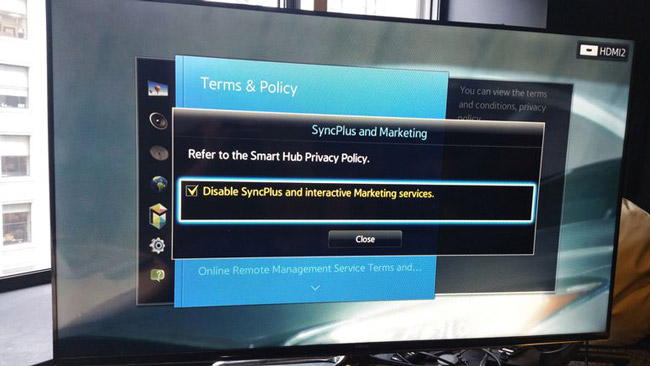
As for some older SmartTV lines of SamSung (for The 2015 line , select Menu From the top of the control), press the Menu Button on the control, scroll down to the Smart Hub Line and select Terms & Policy , then turn off the computer. SynchPlus And Marketing Function. Find and uncheck the check box - Disagree With all the terms you don't want to use here.
On LG SmartTV
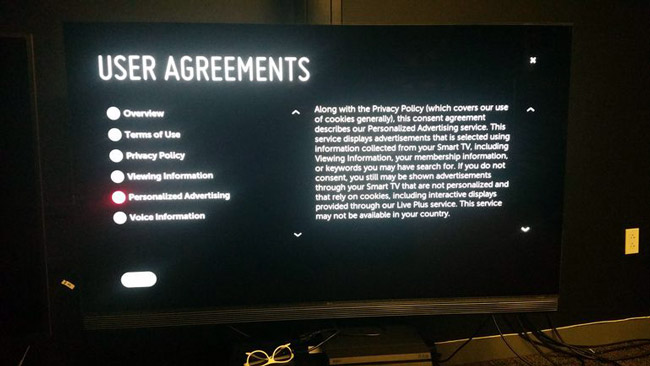
For LG TVs, some LCD Models , OLED SmartTV2015, 2016 Together with WebOS , you click Settings Button on the control (with Gear Icon), select All Settings> General . Continue scrolling down to the About This TV> User Agreements section , where you can deselect with any manufacturer policies if you don't want to use that feature, typically Viewing Information, Personalized Advertising and Voice Information .
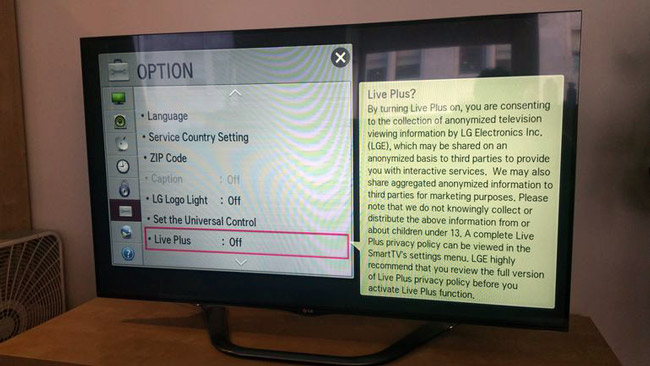
For older SmartTV lines of LG, press the Home or Menu Button on the control, select Option And turn off the Live Plus Feature.
On Vizio's SmartTV
With the latest SmartTVSeries , with the Series Name 2016 E, M and P Using the SmartCast System of Vizio Instead of the usual menu of SmartTV , this "tracking" feature is not activated. As for the older lines (around before 2011), Vizio said that they completely turned off these features.
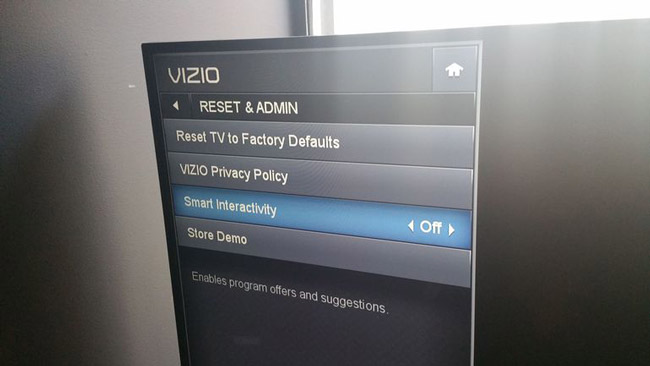
As for the series that were released between 2011 and 2015, as well as the 2016 D Series, users selects the menu to open the Settings Section and Reset and Admin , scroll down and select Smart Interactivity And then switch from On to Off .
With SONY SmartTV
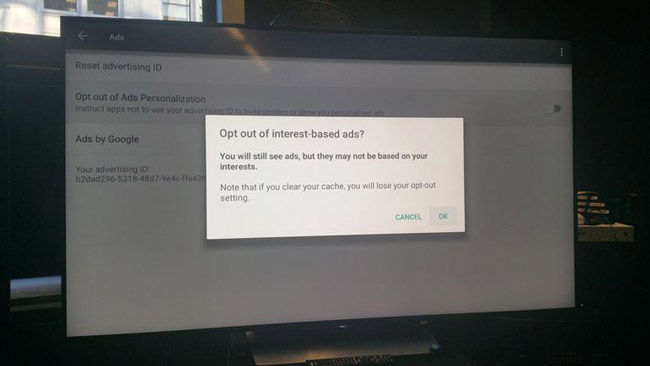
As for Sony , the company's SmartTV Lines from 2015 to 2016 Use Google's Android TV Operating system, then press the Home Button on the control, scroll down under the menu and select Settings , next in the TV Line and select About. > Ads . Choose Opt out of Ads Personalization And OK On the Popup window that appears,
On the SmartTV lines of Roku
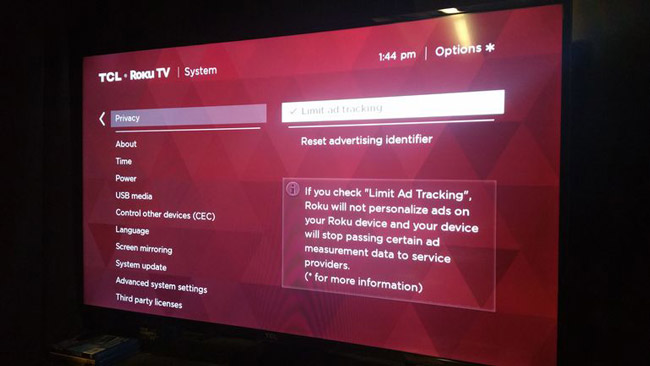
Specifically, with the brands TCL, Sharp, Hisense, Hitachi, Insigna. Using Roku Operating system, you press the Home Button on the control, select Settings> System Then Privacy . Check the box that says Limit ad tracking .
3. How to restrict the tracking feature of other content Streaming devices
Roku box TV box
The advertising policies of Roku On these devices are the same as on SmartTV, you can follow the same instructions.
With Apple TV
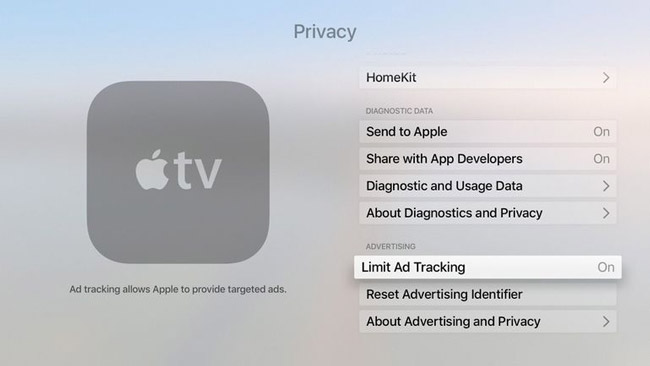
On Apple TV Devices launched in 2015 , you select Settings ( Gear Icon), drag to Privacy Section, then select Limit Ad Tracking And switch to On . Here - this Privacy Section, you can also choose to turn off the feature to share and use Personal user data With Apple with other Third Party Firms, Location Services and see which programs may require permissions. Visit HomeKit or Photos .
For older Apple TV series, select Settings (Gear icon), then select General and change Send Data to Apple from Off to On.
On Google Chromecast
With these devices, users should turn off the Chromecast And Chromecast Ultra features Using the Home Application on a smartphone or tablet. Open the program and select the Menu Icon (with the 3 dashes icon in the upper right corner) select Devices, navigate to the Chromecast device to control and select the 3 dots Icon > Settings And uncheck the Send Chromecast device usage section data and crash reports to Google .
On Amazon Fire TV
To turn off user data tracking on any Amazon Fire TV device, press the Home button on the control, scroll down under Settings, select Preferences> Advertising ID and turn off Interest-based Ads.
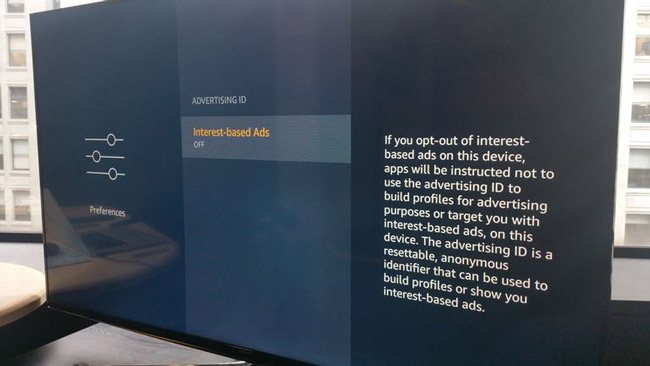
For older Amazon Fire TV Models, press the Home Button on the control and select Settings> System , scroll down under the menu to select Advertitising ID And turn off Interest-based Ads .
With the Nvidia Shield series (Android TV)
You select Settings (with the Gear Icon), then select About , scroll down to the NVIDIA Help Section To improve the SHIELD experience And switch from Yes to No.
Above are some considerations when using Smart TV with technology companies' TV box, of course the feature that helps developers improve the service can be annoying for users, but it is a good part of They aim to improve the quality of services and products. Good luck!
FAQ
What should I prepare before I turn off user tracking on smart TV of vizio, lg…?
Review the requirements in the guide, confirm that your device or software is compatible, and save important work before changing settings related to turn off user tracking on smart TV of vizio, lg….
Why might turn off user tracking on smart TV of vizio, lg… not work as expected?
The most common causes are incompatible versions, missing permissions, incorrect settings, or an interrupted internet connection. Recheck each step and restart the app or device when appropriate.
Can beginners follow these turn off user tracking on smart TV of vizio, lg… steps?
Yes. Follow the steps in order, avoid skipping confirmation screens, and compare your interface with the screenshots because labels may differ slightly between versions.
Related Articles
 5 Tweaks to Stop Your Smart TV from Tracking You7 minutes read
 Windows 10 Location Tracking Feature: Turn Off Location Tracking3 minutes read
 Vizio Started Joining the Computer Market3 minutes read
 How to Connect a Vizio Soundbar to a TV: Step-by-Step Guide8 minutes read
 Firefox Will Slow Down the Process of Loading User Tracking Scripts4 minutes read
 How to Reset Vizio Remote Control: Clear Instructions6 minutes read
Reader Comments 0
Sign in with email or Google to join the discussion.