Table of Contents
This updated guide examines How to Stream Steam Games to Raspberry Pi Without Moonlight and organizes the essential facts, background, and practical takeaways in clear American English.
After "death" of Steam Link hardware, Valve has released Steam Link software for Raspberry Pi. Streaming games from PC to Raspberry Pi is now officially supported, through a dedicated application and independent of Moonlight.
The great thing is that you can set it up in minutes. Now you can install Steam Link software on the Raspberry Pi to play running games on your PC. Here is everything you need to know to stream Steam games to Raspberry Pi without Moonlight.
What you need to play games on Steam with Raspberry Pi
Previously, you could install Nvidia GeForce on your PC (if compatible) and use the GameStream software from Nvidia (Moonlight) to stream games via Raspberry Pi.
Now, all you need to stream games from Steam to Raspberry Pi is:
- Raspberry Pi 3B or 3B +
- 8GB memory card or more with Raspbian Stretch installed
- Keyboard and mouse
- A suitable gaming handle (see below)
- A router with Ethernet port (wireless 5GHz is not recommended for Raspberry Pi)
- Two Ethernet cables.
- HDMI cable
- TV suitable for playing games
- Steam software on PC, Steam account and game library
You will also need a computer running Steam on Windows 7, Mac OS X 10.10 Yosemite or Linux Ubuntu 12.04 and above. You should have a Steam account and at least one game installed.
If you're just using Raspberry Pi, you'll need a copy of the Raspbian Stretch operating system based on Debian. Refer to the article: How to install an operating system on the Raspberry Pi to know how to do it.
Configure PC to play online in the home
Start your PC and connect it to the home network via Ethernet cable. When compared, Steam Link hardware from Valve gives better results when connected via an Ethernet cable. Because Ethernet is faster than WiFi, use the cable to get the best performance. (You can use Steam Link supported by Pi via WiFi, but it should be as close to the router as possible).
Steam should be installed on PC, running and updating.
Updates usually happen automatically when you start Steam, but if this does not happen, open the Steam menu and select Check for Steam Client Updates .
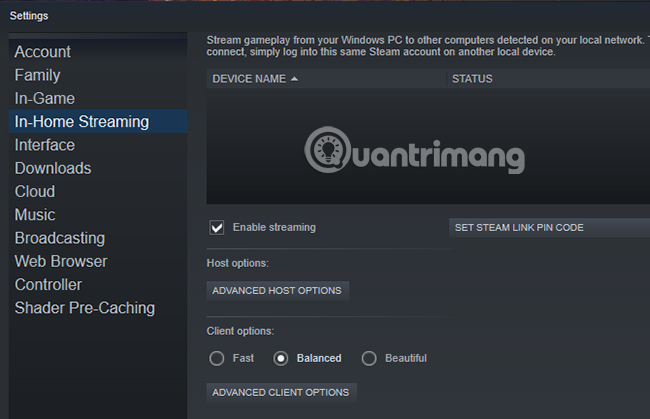
After updating, go to View> Settings and select In-Home Streaming . Here, select Enable streaming and make sure the Client options button is set to Balanced. (You can change this later to improve performance).
Click OK to confirm.
How to install Steam Link on Raspberry Pi
Like computers, Raspberry Pi should be connected to the network via an Ethernet cable. After booting, open the Terminal window (use keyboard shortcutCtrl+Alt+T) and enter:
sudo apt update sudo apt install steamlinkThe first of these commands updates the list of Raspberry Pi packages. Meanwhile, the second order is responsible for finding Steam Link software in the packages and installing it.

Wait until the process is complete, pressYto confirm if prompted.
A moment later, the Steam Link software will be installed on the Raspberry Pi. Assuming you have games in the Steam library, you're ready to start playing on your TV, via Raspberry Pi.
Run Steam Link and play games on TV
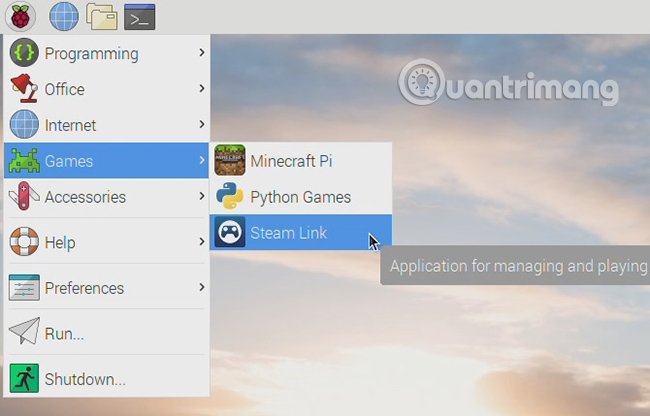
To launch Steam Link software, open Menu> Games> Steam Link on Raspberry Pi.
The full screen Steam interface will appear, showing your computer name and the attached handle. Select your computer to start testing the network. You will be prompted by Steam Link to enter your computer's PIN into the Raspberry Pi, so do this and click OK.
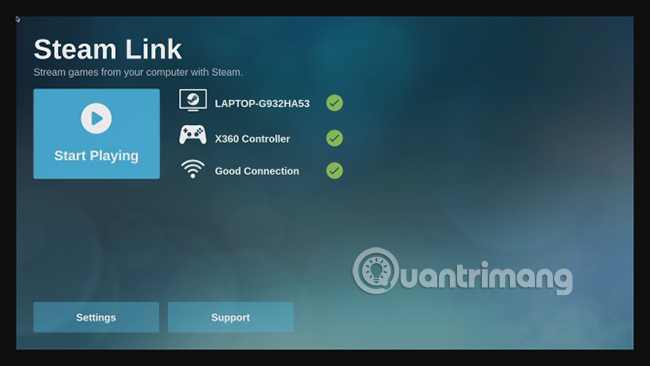
If all goes well, you will see a message stating that the network will work with Steam Link. Use OK and Back to return to the main menu.
However, you may be prompted to update the driver. Steam will handle this for you, just click Install when prompted.
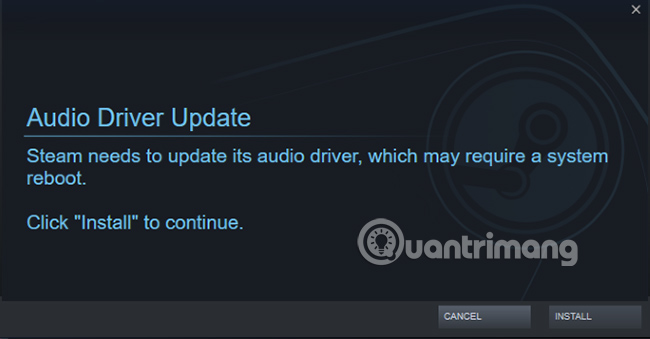
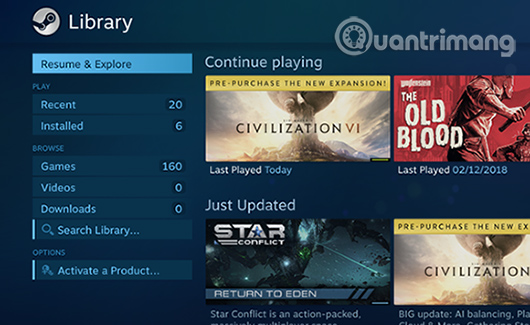
Once the driver is updated, you will be able to access your Steam library. Note that the software will run foreground on the PC (as opposed to the process running in the background), so make sure no one plans to use the computer while you play the game.
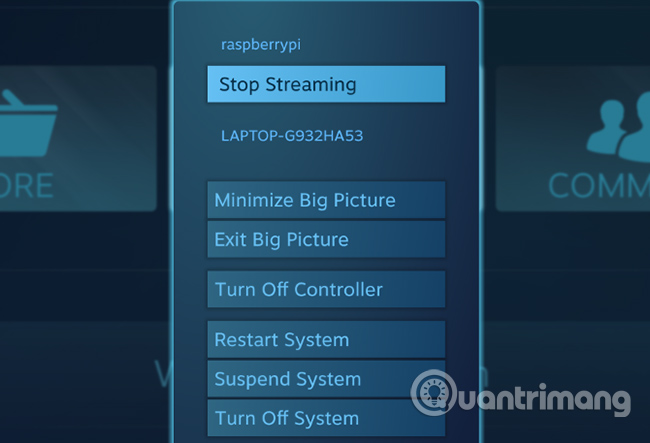
When finished, press the power button in Steam and click Stop Streaming .
How to connect the game handle with Raspberry Pi Steam Link
Use the following gaming handles with Steam Link:
- Steam Controller
- Wired Xbox One
- Xbox 360 wireless or wired
- Sony Dualshock 4 wireless or wired
- Nintendo Switch Pro
For USB handles, all you need to do is plug and play. However, for the Bluetooth handle, you'll need to activate it via the Raspbian desktop.
Click the Bluetooth icon in the menu bar and select Turn on Bluetooth . Next, click Bluetooth again and select Add Device .
Put the gaming handle in pairing mode (check the device's documentation for details), then wait until the device is detected. Select it, click Pair and follow any instructions to complete the pairing.
Note that you may need to repeat the process a few times to make the handle work.
Launch Raspberry Pi directly into Steam Link
Want to use Raspberry Pi 3 or more to make a dedicated Steam Link? It's easy to do this!
In the Terminal window, enter:
sudo nano.bash_aliasesIn the empty file, enter:
steamlinkPressCtrl+XthenYto save and exit nano, then restart Raspberry Pi:
sudo shutdown -r nowOr:
sudo rebootWhen Pi restarts, it will boot straight into the Steam Link software.
You're ready to play the game!
Troubleshoot Raspberry Pi Steam Link
Setting up the Steam Link software set up with Raspberry Pi is very simple. But it may not be entirely suitable for you. Fortunately, some simple troubleshooting methods can fix most problems.
- Game unresponsive or unstable? Switch to a wired Ethernet connection instead of a wireless network connection.
- PIN entered but no connection? Try upgrading your device's graphics card driver. If your system uses Nvidia drivers, update the GeForce Experience, then try again.
- Can't connect the Bluetooth handle? Turn off any consoles whose handles are often paired with.
- Poor overall performance? Check out TipsMake.com 's tips to speed up the Raspberry Pi, especially focusing on new power and microSD memory cards.
How to stream Steam on Raspberry Pi with Moonlight
If for some reason, the Steam Link software is officially not working but you still want to stream the game to Raspberry Pi, some alternatives are available.
Most notable is Moonlight, as mentioned above. This requires your PC to have an Nvidia GTX 650 or more GPU and GeForce Experience software. Before continuing, you should update both Steam and GeForce Experience.
When you are ready, install these dependencies in Raspbian Stretch:
sudo apt install libopus0 libasound2 libudev0 libavahi-client3 libcurl3 libevdev2Next, edit the source list:
sudo nano /etc/apt/sources.listIn the text editor, add:
deb http://archive.itimmer.nl/raspbian/moonlight stretch mainPressCtrl+Xto save (confirm withY) then download and add the GPG key.
wget http://archive.itimmer.nl/itimmer.gpg sudo apt-key add itimmer.gpgUpdate your source:
sudo apt updateThen install Moonlight:
sudo apt install moonlight-embeddedNext, you can pair Pi with PC. Check the IP address of the PC ( ipconfig in the Windows command line, ifconfig on Linux), then enter
moonlight pair [ip address]Find the Nvidia GeForce Experience pop-up window on your PC and enter your PIN when prompted.
If you're ready to play a game, enter the following:
moonlight stream [options] -app [app name]In which [options] is something like resolution and FPS (eg -1080 -30fps) and [app name] is the name of the game.
Note : It is noteworthy that Moonlight may be unpopular when Steam Link software is available. If it doesn't work for you at the present time, updates from Valve can solve all the problems you're having.
If you want to stream other games from PC to TV, TipsMake.com 's tutorial on Parsec will help you stream any game from PC to Raspberry Pi.
If you've followed the steps and used the right hardware, you can now stream games to your PC over the network using Raspberry Pi.
Steam Link is also not limited to transferring games to TV. Software available on mobile devices also allows you to play PC games on Android.
If you like playing favorite PC games on the Raspberry Pi, this is just the beginning. Thanks to streaming and emulation, a large number of games can be played on Raspberry Pi.
Hope you are succesful.
FAQ
What is How to Stream Steam Games to Raspberry Pi Without Moonlight about?
It provides a structured overview of Steam game, explains the main context, and highlights practical takeaways for readers.
Why does this topic matter?
Understanding the main concepts helps readers evaluate the issue, avoid common mistakes, and make better-informed decisions.
How should readers use this information?
Use the guidance as a practical starting point, confirm details that may have changed, and follow current product, safety, or security recommendations.
Related Articles
 How to Stream Any PC Game to the TV Using Raspberry Pi12 minutes read
 How to Stream Live to Youtube with Raspberry Pi10 minutes read
 How to Pin a Steam Game in Windows 108 minutes read
 How to Play Steam Games on Your Phone Using the Steam Link6 minutes read
 How to See a List of Hidden Games on Steam4 minutes read
 Fixes the Issue Where Steam Games Don't Show up in the App: Explained4 minutes read
Reader Comments 0
Sign in with email or Google to join the discussion.