Table of Contents
Learn how to make furniture and build in stranded deep survival game. It also highlights practical details and common issues to consider.
Stranded Deep is a wild island survival game released on January 23, 2016. You will play the role of a survivor of a plane crash and be washed into a deserted island somewhere on the sea. Pacific. Your task is to survive the longest way possible.
To do so, the first thing you need to do is to create your own tools to survive, as well as to build shelter. The following article will show you how to make furniture and build in Stranded Deep survival game.
Download Stranded Deep game
How to Make Furniture in Stranded Deep
Crafting is an in-game technique that allows you to create objects and tools to exploit the island's resources.
You will always be in Crafting mode unless you are building a house with a hammer. Items that can be used to make them will be flashing orange.
Dragging is the main technique used to crafting . You can drag any object that is usable by holding the right mouse button. Then drag all the necessary objects into a group to create objects.
After you have gathered all the necessary items to make, there will be a notice icon appear. Holding the left mouse button on the icon, you will see a small table appear, including all the options you can make.

Below is a table showing some things you can create:
Crude Knife :
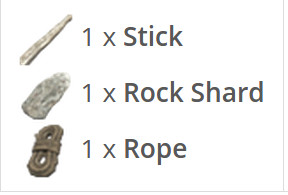
Crude Ax (Rough Ax) :
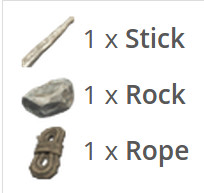
Crude Hammer :
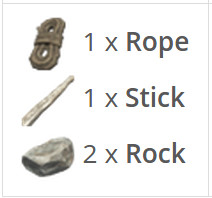
Spear Crude :
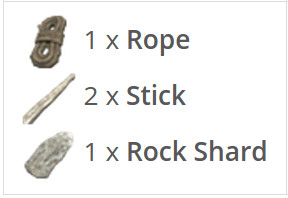
Campfire (Small campfire) :

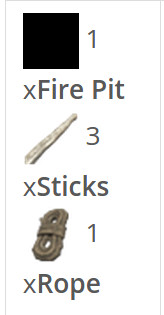
Fire Pit :
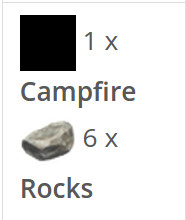
Fire Spit (Cooking skewers) :
Way to Build in Stranded Deep
Building is an in-game technique that allows you to build things like houses using available resources.
To activate the building mode, you need to hold on to Hammer (Hammer) or Crude Hammer (Rough Hammer) . Items that can be used to build will flash in blue. Using Building techniques is quite similar to using Crafting techniques. You group items that can be rebuilt and a screen will appear with a notice icon.
Holding the left mouse button on the icon, you will see a small table appear, including all the options you can build.
Below is a table showing some things you can build:
Shelter : To build a house, you will need to build the Foundation first. Foundation can be expanded with Supports (House column) , Wall (Wall) and Roof (Roof) .
Raft (House construction) : Same as the formula for building Foundation but must be placed in the water.
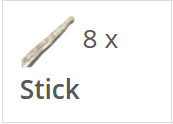
Foundation (Foundation):

Supports (House column) :
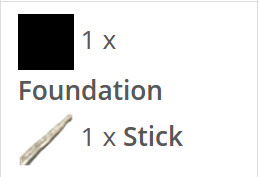
Wall (Wall) :
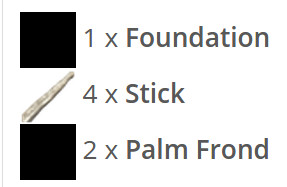
Roof (Roof) :
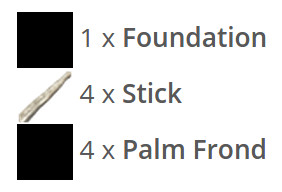
Steps :
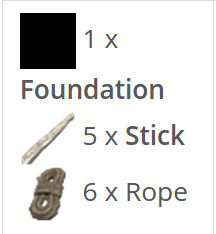
Update note: Game mechanics, item values, menus, and availability can change. Check the current game version or official support information if your experience differs.
FAQ
What does this guide explain about make Furniture and Build in Stranded Deep Survival Game?
Learn how to make furniture and build in stranded deep survival game. It also highlights practical details and common issues to consider.
What is the best way to apply these tips?
Work through the sections in order, especially how to make furniture in Stranded Deep and way to build in Stranded Deep. Practice one change at a time so you can see what improves your results.
Can game features or requirements change?
Yes. Updates can change menus, mechanics, item values, compatibility, and availability. Check the current in-game information or the developer's official support pages when details differ.
Related Articles
 TOP Best Survival Game on PC and Download Link5 minutes read
 How to Fix Errors Hanging Game Rules of Survival5 minutes read
 There Was Survival Game of Survival Game Between PUBG and Fortnite of Xiaomi, Invited to Download4 minutes read
 Last Z: Survival Shooter: Zombie Survival Shooting Game6 minutes read
 How to Install the Rules of Survival Game on PC7 minutes read
 Please Download Last Survivor Diaries, the Survival Game About2 minutes read
Reader Comments 0
Sign in with email or Google to join the discussion.