Table of Contents
Easy DriverPack is software that helps you scan and update the latest drivers on your computer, from audio drivers and chip drivers to display drivers, and more. It includes all the necessary drivers to optimize your device's performance. Easy DriverPack is completely safe, so you can confidently install and use it to find drivers.
Instructions on how to install Easy DriverPack
How to install Easy DriverPack
Step 1
First, download the version of Easy DriverPack that is compatible with your operating system. You can check if your Windows is 32-bit or 64-bit to find out which version is compatible with your operating system.
Download Easy DriverPack for Windows 10 : Download Easy DriverPack for Windows 10
Download Easy DriverPack for Windows 8.1 (64bit) : Download Easy DriverPack for Windows 8.1 (64bit)
Download Easy DriverPack for Windows 8.1 (32bit) : Download Easy DriverPack for Windows 8.1 (32bit)
Download Easy DriverPack for Windows 7 (64bit) : Download Easy DriverPack for Windows 7 (64bit)
Download Easy DriverPack for Windows 7 (32bit): Download Easy DriverPack for Windows 7 (32bit)
Step 2
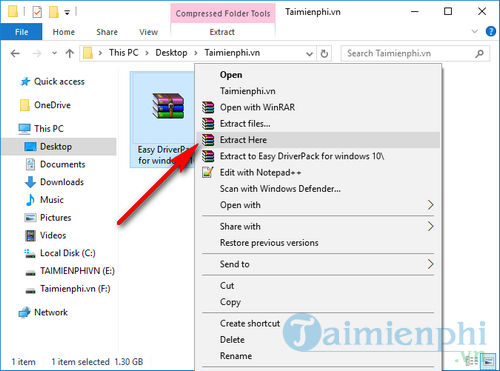
After the download is successful, you will receive a compressed file. Right-click on the compressed file and select "Extract Here" to extract the Easy DriverPack installer.
Step 3
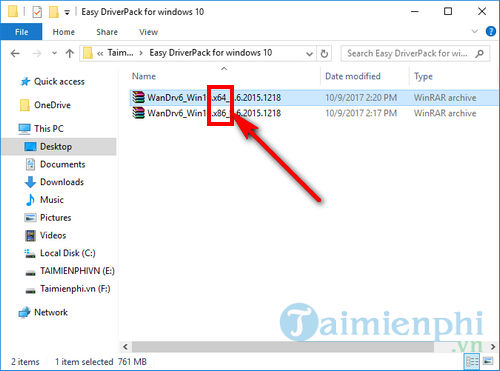
Open the folder you just compressed. You may find two more compressed files, which are two different versions of Easy DriverPack, as shown in the image. Right-click on the x64 (64-bit) or x86 (32-bit) version that matches your operating system.
Note : Skip this step if the two compressed files shown in the image do not appear.
Step 4
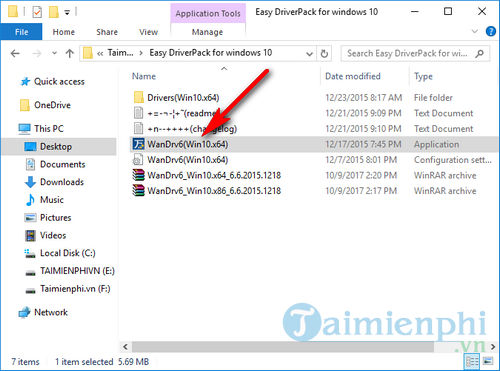
After the extraction is complete, you will receive the WanDrv file as shown in the image below, which means you have successfully installed Easy DriverPack on your computer.
Easy DriverPack's interface is quite detailed, including a list of hardware drivers that need updating.
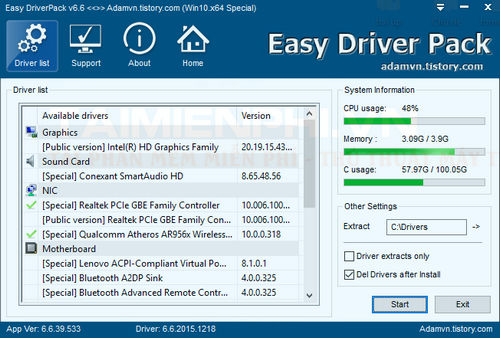
Above, TipsMake has guided you on how to install Easy DriverPack, currently the best automatic driver update software. After installation, you can use Easy DriverPack to update drivers and optimize your computer's performance.
Besides Easy DriverPack, Driver Booster is also a highly-rated software; you can easily update drivers on your device using Driver Booster without any problems. Good luck!
Related Articles
 How to Use Easy DriverPack3 minutes read
 How to Install Drivers for Windows with DriverPack Solution5 minutes read
 Driverpack Solution - Download Driverpack Solution to Automatically Update3 minutes read
 Driver Driver Installation Software for Computers7 minutes read
 How to Install Easy GIF Animator to Create GIF Animations3 minutes read
 How to Install Debian on a Computer9 minutes read
Reader Comments 0
Sign in with email or Google to join the discussion.