Table of Contents
Credibility Score in Arena of Valor tracks disruptive match behavior such as going AFK, leaving early, intentional feeding, abusive chat, or other confirmed violations. A low score can reduce rewards or restrict access to Ranked and player-versus-player modes.
The reliable way to restore points is to finish eligible matches and maintain good behavior. There is no legitimate shortcut that instantly clears a penalty. Exact gains, daily caps, and restriction thresholds can differ by server and game update, so the rules shown on your in-game Credibility page take priority over older tables or guides.
How to check your Credibility Score and rules
- Open Arena of Valor and select your profile portrait.
- Open Credibility Score or the similarly named behavior/reputation section.
- Review your score, recent deductions, available modes, daily recovery allowance, and the reason for each penalty.
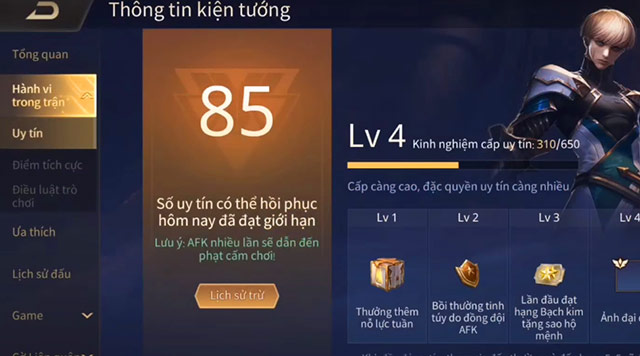
Some regional releases translate the system as “reputation,” but Credibility Score is the name used in Arena of Valor's English materials. Do not confuse the numeric score with Credibility Level, a related progression system that may affect the daily recovery cap or other benefits.
Fastest safe way to restore Credibility Score
- Choose an eligible mode shown in the Credibility screen. If Ranked or Standard matches are locked, use the permitted AI mode until the score reaches the required threshold.
- Complete every match. Do not exit after joining, even if the match is going badly. An early departure can cause another deduction and erase the recovery.
- Stay active and play normally. Merely remaining connected may not be enough if the system detects extended inactivity or intentional feeding.
- Continue only until the daily recovery cap is reached. Further matches can still improve your behavior record, but may not award more points that day.
- Return after the cap resets. The in-game page is the best place to see how many points can still be recovered.
Older versions of Arena of Valor awarded a point for completing a Standard match and another for winning a multiplayer match, with restrictions at certain score thresholds. Current regional rules may be different. Do not intentionally leave an AI match; leaving is the behavior the system is designed to penalize.
Credibility Score and Credibility Level are different
| System | What it represents | What to check |
|---|---|---|
| Credibility Score | Your current behavior score, commonly starting at or returning toward 100 | Match restrictions, reward effects, recent deductions, and points recoverable today |
| Credibility Level | Longer-term behavior progression used in some versions of the game | Level benefits, experience requirements, and the daily score-recovery allowance |
| Credibility EXP | Progress toward a Credibility Level in versions that use the level system | Eligible modes and conditions, which may require playing at a full score |
Because the two systems appear together, old guides sometimes mislabel level progression as score recovery. Playing several matches at a full score may earn Credibility EXP without adding points above the maximum.
What happens when the score is low?
| Possible effect | What it means |
|---|---|
| Reduced or lost bonus rewards | A score below the good-standing threshold may reduce weekly or match rewards, depending on the current server rules. |
| Ranked Mode locked | You must restore the score above the threshold displayed in the client before entering Ranked matches. |
| Standard PvP locked | At a lower score, the game may allow only AI matches until enough points are recovered. |
| Chat or account restriction | Abusive communication, cheating, or repeated serious violations can lead to separate penalties beyond the Credibility Score. |
Do not rely on a fixed threshold copied from another region. Arena of Valor has changed its system over time, and publishers may apply different rules. Select a locked mode in the client to see the score currently required for your account.

Behaviors that can lower Credibility Score
| Behavior | How to prevent another deduction |
|---|---|
| Leaving or going AFK | Start only when you have enough time; keep the app active and return promptly after a brief disconnection. |
| Intentional feeding or refusing to participate | Continue playing toward the objective even when the team is behind; avoid repeated reckless deaths. |
| Role or lane disruption | Use role selection and team communication; do not deliberately take a declared position to provoke a teammate. |
| Abusive or spam chat | Keep messages limited to useful coordination. Mute another player instead of escalating an argument. |
| Cheats, scripts, or prohibited tools | Use the official client and permitted controls only. Serious violations may result in restrictions beyond score loss. |
| Repeated connection loss | Test the network before queueing and avoid Ranked matches on an unstable connection. |
The number of points deducted depends on the detected behavior, mode, severity, duration, reports, and current system rules. It is safer to check the match result and Credibility history than to assume every AFK event has one fixed penalty.
If you lost points because of a disconnect or crash
A connection failure can still harm teammates, so the automated system may apply a penalty even when it was not intentional. Before joining another match:
- switch to a stable Wi-Fi or mobile connection;
- restart the game and close memory-heavy background apps;
- disable battery-saving restrictions that suspend the game;
- install the current game update and ensure enough free storage; and
- test an AI match before returning to PvP.
If the history shows a penalty you believe is clearly incorrect, use the in-game support or appeal option and provide the match time, account/server information, and screenshots. An appeal is not guaranteed, and repeatedly submitting reports will not speed up ordinary point recovery.
How to avoid losing recovered points
- Do not queue when you may need to leave within the next match.
- Charge the phone and prevent calls or aggressive power saving from interrupting play.
- Use quick-chat commands rather than arguing in text or voice chat.
- Do not ask a friend to carry, idle, or manipulate matches to farm score.
- Stop playing and troubleshoot if the game crashes or disconnects more than once.
The quickest recovery is consistent completion of the eligible matches shown by the game, up to the daily cap. Once the score is restored, maintaining it is much faster than recovering from repeated violations.
Related Articles
 How to Change Language in Arena of Valor6 minutes read
 Summary of Events to Receive Free Skins in Arena of Valor in April 20267 minutes read
 Collection of Arena of Valor Splash Art6 minutes read
 minutes read
 How to Gift Skins to Friends in Arena of Valor6 minutes read
 How to Play Arena of Valor Now Gg Online Without Downloading4 minutes read
Reader Comments 0
Sign in with email or Google to join the discussion.