Table of Contents
Arena of Valor can offer separate text and voice language controls, but the available choices depend on the regional client and game version. In the Vietnamese client shown below, the language menu is under General settings.
Change the text or voice language
- Open Arena of Valor and sign in.
- From the lobby, tap the gear icon to open Settings.
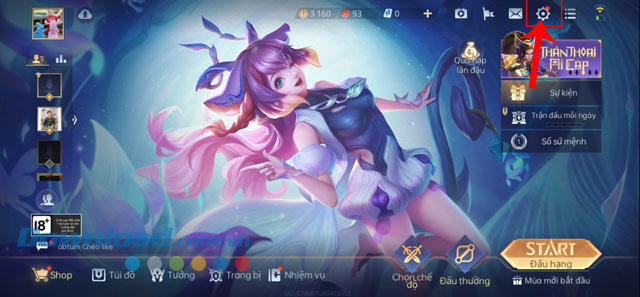
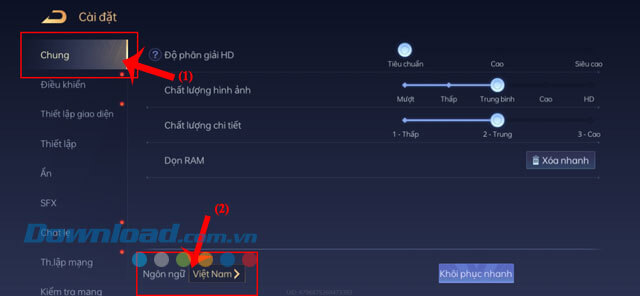
- Select General. Find the current language entry and tap it.
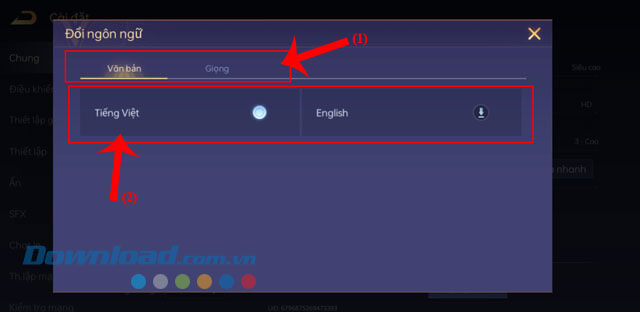
- In the Change Language window, choose Text or Voice, depending on what you want to change.
- Select one of the languages offered by your client. The example screens show Vietnamese and English.
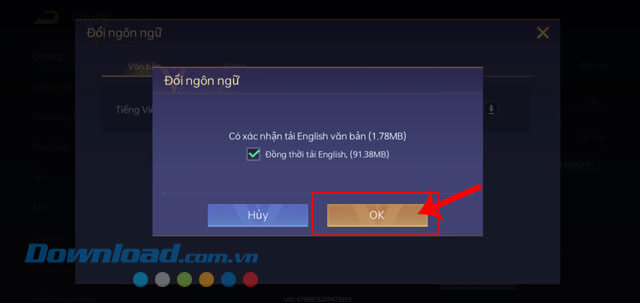
- Tap OK to confirm. Allow any requested language pack to download, then restart the game if the new setting does not apply immediately.
Text language and voice language are different
Text changes menus, item descriptions and other written interface elements. Voice changes supported spoken dialogue and announcements. If the client exposes both controls, you can choose them independently; a voice pack may require a larger additional download than interface text.
If the language option is missing
- Update Arena of Valor through the same app store or launcher from which you installed it.
- Confirm that you are using the intended regional client. Language selections can differ between publishers and servers.
- Finish any resource download shown on the login screen, then check Settings again.
- Restart the game after changing the phone's system language if the client follows the device language automatically.
- Do not install a different client or unofficial language package over an existing account without checking its regional account support.
If the language pack will not download
Use a stable Wi-Fi connection, make sure the device has free storage, and leave the game open until the resource download completes. If the download stalls, restart the app and retry. Clearing all app data should be a last resort because it can remove locally stored settings and may require another sign-in and full resource download.
Changing a supported language setting should affect presentation rather than heroes, skins, items or match history. Even so, verify that the game is linked to a recoverable account before reinstalling the app or clearing its data.
Related Articles
 Summary of Events to Receive Free Skins in Arena of Valor in April 20267 minutes read
 Collection of Arena of Valor Splash Art6 minutes read
 minutes read
 How to Restore Arena of Valor Credibility Score Fast11 minutes read
 How to Gift Skins to Friends in Arena of Valor6 minutes read
 How to Play Arena of Valor Now Gg Online Without Downloading4 minutes read
Reader Comments 0
Sign in with email or Google to join the discussion.