Table of Contents
This updated guide explains how to Find Free Facebook, Twitter Cover Photos on Mind Your through clear steps, practical examples, and important checks that help prevent common errors.
Instructions for Finding Cover Images on Mind Your Banners
Step 1:
Users visit the link below to access the homepage of Mind Your Banners.
https://www.mindyourbanners.com/
Step 2:
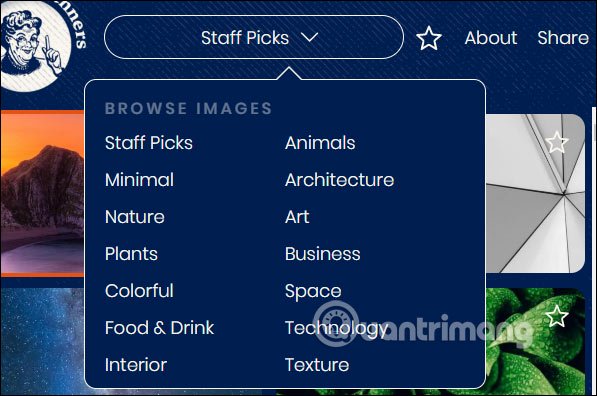
Click Staff Picks to select the topic you may need to search for covers such as Art (art), Nature (nature), Space (space),. and then click the cover image you may need to use.
Step 3:
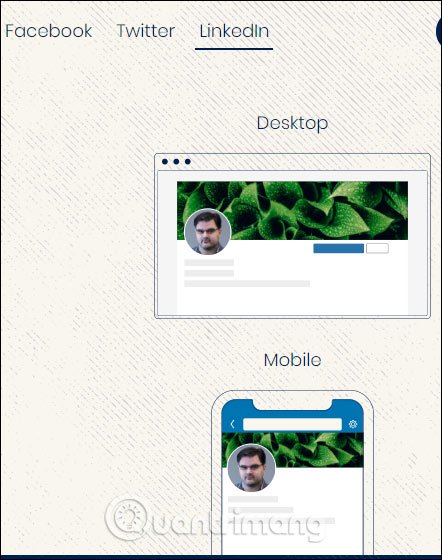
The selected image will be applied immediately as a cover image for Facebook, Twitter or LinkedIn with a desktop interface and a mobile interface for you to check.
Each social network will have different cover image sizes, so users choose the right account to install the cover image on.
Step 4:
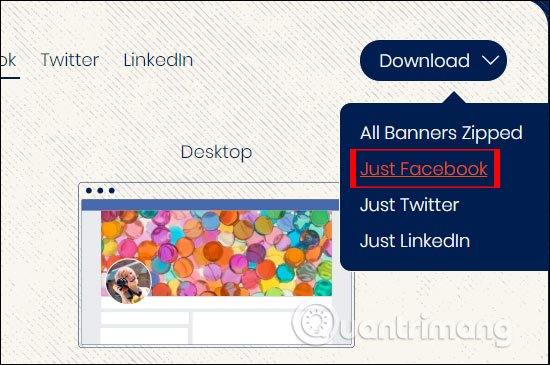
To download a separate cover image for a certain social network account , such as a Facebook cover image, click Download> Just Facebook .
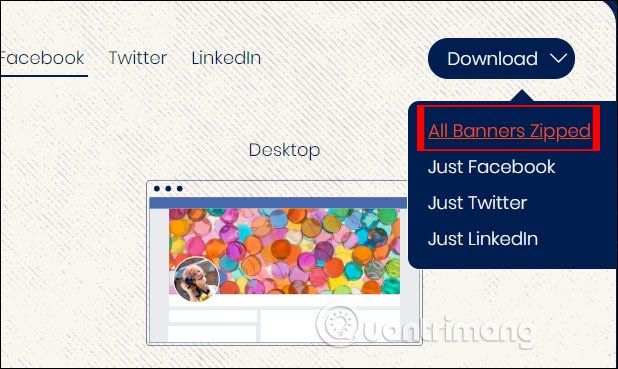
If you may need to download cover images for all 3 social networks of different sizes, click Download> All Banners Zipped . The image file is downloaded in zip format.
FAQ
What is the easiest way to Find Free Facebook, Twitter Cover Photos on Mind Your?
Start with the requirements in this guide, then follow each step in order. Check the result after every major change so problems are easier to identify.
Can beginners follow these instructions?
Yes. The process is organized into practical steps, and you can repeat any step before moving forward.
What should I check if the method does not work?
Confirm your software or device version, permissions, settings, file format, and internet connection when the task depends on online services.
Related Articles
 How to Create Facebook, Twitter, YouTube,… Covers Quickly6 minutes read
 Summary of the Most Exclusive and Exclusive Facebook Cover Photo3 minutes read
 How to Set a 360-Degree Photo as a Cover Image on Facebook5 minutes read
 50+ Best Facebook Cover Photos: Complete Guide3 minutes read
 Facebook Cover Art Photos for Those Who Want to Show Personality3 minutes read
 How to Link Facebook to Twitter and Vice Versa5 minutes read
Reader Comments 0
Sign in with email or Google to join the discussion.