Table of Contents
This updated guide explains how to Block TikTok Users through clear steps, practical examples, and important checks that help prevent common errors.
When you encounter such content, you can block users on Tik Tok with inappropriate content. Blocking users in Tik Tok not only helps you avoid content from that person, but also helps you avoid interactions from blocked users, such as direct messages, comments or following.
And that user cannot view your video once you've blocked it. To perform blocking Tik Tok users on your phone, follow the steps below.
Instructions for Blocking Accounts on Tik Tok
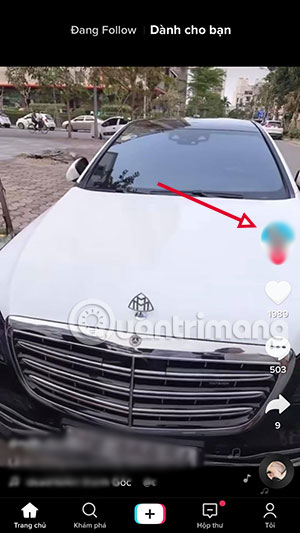
Step 1: To block a user on Tik Tok, click the user's avatar image. Then click the three dots in the upper right corner.

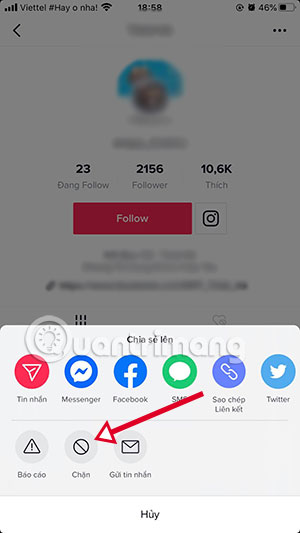
Step 2: The sharing board appears, click Block > and then select Confirm in the next message.
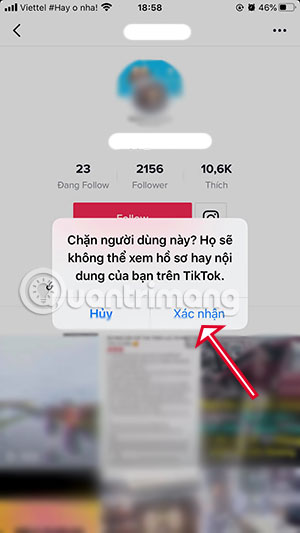
This way, accounts with content that is inappropriate for you will no longer show up in your Tik Tok user video series and all interactions between you and that person will also be blocked. Also all the content you post will not be visible to the person who blocked it.
And if you find the content is inappropriate or of an unfair nature. You can report a Tik Tok user to Tik Tok review content from that user.
FAQ
What is the easiest way to Block TikTok Users?
Start with the requirements in this guide, then follow each step in order. Check the result after every major change so problems are easier to identify.
Can beginners follow these instructions?
Yes. The process is organized into practical steps, and you can repeat any step before moving forward.
What should I check if the method does not work?
Confirm your software or device version, permissions, settings, file format, and internet connection when the task depends on online services.
Related Articles
 How to Block Tagging Your Tiktok Account3 minutes read
 How to Report Videos, Accounts and Comments on Tiktok2 minutes read
 How to Block AI Videos in TikTok: Step-by-Step Guide4 minutes read
 Instructions to Block Taking Screenshots of Messages on TikTok2 minutes read
 In Which Countries Is TikTok Banned: What to Know10 minutes read
 What Is Zefoy TikTok? How to Use It3 minutes read
Reader Comments 0
Sign in with email or Google to join the discussion.