Table of Contents
This article, Free Download, will guide you on how to activate GPS when taking photos. Your iPhone camera will automatically record the coordinates of where you took the photo, making it easier to find the photo later.
How to enable location services when taking photos on iPhone
Step 1: Go to the settings on your device.

Step 2: Here, go to the Privacy section > select Location Services , and of course, you need to activate it to use it.
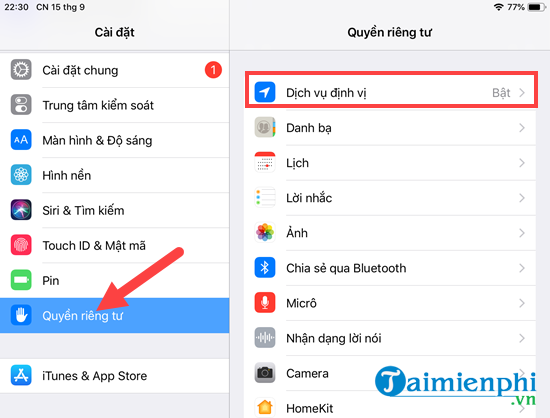
Step 3: Here, simply activate location services and then tap the Camera app on your iPhone or iPad.
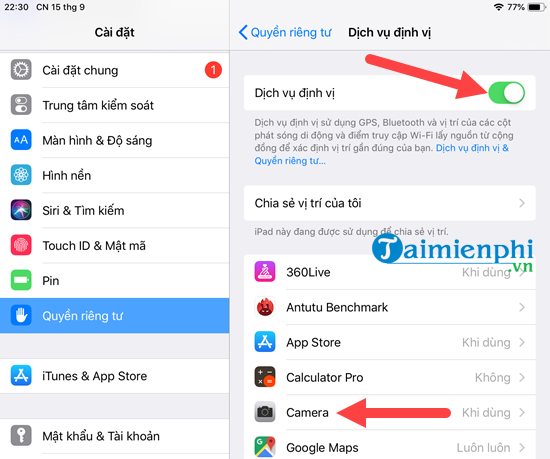
Step 4: And here you just need to activate it when using the application.

Step 5: Then, take photos as usual. When you go to your photo gallery and view them by day or month, you will see the locations where you took the photos for each photo set or individual photo.

Alternatively, when you search by album , you'll find a collection of all the locations where you took the photos. These albums are logically organized and look very appealing.

Additionally, we can view the images on Google Maps to see the exact locations where the photos were taken.
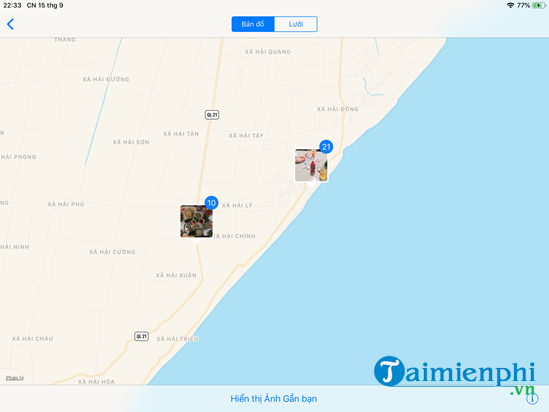
When location services are enabled while taking photos on an iPhone, users can manage photos by location, making it easier to search and organize images. Additionally, this is a crucial feature for finding a lost iPhone , as the GPS data in the photos can help determine the device's last known location.
However, if you are concerned about privacy, you can turn off location services on your iPhone when not needed or adjust access permissions in the settings. Using location services responsibly will help you take advantage of their benefits while ensuring the security of your personal information.
Related Articles
 How to Enable Location Services on iPhone iPad4 minutes read
 Guide to Taking HDR Photos on iPhone10 minutes read
 How to Use iCloud Photos on iPhone, iPad, and Mac4 minutes read
 How to See Someone's Location on iPhone: a Comprehensive Guide7 minutes read
 How to Delete the Location of Photos on iPhone5 minutes read
 iPhone Can Take Super Sharp Photos Without Increasing the 'Dot'4 minutes read
Reader Comments 0
Sign in with email or Google to join the discussion.