Table of Contents
Multiple Claude Code sessions can shorten delivery time when the work is genuinely independent, but parallelism without isolation creates conflicting edits and difficult reviews. The reliable pattern is to give each session a narrow task, its own Git worktree and branch, a validation command, and a defined handoff.
Claude Code now includes an agent view for launching and monitoring parallel background sessions. You can also run separate CLI sessions in ordinary terminal tabs or panes. The interface is less important than preventing two agents from competing over the same files or assumptions.

Choose tasks that can run independently
Do not split work merely because several sessions are available. Parallel execution helps when each task has a clear boundary and minimal dependency on another task’s unfinished code.
| Good parallel task | Risky parallel task |
|---|---|
| Add tests for an existing stable module | Rewrite that module while another session writes tests against the old behavior |
| Investigate two competing hypotheses without editing | Ask two sessions to “fix the bug” in the same checkout |
| Update independent services with separate owners | Change a shared schema while consumers are being edited independently |
| Review security, accessibility, and performance separately | Let reviewers automatically rewrite overlapping files |
| Implement a self-contained endpoint on its own branch | Parallelize a small change whose coordination cost exceeds the work |
Write one sentence for each session: “Own this outcome, limit edits to these paths, do not change these interfaces, run these checks, and return this evidence.” If that sentence cannot define a clean boundary, keep the work sequential or use read-only investigation first.
Pick the right Claude Code parallelism model
Claude Code offers several related concepts. They solve different problems:
- Background sessions: independent full sessions that can be launched and monitored in agent view.
- Subagents: specialized workers inside one Claude Code session; they use isolated context and return findings to the parent session.
- Agent teams: coordinated sessions with shared tasks and communication, suitable when work must be divided and synchronized.
- Separate terminal sessions: manually managed Claude Code processes in different tabs, panes, or windows.
Anthropic’s subagent documentation distinguishes subagents from independent sessions and agent teams. Use the simplest model that satisfies the task: a second full session is unnecessary when a read-only subagent can research one question and return a concise result.
Prepare the repository before launching agents
Start from a clean, tested base branch. Record the commit so every worktree begins from the same known state:
git status
git pull --ff-only
git rev-parse HEAD
npm test
Replace npm test with the repository’s actual verification command. If the base already fails, record the failing tests before delegation so agents do not claim unrelated failures as their own.
Break the goal into an ownership table:
| Session | Outcome | Allowed paths | Validation | Depends on |
|---|---|---|---|---|
| A | Fix token refresh race | src/auth/**, auth tests | auth unit and integration tests | none |
| B | Add expiry metrics | src/metrics/** | metrics tests and lint | existing auth events only |
| C | Review threat model | read-only | evidence with file and line references | A’s final diff |
This makes hidden dependencies visible. Session C should not begin its final review until A has produced a stable diff, even if its preliminary inspection runs in parallel.
Isolate every editing session with a Git worktree
Separate sessions in the same working directory share the same files. A branch name alone does not prevent one process from seeing another process’s uncommitted changes. Use a worktree for each editing agent:
git worktree add ../project-auth -b agent/auth-refresh
git worktree add ../project-metrics -b agent/expiry-metrics
Start each Claude Code session from its assigned directory:
cd ../project-auth
claude
Each session should commit only its scoped changes. Do not let agents merge their own branches into the shared integration branch unless that is an explicitly approved automated workflow.
When a completed branch is merged and no longer needed, remove its worktree with a normal Git command after confirming there are no uncommitted changes:
git worktree list
git worktree remove ../project-auth
git branch -d agent/auth-refresh
Never force-remove a worktree just to clear an error; inspect and preserve any outstanding work first.
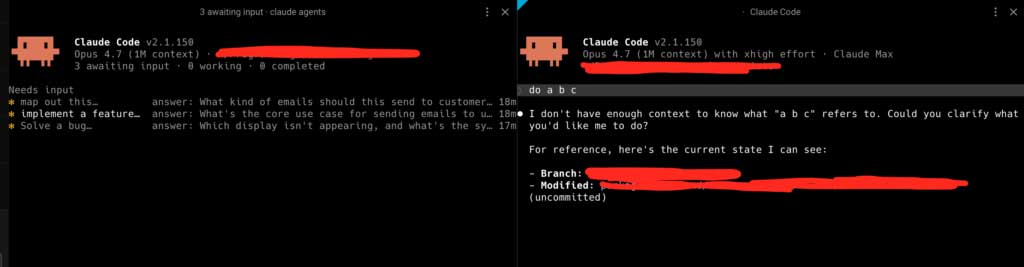
Monitor sessions with the Claude agent view
Run:
claude agentsAccording to the current Claude Code CLI reference, this opens agent view for monitoring and dispatching parallel background sessions. The command supports options such as --cwd to filter sessions by directory and --json for scripted status inspection.
Use status as a routing signal:
- Running: leave it alone unless it is consuming unexpected time or touching the wrong scope.
- Waiting: answer the question promptly or restate the boundary.
- Completed: inspect the diff, commands, test output, and unresolved caveats.
- Failed or stalled: preserve logs, identify whether the cause is environmental or task-related, and decide whether to retry.
A session being “completed” means its loop stopped; it does not mean the implementation is correct.
Use tabs and panes when you prefer manual control
Any terminal can run independent sessions. A practical layout is one tab per repository and one pane per worktree. Name each pane after its branch or outcome so “session 3” never becomes an ambiguous identifier.
Warp supports separate terminal sessions in split panes and documents Cmd+D for a right split and Shift+Cmd+D for a downward split on macOS. Windows and Linux use different shortcuts, so verify the current Warp split-pane documentation instead of assuming the macOS keys apply everywhere.
Warp’s multi-agent workflow guide also recommends distinct worktrees, branches, validation commands, and task ownership when running Claude Code or other CLI agents in parallel.
Notify yourself only when intervention is required
Checking every pane repeatedly defeats the benefit of background work. Claude Code hooks can run scripts or requests at defined lifecycle events. Use them for a quiet desktop notification or terminal marker when a session needs attention, completes, or fails.
Before adding a hook:
- read the current Claude Code hooks reference for the event and input schema;
- keep the script local and deterministic;
- avoid putting prompts, source code, secrets, or command output into a third-party notification service;
- quote event data safely rather than evaluating it as shell code; and
- test the hook in a disposable repository.
A notification should identify the project, branch, and requested action. “Agent done” is less useful than “auth-refresh: tests complete; diff awaiting review.”
Create a session brief that survives context switching
Do not depend on remembering a chat from 20 minutes ago. Keep a compact brief in the issue, task tracker, or branch description:
- original objective and acceptance criteria;
- worktree and branch;
- allowed and prohibited paths;
- assumptions and dependencies;
- commands already run;
- current blocker or decision needed; and
- expected handoff format.
Ask the agent to finish with a structured handoff: summary, files changed, tests run, known risks, and questions. Session summaries can help you re-enter the context, but the repository diff and test evidence remain authoritative.
Review each result before integration
Use the same gate for every branch:
- Read the session’s summary and unresolved questions.
- Inspect
git statusand the complete diff. - Confirm that edits stayed within the assigned paths.
- Run the task-specific tests yourself.
- Run lint, type checks, security checks, and the broader test suite as appropriate.
- Check generated dependencies, migrations, lockfiles, and configuration changes deliberately.
- Review error handling, authorization, data exposure, and rollback behavior.
- Merge one branch at a time and rerun integration tests after each merge.
TipsMake’s Claude Code in VS Code guide covers interactive multi-file work. For tool selection, compare Cursor and GitHub Copilot or review the broader list of AI tools for programming.
Handle dependencies without creating merge chaos
If session B needs an interface produced by session A, choose one approach before work begins:
- run A first, then rebase B onto the approved commit;
- agree on a small interface contract and freeze it while both work;
- let B use a test double and integrate only after A is stable; or
- combine the tasks under one lead session if coordination is continuous.
Do not ask both agents to resolve merge conflicts independently. The integrator should understand which behavior is intended and make or approve the resolution.
Set a practical limit on concurrency
The best session count depends on task independence, test speed, machine resources, rate limits, and the reviewer’s attention. Start with two editing sessions. Increase only when completed branches can be reviewed promptly and conflicts remain rare.
Warning signs that concurrency is too high include:
- several completed branches waiting unreviewed;
- repeated changes to shared files;
- agents blocked on unanswered questions;
- duplicate implementations of the same behavior;
- tests competing for ports, databases, or CPU; and
- summaries you accept without reading the diff.
A repeatable operating loop
- Decompose the goal and identify dependencies.
- Assign one owner, worktree, branch, path scope, and test command per task.
- Launch only the tasks that can proceed independently.
- Monitor for waiting, failure, or completion instead of constantly switching panes.
- Review and validate each branch.
- Integrate in a deliberate order and rerun the combined test suite.
- Remove finished worktrees only after all work is safely committed or merged.
- Record failures and improve the next task brief.
Parallel coding agents change the bottleneck from typing to coordination and verification. The productivity gain appears only when isolation, ownership, and review are strong enough that faster generation does not create slower integration.
Related Articles
 How to Use Claude to Code and Debug Code6 minutes read
 What Is the Claude Code: Clear Explanation7 minutes read
 Running DeepSeek V4-Pro in Claude Code21 minutes read
 How to Create Multiple Subagents in Claude Code to Complete the Task7 minutes read
 Claude Code in VS Code: How to Use AI for Efficient Multi-File Programming9 minutes read
 How to Manage Multiple Browsing Sessions in Google Chrome7 minutes read
Reader Comments 0
Sign in with email or Google to join the discussion.