Table of Contents
Learn how to edit password-protected ms office files directly on Google drive with clear steps.
This feature applies to password-protected Microsoft Word, Excel, and PowerPoint files, as long as they are stored in Google Drive. This allows users to open and edit documents directly within the Google ecosystem, instead of having to download the file and then use third-party software to remove the password or make edits as before.
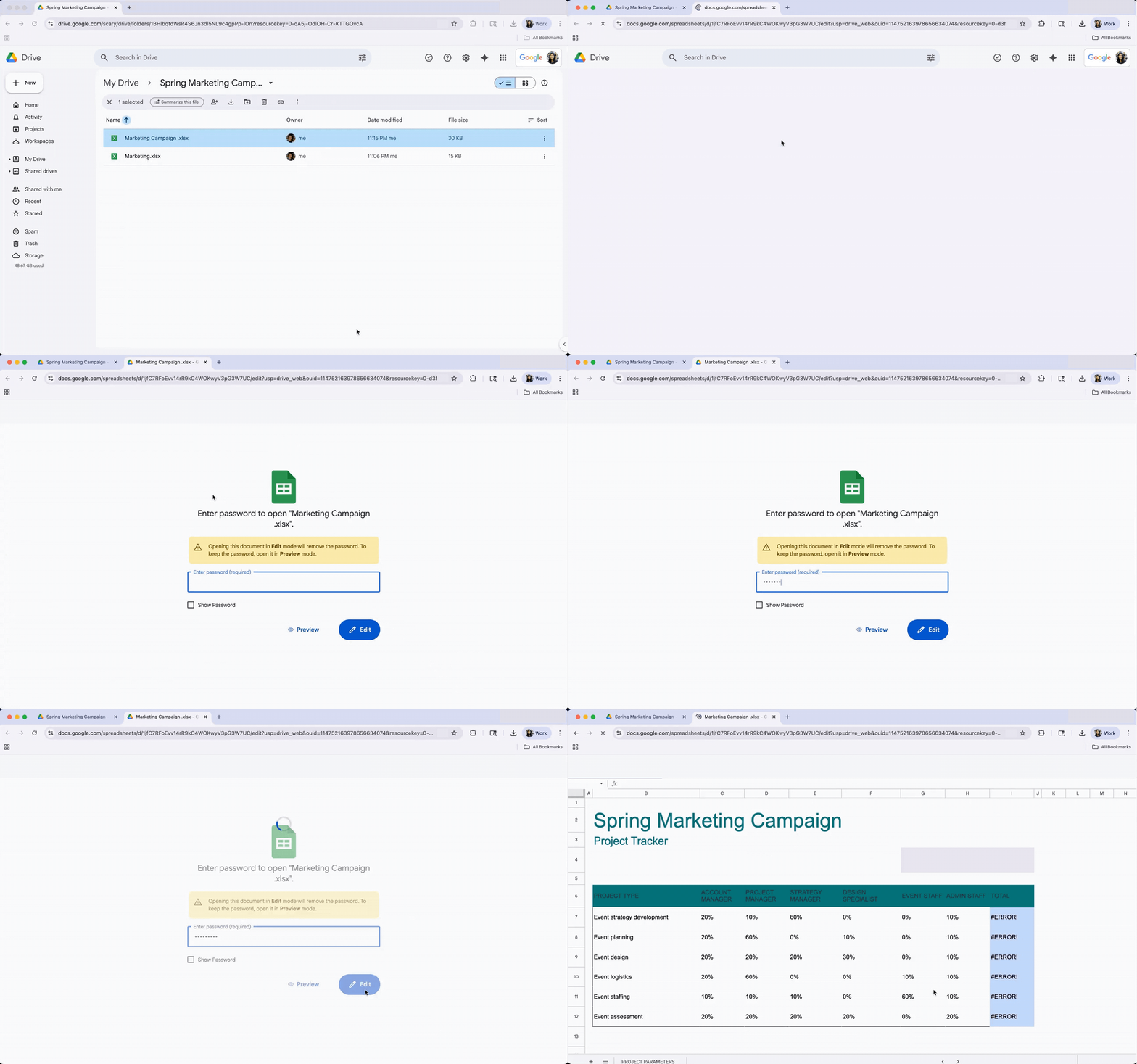
According to Google, when you open a password-protected Office file in Google Drive, the system will prompt you for the password and offer two options: View or Edit . If you don't have the password, you can still select Preview to open the file in read-only mode.
If you select Edit and enter the correct password, the file will open in Google Docs, Sheets, or Slides , depending on its original format. Notably, during this process, the file's password protection will be removed , allowing you to edit the content like a regular Google document.
Google says the feature is being rolled out gradually to users and will take about a week to complete. Once finished, it will be available to all Google Workspace customers , paying individual users, as well as free Google accounts .
Recently, Google has been continuously stepping up its efforts to make its services work more smoothly with third-party platforms . Previously, the company allowed data migration from Dropbox to Google Drive, and also made Google Chat compatible with Microsoft Teams .
Additionally, Google has just launched Personal Intelligence for Google Drive – one of the most requested features by users. Personal Intelligence allows Gemini to connect with Google Drive and other applications, thereby providing more personalized responses based on user data.
Final Thoughts
Use this guide as a practical checklist for how to edit password-protected ms office files directly on google drive. Work through the steps in order, verify each result, and adjust the options to match your needs.
FAQ
What do you need before following this How to Edit Password-protected MS Office Files Directly on Google Drive guide?
Review the required tools, accounts, settings, or materials mentioned in the article. Learn how to edit password-protected ms office files directly on Google drive with clear steps.
What are the main steps for how to edit password-protected ms office files directly on google drive?
Follow the sections in order. Complete each step before continuing and verify the result as you go.
What should you do if the process does not work as expected?
Recheck the prerequisites, update the relevant app or service, review the settings, and repeat the step that caused the issue. Use any troubleshooting notes included in the guide.
Related Articles
 How to Send Password Protected Files Without Buying Software6 minutes read
 Download Files and Websites Directly from Google Drive in Chrome7 minutes read
 How to Turn Off Protected View in Office 2013 to Edit Files3 minutes read
 How to Edit Documents on Google Drive with Microsoft Office6 minutes read
 Google Chrome Will Warn Users About password-protected Malicious4 minutes read
 How to Change Folder Ownership in Google Drive4 minutes read
Reader Comments 0
Sign in with email or Google to join the discussion.