Table of Contents
If Avast is blocking a trusted installer or interfering with troubleshooting, you can pause its real-time protection for a limited period. On current Windows versions of Avast, the quickest route is the Avast icon in the taskbar notification area. Choose the shortest time you need, complete the task, and then confirm that protection is active again.
Important: Disabling antivirus protection leaves the computer more exposed. Do not browse unfamiliar sites, open unexpected attachments, or install software from an unverified source while Avast is paused. If only one trusted file, folder, or website is affected, adding a narrow exception is usually safer than disabling every shield.
Temporarily disable all Avast shields
- Find the Avast icon in the notification area at the right side of the Windows taskbar. If it is hidden, select the up arrow to show additional icons.
- Right-click the Avast icon and select Manage Shields. Some older Avast releases label this menu Avast Shields Control, as shown in the screenshots below.
- Select a duration, such as 10 minutes, 1 hour, or until the computer restarts. The available choices can vary by Avast product and version.
- Confirm the warning by selecting OK, Stop or the equivalent confirmation button.
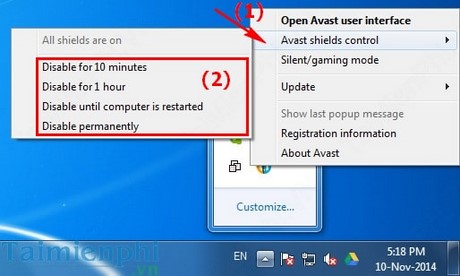
Avast should automatically enable its shields again when the selected period ends. If you choose an option that lasts until restart, restarting Windows restores protection. Avoid a permanent-disable option unless you are immediately replacing Avast with another active security product.
Disable only the shield causing the problem
If you know which protection component is blocking an action, pause only that component. Open Avast, go to the protection or shield settings, and select the relevant shield. Depending on the edition, this may be File Shield, Web Shield, Mail Shield, or Behavior Shield. Turn it off for the shortest available period and approve the confirmation prompt.
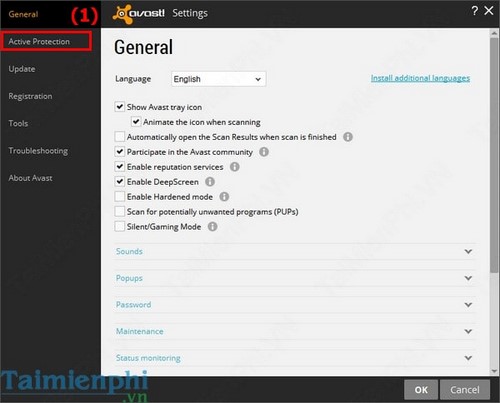
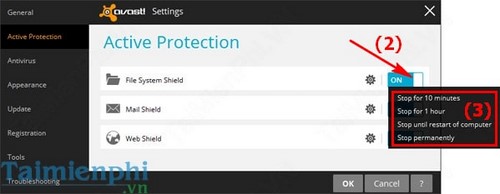
The exact menu names have changed across Avast releases, so use the current shield settings shown in your installed version. Avast also maintains an official guide to temporarily disabling protection.
Use an exception when the file is trusted
Turning off all protection is often unnecessary when Avast repeatedly flags the same known-safe file or folder. In Avast settings, look for Exceptions, add only the specific path that needs access, and remove the exception after the task is complete if it is no longer required. Never create a broad exception for an entire drive or Downloads folder.
Before allowing a flagged file, verify that it came from the developer's official site and that its digital signature or published checksum matches. If you are uncertain, leave the item blocked and scan the computer. TipsMake also explains how to run a full system scan with Microsoft Defender and lists portable virus scanners that can provide a second opinion.
Turn Avast protection back on
- Right-click the Avast icon in the notification area.
- Open Manage Shields and select the option to enable all shields, or open Avast and switch any disabled shield back on.
- Check that the Avast status screen reports that the computer is protected.
If Avast turns off again unexpectedly, update the application and restart Windows. A persistent problem may indicate a damaged installation or a conflict with another real-time antivirus program; running two real-time antivirus products at once can cause false alerts and performance issues.
Related Articles
 How to Turn on // Off Self-defense in Avast Antivirus2 minutes read
 Troubleshoot Problems with Avast Free Antivirus in Windows 106 minutes read
 Avast and Avg Are Back on Chrome After a Short Time Being Removed3 minutes read
 Instructions on How to Turn Off Avast Notifications Temporarily or3 minutes read
 Scan: How to Use Avast Premier5 minutes read
 Avast Free Antivirus 20.10.24427 minutes read
Reader Comments 0
Sign in with email or Google to join the discussion.