Table of Contents
How to Delete a Google+ Account Still Keeps Gmail Account covers the essential facts behind the topic, including what changed, why it mattered, and how it affected users.
In addition to the popular Google services that users will be using after creating a Google account such as Gmail, YouTube, you will be able to use additional networks to wash Google+. This Google+ social network supports many features such as Circles to connect contacts accounts into information sharing groups. Or Hangouts for group video chat,.
So if you don't want to use Google+ and want to delete your Google+ account, does it mean that we have to delete Google accounts and Gmail accounts? In practice, Google+ uses the same Google account with Gmail, but you can completely delete your Google+ account and still be able to keep your Gmail account, with a very simple way to do it. Let's learn how to delete the Google+ profile in the following article of Network Administrator.
- How to block other people on Google+
- Instructions for deleting Google accounts permanently
- 40 tips for Google Plus users
Instructions to Delete Google+ Still Retain Gmail Account
Note to users, before deleting your Google+ account, you need to check all the data on your account and perform the necessary backup of Google+ data.
Step 1:
If you are logged in to your Google+ account, at the main interface of Google+, click on Settings.

Or we can quickly access the link below to open the Settings interface on Google+.
- Https://plus. Google. Com/u/0/settings
Step 2:
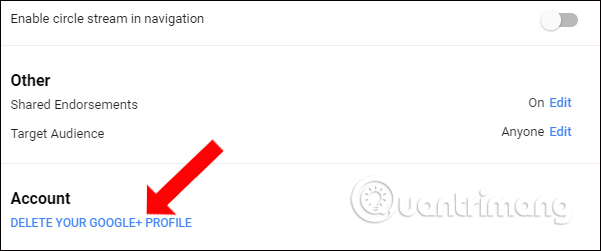
Switch to the new interface and scroll down to the bottom option of the interface, click on Delete your Google+ profile in the Account section.
Step 3:
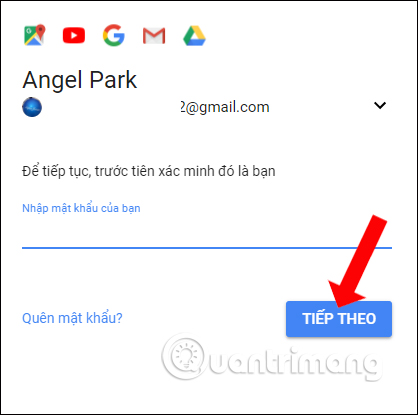
In order to confirm the account holder, users will need to enter the password for the Google account. Enter the password and then click Next to proceed.
Step 4:
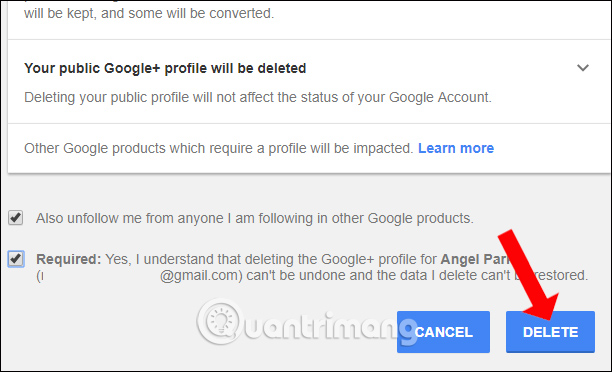
Next in the Delete your Google+ profile interface, scrolling down will have 2 options to delete the Google+ account. Check both of these options to agree to the terms that Google announces. Click the Delete button to agree to delete the account.
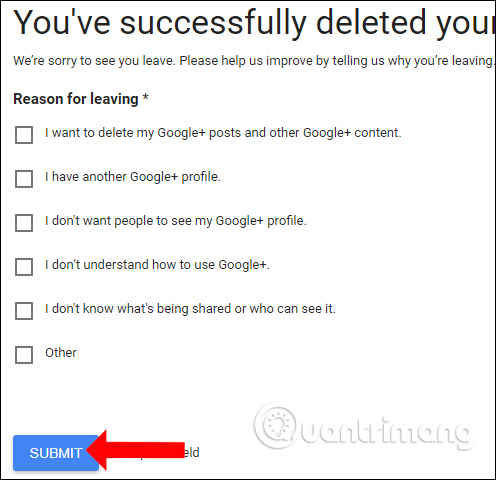
Finally, Google will ask you why you want to delete your Google+ account. Check on the reasons provided by Google, or you can click on the Other item and then click Submit to complete the operation to delete the Google+ account.
So the Google+ account has been deleted without deleting the Gmail account. All data of Gmail account remains the same. If you want to recreate your Google+ account, just click on the Join Google+ button to join again.
- Want to secure your Google account? Do not ignore the following!
- How to log out of your Google account on devices
- Instructions for permanently deleting Google history
I wish you all success!
FAQ
How does Delete your Google + account work?
How to Delete a Google+ Account Still Keeps Gmail Account covers the essential facts behind the topic, including what changed, why it mattered, and how it affected users.
What should you prepare before using this method?
In addition to the popular Google services that users will be using after creating a Google account such as Gmail, YouTube, you will be able to use additional networks to wash Google+.
What should you do if the process does not work as expected?
This Google+ social network supports many features such as Circles to connect contacts accounts into information sharing groups.
Related Articles
 Instructions for Deleting Gmail and Google Accounts6 minutes read
 How to Delete Gmail Account Without Losing Google Account3 minutes read
 How to Delete Your Gmail Inbox and Not Delete Your Google Account3 minutes read
 Instructions for Deleting Google Accounts Permanently6 minutes read
 How to Delete Google Plus and Google+ Accounts3 minutes read
 How to Log Out of Your Google Account on Devices7 minutes read
Reader Comments 0
Sign in with email or Google to join the discussion.