Table of Contents
PUBG Mobile clans let players complete group activities, earn Clan Coins, exchange them in the Clan Shop, and find regular teammates. You can request to join an existing clan from the lobby, or create one after reaching level 5 and paying 50,000 BP.
The screenshots below show an older interface. Current button placement may differ, but the membership and creation flow remains recognizable.
How to join a PUBG Mobile clan
1. Open the Clan menu
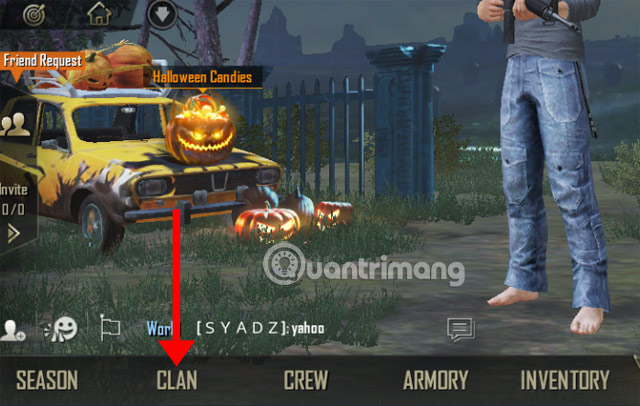
From the main lobby, open the expanded menu if necessary and select Clan.
2. Review recommended clans
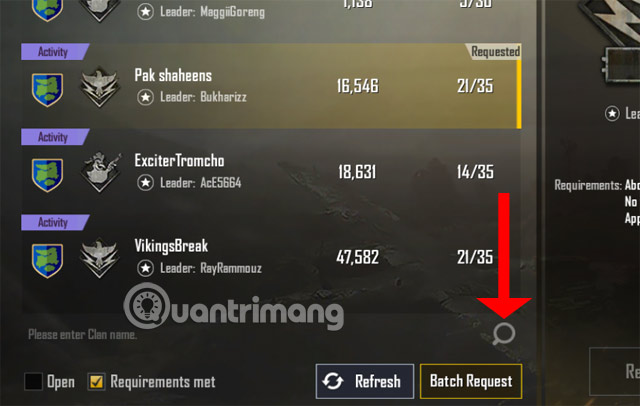
The list can show a clan's name, icon, leader, activity, level, region, and current membership. Do not choose only by member count. Look for a compatible language, active times, mode preference, and admission policy.

3. Search by exact name
If a friend gave you a clan name, use search and check the leader and icon before submitting a request. Similar names are common.
4. Send the request
Select the clan and tap Request or Join. An open clan may accept immediately; an approval-based clan requires the leader or deputy to review the request.

Send one clear request and wait. Repeated requests or unsolicited messages do not improve the chance of approval.
How to create a PUBG Mobile clan
PUBG Mobile's official clan creation guide currently lists two requirements: reach level 5 and spend 50,000 BP. Confirm the cost displayed in your client before finalizing.
1. Choose Create Clan
In the Clan menu, select Create Clan. Enter a distinctive name and choose the region or other profile settings requested by the form.

2. Set the icon and insignia
Choose an emblem that is easy to recognize. Review the insignia text and spelling carefully; a later rename may require an item or currency.

3. Review and create
Check the name, region, icon, and BP balance, then tap Create Clan once. Do not close the app during the confirmation.

Invite friends and manage approvals
According to the official clan invitation rules, a clan master or deputy master can invite friends directly. Ordinary members may invite friends, but the master or deputy must approve the invitation.
- Tell friends the exact clan name and leader before they search.
- Set a short description covering language, active hours, preferred modes, and conduct.
- Promote deputies only when they understand approval and moderation expectations.
- Remove inactive members using a stated policy rather than without warning.
Clan levels, activity, and rewards
Members contribute activity by completing clan training, playing matches, and forming parties with clanmates. Higher clan levels unlock more benefits, can raise capacity up to 100 members, and provide access to higher-level Clan Shop items.
Clan Coins are earned through clan activity and spent in the Clan Shop. The official clan benefits page confirms the mission, coin, and shop loop. Available items can rotate, so review the live shop before saving for a specific reward.
Choose a clan that fits your play style
- Competitive players: Ask about rank requirements, scrims, and voice communication.
- Casual players: Look for realistic activity rules and flexible schedules.
- New players: Prefer a clan that explains roles and practices together.
- Regional squads: Check language and normal play time, not just the displayed country.
A clan improves coordination only when members communicate clearly. TipsMake's guide to marking supplies and enemy positions helps squads that do not use voice chat. The late-game loadout guide can help a clan distribute weapon roles rather than having every member compete for the same ammunition.
If you cannot join or create a clan
- Confirm that the game is updated and connected to the correct regional edition.
- Check whether you are still a member of another clan or subject to a leave/rejoin cooldown.
- For creation, verify level 5 and at least 50,000 BP.
- Try the exact clan name and confirm the clan is not full or closed.
- Ask the leader to check pending requests and membership capacity.
Do not pay a third party to create, sell, or transfer a clan. Use only the controls and currencies shown inside the verified PUBG Mobile client.
Related Articles
 How to Fix Another Version Version PUBG Mobile4 minutes read
 PUBG Mobile: Weapons That Are Easy to Win the TOP 1 of the Game9 minutes read
 Comparison Between PUBG Mobile VNG and PUBG Mobile International6 minutes read
 PUBG Mobile: the Best Gun Combos to Win the TOP 1 in the Game8 minutes read
 PUBG Mobile Errors and How to Fix Them8 minutes read
 How to Enter the Practice Mode PUBG Mobile5 minutes read
Reader Comments 0
Sign in with email or Google to join the discussion.