Table of Contents
This practical guide explains how to create a gameboy advance sp iphone simulation wallpaper with clear steps and useful context. It also covers common requirements, potential problems, and the details that can help you get better results.
Instructions for Creating Gameboy Advance SP iPhone Wallpapers
Step 1:
First, we access the link below to enter the GameBoy Advance SP iPhone wallpaper creation website.
https://taoanhdep.com/tao-hinh-nen-gameboy-advance-sp-cho-iphone/Step 2:
In this interface you will see the GameBoy Advance SP machine simulation wallpapers for you to choose from. We choose the color of the game console, the keyboard interface of the game console according to our preferences. You drag the horizontal bar to the right, to the left to see the full range of GameBoy Advance SP models. If you want to use any wallpaper pattern, click on that template to use.

Step 3:
Next we click on the Choose photo button to load your personal image as the image inside. Now we are transferred to the interface to resize and the image area we want to take, and then click the Crop image button.
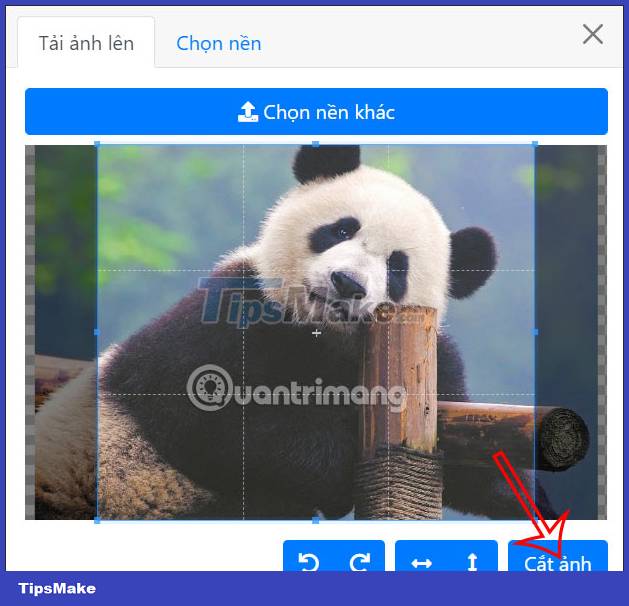
After uploading the image, you adjust to the display pixel opacity of the image, at the Pixel Opacity bar. Finally click the Create image button to proceed to create a GameBoy Advance SP simulation wallpaper for iPhone.

Step 4:
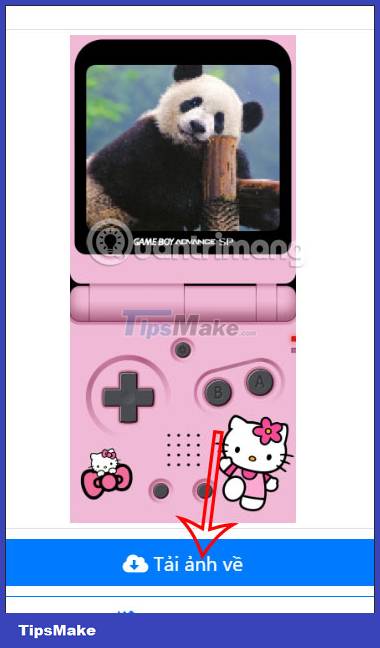
As a result we get the GameBoy Advance SP simulation wallpaper on the iPhone as shown below. If you like, then we click Download photos to set the wallpaper for iPhone. If you don't like it, change the details you want and then click Create again to get a new photo.
Conclusion
Understanding Create Gameboy Advance SP iPhone Wallpapers makes it easier to compare options, avoid common mistakes, and apply the information in this guide more effectively. Review the relevant requirements before making changes or choosing a solution.
FAQ
How do you create a gameboy advance sp iphone simulation wallpaper?
Follow the steps in this guide in order, confirm the required settings or tools, and verify the result before making additional changes.
Is it safe to create a gameboy advance sp iphone simulation wallpaper?
It is generally safe when you follow the recommended instructions, use trusted tools, and avoid changing settings you do not understand.
What should you do if the process does not work?
Recheck the requirements, restart the device or application when appropriate, and review each step for missed settings or compatibility issues.
Related Articles
 Emulate the Gameboy Experience on iOS3 minutes read
 iPhone 16e Wallpaper, iPhone SE 4 Wallpaper4 minutes read
 How to Create Emoji Wallpaper on iPhone3 minutes read
 How to Play Pokémon on PC: Clear Instructions9 minutes read
 Download Iphone 11, Iphone 11 Pro, Iphone 11 Pro Max Wallpapers3 minutes read
 Formula 1 Racing Recorded with GameBoy's Resolution of 0.016MP Will Be This Interesting3 minutes read
Reader Comments 0
Sign in with email or Google to join the discussion.