Table of Contents
This practical guide walks through how to connect a PS5 controller to an iPhone or iPad, explains the main requirements, and highlights common issues that may appear along the way.
So how to connect PS5 Dualsense controller to iPhone, iPad? This guide explains right here.
Connect PS5 controller to iPhone or iPad
First, put your DualSense controller into pairing mode by holding down the PlayStation icon button and the Create button simultaneously.
(The Create button is located directly above the D-Pad on the left, while the PlayStation logo key is located between the two analog sticks.)
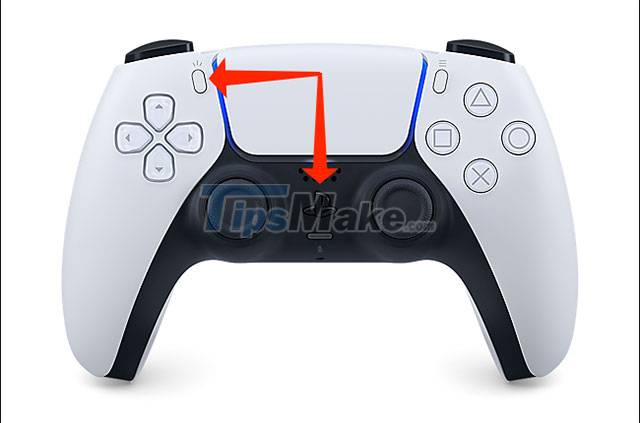
Once the controller is in pairing mode, you'll see the light around the DualSense controller's touchpad turn blue and flash twice quickly before going dark.
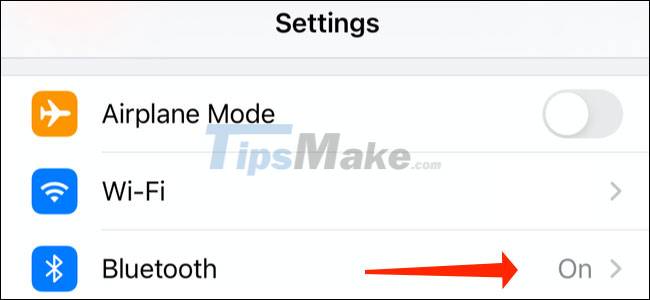
Now, open your iPhone or iPad, tap the gear icon on the screen to access the Settings app, and select 'Bluetooth'.
In the 'Other Devices' section you will see a new device called 'DualSense Wireless Controller'. Click that.
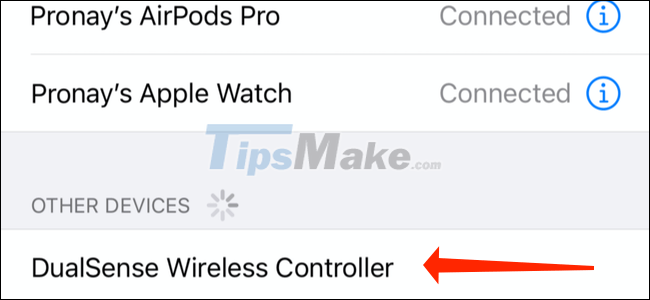
The DualSense controller should now be connected to your iPhone or iPad. Once the connection is established successfully, you will see the controller LEDs change to orange on either side of the touchpad, while the lights on the PlayStation button will show a single white color.
Find iPhone and iPad games compatible with PS5 controllers
As mentioned, not every game on your iPhone or iPad also supports team mode with a dedicated controller. Fortunately, there are many great games on iOS or iPadOS that support this feature. You can visit https://controller.wtf/mfi-games for a full list of such games.
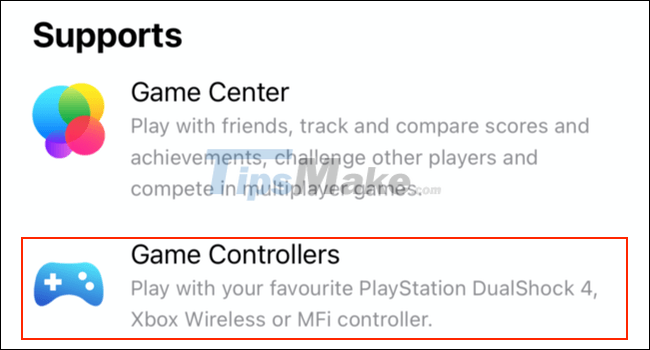
If you're signed up for an Apple Arcade subscription, you'll find many games on the service that work with the DualSense controller. To check if any Apple Arcade game has controller support, simply visit the game's App Store page and scroll to the bottom.
Look at the 'Supports' section just below the link to the developer site and privacy policy. If the game comes with controller support, you'll see 'Game Controllers' listed here.
Wish you have moments of complete entertainment on your device.
Key Takeaways
Use the information above as a practical reference for how to connect a PS5 controller to an iPhone or iPad. Review each step carefully, confirm any requirements, and choose the option that best fits your situation.
FAQ
What does this guide explain about Connect a PS5 Controller to an iPhone or iPad?
It explains the main concepts, practical considerations, and useful steps related to connect a PS5 controller to an iPhone or iPad without requiring advanced knowledge.
Who can benefit from learning about Connect a PS5 Controller to an iPhone or iPad?
This information is useful for readers who want a clear overview, practical guidance, and reliable steps related to connect a PS5 controller to an iPhone or iPad.
What should I check before applying this information?
Review the requirements, confirm that your device, software, or situation matches the instructions, and back up important data before making major changes.
Related Articles
 How to Connect the PS4 Controller to a Computer6 minutes read
 How to Connect iPhone/iPad to TV: Complete Guide6 minutes read
 How to Prevent iPhone and iPad from Automatically Connecting to4 minutes read
 How to Connect a Gaming Controller in iOS 136 minutes read
 How to Sync PS3 Controller: Practical Guide11 minutes read
 How to Connect the Xbox One Controller to the Raspberry Pi8 minutes read
Reader Comments 0
Sign in with email or Google to join the discussion.