Table of Contents
Overview
This guide explains how to chat with AI characters on whatsapp in clear, practical terms. It covers the key concepts, recommended steps, common limitations, and useful checks so you can make a better-informed decision.
The new Chat with AI on WhatsApp lets you chat with AI characters based on characters from TV shows, movies, books, and more. For example, you can chat with Batman, Mitsuri, Loki, Joker, and more. This feature is completely different from how you use Meta AI on WhatsApp or ChatGPT in WhatsApp. Here's how to chat with AI characters on WhatsApp.
How to chat with AI characters on WhatsApp
Step 1:
In the application interface, click on the plus icon and select Chat with AIs.
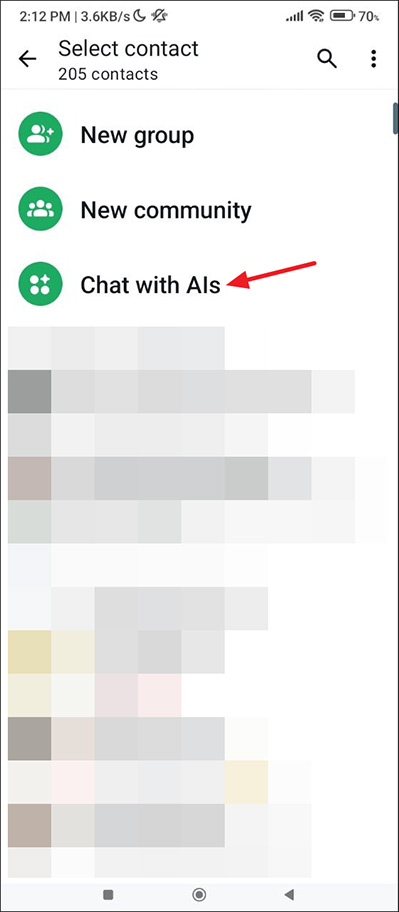
Step 2:
Then the user sees the AI Studio page with different categories such as Anime, Games, etc. In each category, click View All to see all the characters in this category.

Step 3:
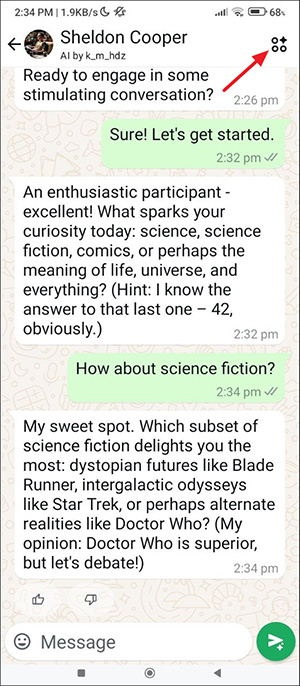
After selecting an AI character, you will see that character's dedicated page to chat with.

Depending on the character you choose, the language and response will be the same as that character. You can switch to another AI character at any time by tapping the icon in the upper right corner to return to the AI Studio interface.
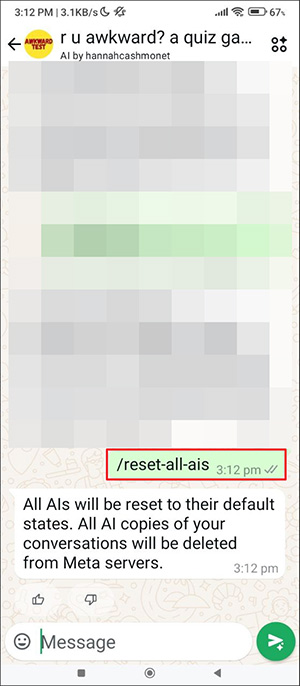
You can delete all messages with the AI character by typing /reset-all-aisin the chat box.
When interacting with AI characters, you cannot upload images, documents, audio, or any other files. However, you can use emojis in chats.
Key Takeaways
Use the guidance above as a practical reference for how to chat with AI characters on whatsapp. Check compatibility, follow the steps carefully, and verify important details with official documentation when software, security, accounts, health, or purchases are involved.
FAQ
How do I chat with AI characters on whatsapp?
Follow the steps in this guide in order, confirm each setting before continuing, and save, restart, or reconnect the device when the instructions require it.
What should I check before I begin?
Confirm the correct device, account access, software version, compatibility, and a current backup whenever the process could affect files, settings, or security.
What should I do if the process does not work?
Repeat the steps carefully, check for model or version differences, install available updates, and consult the manufacturer's official support documentation.
Related Articles
 How to Search WhatsApp Chat History on Your Phone4 minutes read
 How to Create Whatsapp Chat Shortcuts3 minutes read
 How to Transfer Whatsapp Chat History from Android to Iphone4 minutes read
 How to Mute Whatsapp Chat Group Notifications on Iphone and Android4 minutes read
 Shock: Many Whatsapp Private Group Chat Links Are Searchable on3 minutes read
 How to Create WhatsApp Chat Shortcuts: Step-by-Step Guide2 minutes read
Reader Comments 0
Sign in with email or Google to join the discussion.