Table of Contents
This practical guide explains how to block ChatGPT conversations from appearing in Google search. Follow the steps in order, review the requirements first, and use the troubleshooting notes when a setting or option does not work as expected.
How to block ChatGPT conversations from appearing in Google Search
Step 1:
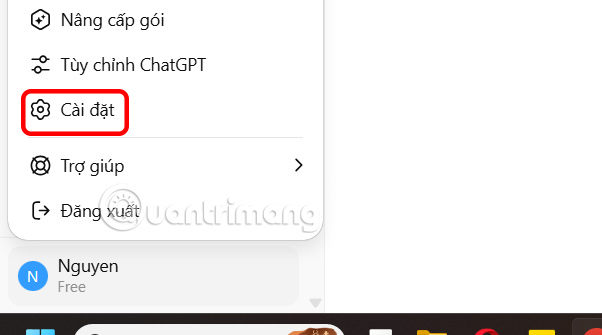
At the ChatGPT interface, select the account name and select Settings in the displayed list.
Step 2:
Go to the ChatGPT account settings interface, click Data Control on the left side of the interface.
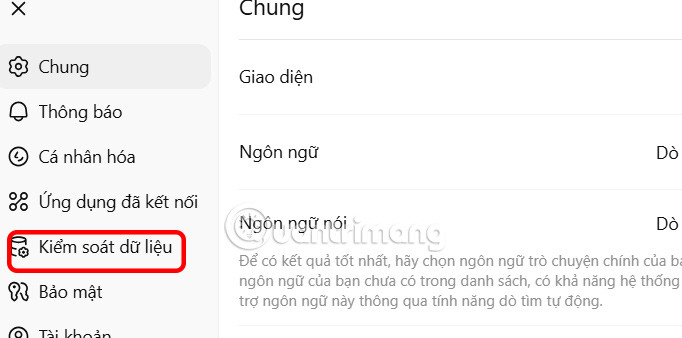
Look to the right at Shared Links, click the Manage button to control all conversations that have been shared to others via the link.

Step 3:
You pay attention to all the conversations you have shared in this interface.

Step 4:
Open Google Search on your computer, then search for the command below to confirm whether any of your conversations have been indexed by the search engine.
site:chatgpt.com/share + keyword
Keyword is the name that ChatGPT gives to the shared conversation, or other keywords you want to search for.

Step 5:
Finally, if you no longer share ChatGPT conversations, you should delete them.

FAQ
How to block ChatGPT conversations from appearing in Google Search?
At the ChatGPT interface, select the account name and select Settings in the displayed list.
What does this guide cover?
This guide explains block ChatGPT conversations from appearing in Google search, including the main steps, important details, and practical considerations.
Who is this guide for?
It is designed for readers who want a clear, practical overview and a reliable process they can follow without unnecessary complexity.
Related Articles
 5 Ways to Use ChatGPT Search to Find Information Faster Than Google9 minutes read
 Search Race: Is ChatGPT Threatening Google's Throne?4 minutes read
 How to Use ChatGPT Search Like a Pro7 minutes read
 Google AI Mode or ChatGPT Web Search Is Where You Should Search the Web?12 minutes read
 Tips to Set ChatGPT as Default Search on iPhone3 minutes read
 ChatGPT May Be Silently Working on Your Phone and How3 minutes read
Reader Comments 0
Sign in with email or Google to join the discussion.