Table of Contents
This guide provides a clear overview of microsoft teams, including Simple but Effective Form of Malware Distribution. Use it to understand the topic, compare the available options, and make a more informed decision.
More than 270 million people are interacting on Microsoft Teams every month, from millions of organizations and businesses around the world. Most of them completely trust this application, but in fact Microsoft Teams currently does not have an effective measure against malicious files spreading on the platform.
Simple but Effective Form of Malware Distribution
Researchers at Avanan, a security company that primarily targets cloud email and collaboration platforms, were the first to detect this form of malware distribution targeting Microsoft Teams users.
The attacks appear to have begun in January. In it, hackers insert into the chat they successfully break into an executable file named 'User Centric' to convince and fool other members to launch it.
After the program is executed, the malware writes data to the system registry, then installs DLL files and establishes its stability on the infected Windows computer.
The method used by the hacker to gain access to the victim's Teams account is still unclear. But some possible possibilities include stealing email or Microsoft 365 credentials through phishing, or breaching a partner organization.
Analysis of malware distributed in this way shows that the trojan can establish persistence on the target system through Windows Registry Run keys, or by creating an entry in the startup directory.
At the same time, the malware also collects detailed information about the operating system and the hardware it runs on, along with the security status of the machine based on the operating system version and installed patches.
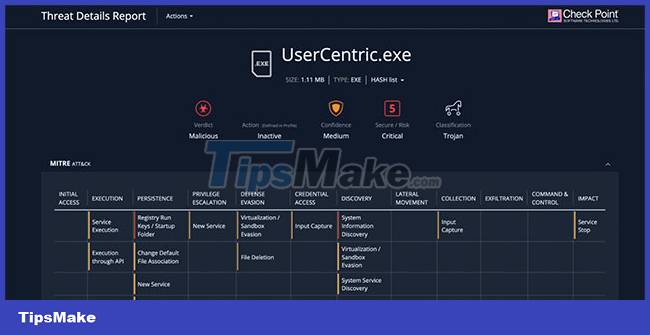
Although the overall attack process is quite simple, the actual effectiveness is high because the common mentality of many Microsoft Teams users today is to completely trust the files that their colleagues share, researchers say. by Avanan said.
The company analyzed data from several hospitals that use Teams, and found that doctors often use the platform to share medical information unrestricted. In addition, impersonation on Microsoft Teams is also a big problem.
Researchers say the problem is exacerbated by 'the fact that Microsoft Teams is lacking default protections, as scanning for malicious links and files is limited' and 'multiple security solutions' email security does not provide strong protection for Teams'.
To 'defence' against such attacks, Avanan recommends the following:
- Implement measures to scan downloads to detect malicious content early
- Deploy comprehensive, powerful security for the system.
- Encourage end users to contact IT when suspicious files are distributed on the system
Conclusion
Understanding Microsoft Teams makes it easier to compare options, avoid common mistakes, and apply the information in this guide more effectively. Review the relevant requirements before making changes or choosing a solution.
FAQ
What is Microsoft Teams?
More than 270 million people are interacting on Microsoft Teams every month, from millions of organizations and businesses around the world.
Why is Microsoft Teams important?
Understanding Microsoft Teams helps you evaluate features, compatibility, performance, and potential limitations before you choose a product or follow a procedure.
What should you consider when using or choosing Microsoft Teams?
Consider your specific goal, compatibility requirements, available features, cost, security, and the practical recommendations described in this guide.
Related Articles
 Microsoft Warns of New Malware Threat Spread Through Teams3 minutes read
 How to Hide, Show Chats on Microsoft Teams4 minutes read
 How to Hide or Pin and Filter Chats in Microsoft Teams5 minutes read
 Hackers Are Using New Microsoft Office Vulnerabilities to Distribute Malware5 minutes read
 Microsoft Outlook Has a 'Severe' Vulnerability That Could Easily3 minutes read
 The 4 Most Common Ways to Spread Malware Today9 minutes read
Reader Comments 0
Sign in with email or Google to join the discussion.