Table of Contents
An AI Detector available through Canva Apps can analyze pasted text and return an estimate of whether the wording resembles machine-generated content. The basic workflow is to open Apps, find the detector, add it to a design, paste a sufficiently long sample, and run the scan. Treat the result as a screening signal—not proof that a person did or did not use AI.
App names, menus, limits, and result labels can change. The screenshots below show the interface available when this guide was prepared.
Before pasting text into a Canva app
Canva Apps can include tools supplied by third-party developers. Before submitting unpublished, student, client, legal, or confidential material, open the app's details and review its provider, requested permissions, privacy terms, and data-handling information. Remove personal information when the full text is not necessary for the check.
AI detection is also different from plagiarism detection. An AI detector estimates writing patterns; a plagiarism checker looks for similarity to existing sources. A passage can be original yet score as AI-like, or contain copied material without being flagged as AI-generated.
1. Open Apps in Canva
Open an existing Canva design or create a temporary document for the check. In the editor, select Apps. Depending on your layout and device, Apps may appear directly in the side panel or under a More or three-dot menu.
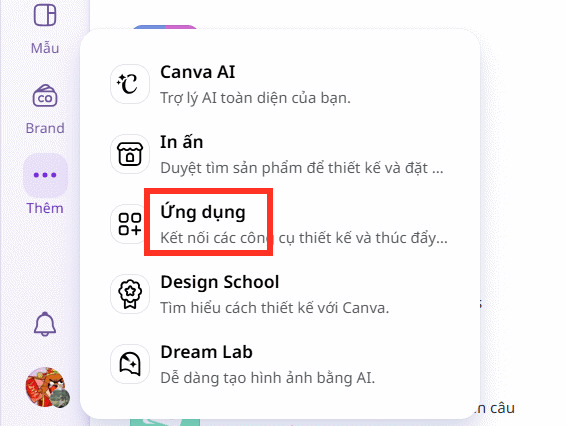
2. Find the AI Detector app
Search for AI Detector or Detector. Review the result carefully before opening it: confirm the app name and provider rather than choosing the first similarly named listing.
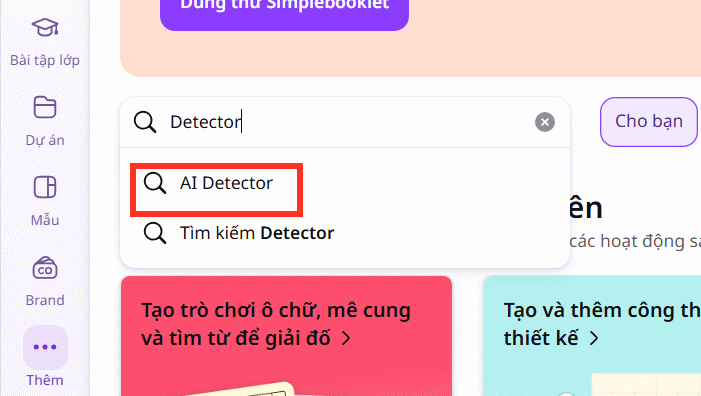
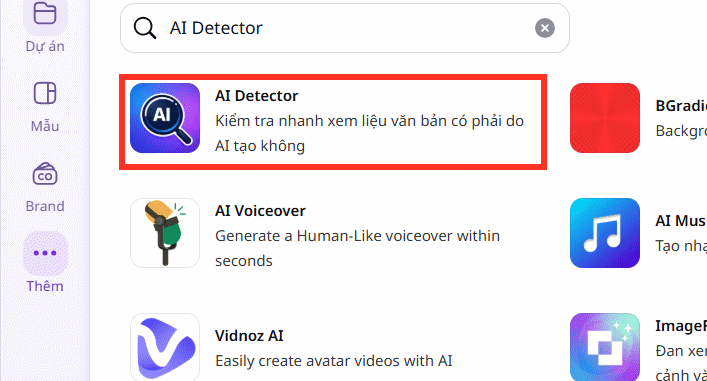
If the app no longer appears, it may have been renamed, removed, restricted by an organization administrator, or made unavailable in your region. Do not install an unrelated app merely because its icon or name looks similar.
3. Add the detector to a design
Select the option to use the app in the current design or in a new design. A text-focused Canva document usually gives the panel enough room to work comfortably. Approve only the access the app needs for the task.

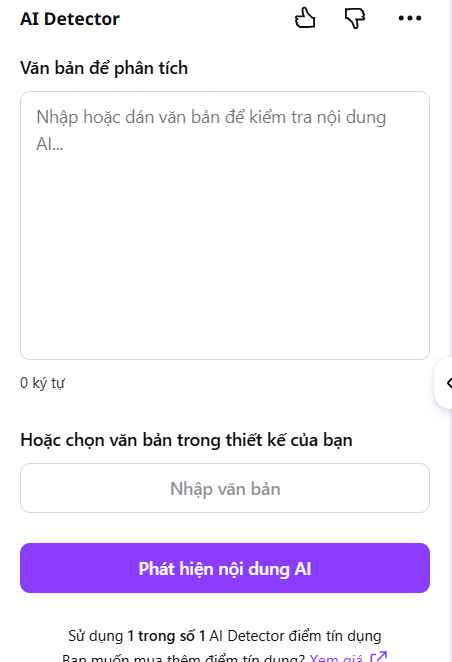
4. Paste a useful sample and run the scan
Paste the text into the input area, then select Detect AI content or the equivalent command. Use a complete passage rather than a title, slogan, list, or single sentence. Very short and heavily formatted samples give a detector fewer language patterns to assess.
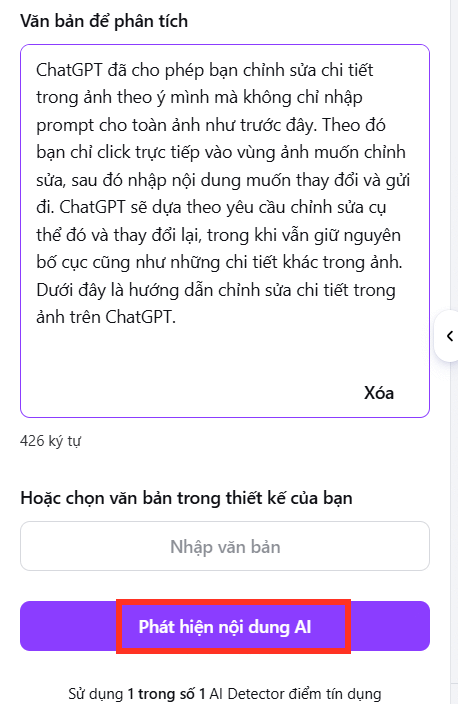
Before running the scan, remove footnotes, references, navigation labels, quoted passages, and boilerplate that were not written by the person whose work you are assessing. Mixing several authors or source types can make the result harder to interpret.
5. Read the result as an estimate
The app may show an overall AI score or percentage. This number reflects the detector's model and threshold; it is not a measured percentage of sentences that were definitely written by AI. A high score can be a reason to review the text more closely, while a low score cannot prove human authorship.
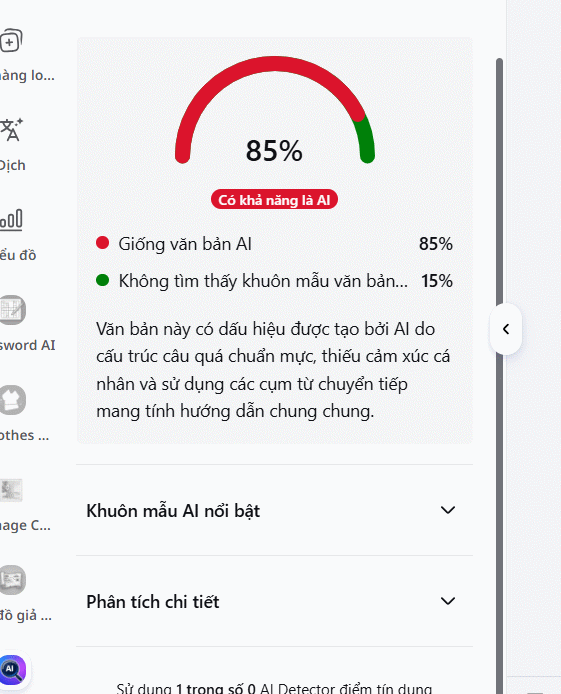
6. Examine patterns and detailed analysis
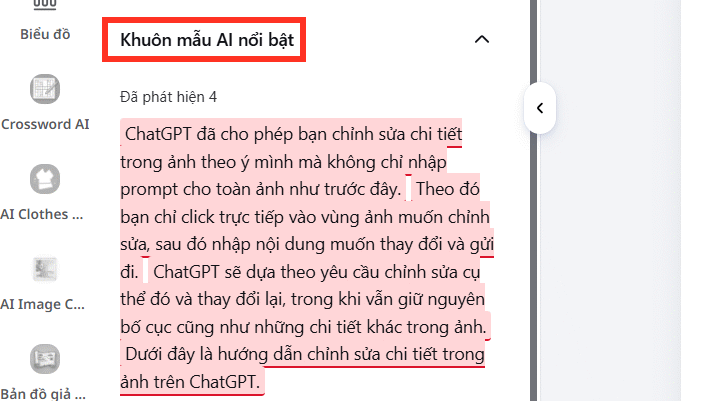
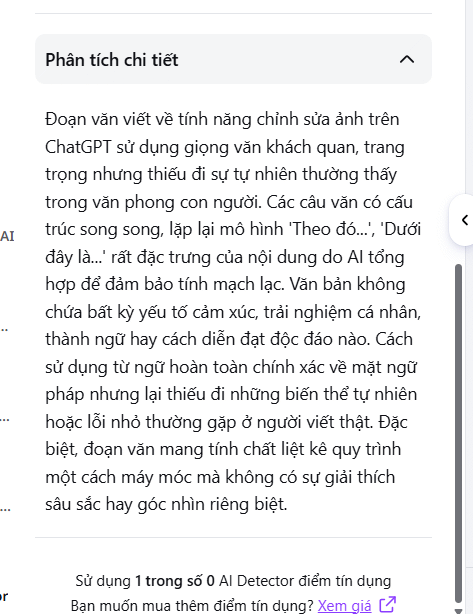
If the result includes AI Patterns, sentence highlighting, or a Detailed Analysis panel, inspect the specific passages that influenced the score. Repetitive sentence shapes, predictable transitions, generic phrasing, and unusually uniform structure may be signals, but people can write this way too.
How to use the result responsibly
- Do not make a high-stakes decision from one scan. A detector can produce false positives and false negatives.
- Check the writing process. Draft history, notes, citations, version history, and the author's ability to explain revisions provide stronger context.
- Compare like with like. Test the original passage without quotations, templates, or material written by other people.
- Do not rewrite solely to “beat” a detector. Improve clarity, evidence, attribution, and originality for readers instead.
- Document the tool and date. Interfaces and detection models change, so a saved score may not reproduce later.
- Allow a response. If the result affects a student, employee, or contributor, give that person a chance to explain their process and evidence.
For another form of quick screening, TipsMake covers Chrome extensions that detect AI content. Different detectors can disagree, so using several tools still does not turn their scores into proof.
AI detection versus content quality review
| Question | Better evidence |
|---|---|
| Does the passage resemble common AI output? | An AI detector score plus sentence-level review |
| Was material copied from a published source? | A plagiarism or similarity search with matched sources |
| Are the claims correct? | Fact-checking against primary sources |
| Is the writing useful and original? | Editorial review of reasoning, examples, evidence, and contribution |
| Who wrote it? | Drafts, revision history, notes, interviews, and other process evidence |
If your goal is copied-text detection rather than AI-pattern analysis, start with TipsMake's overview of content checking and similarity tools. Choose a current service with clear privacy terms before uploading private work.
If Canva AI Detector does not work
- Refresh Canva and reopen the app panel.
- Try a supported desktop browser and disable an extension only if it is interfering with the editor.
- Confirm that your Canva team or school administrator allows the app.
- Shorten an over-limit sample without removing the context needed to interpret it.
- Check the app listing for current limits, account requirements, or service notices.
- If the app has disappeared, use a verified alternative rather than a lookalike listing.
The most useful outcome is not a verdict of “AI” or “human.” It is a focused review of the passages, sources, and writing process that deserve closer attention.
Related Articles
 TOP Most Accurate AI Content Detection Tools11 minutes read
 Mobile Canvas House - Video Instruction for Removing Canvas Frame6 minutes read
 Xiaomi Launched a Hidden Camera Detector, Priced at Vnd 330,0003 minutes read
 Instructions to Turn Off the Spotify Canvas Feature3 minutes read
 How to Use the NVIDIA Canvas App8 minutes read
 Reference Canvas in HTML6 minutes read
Reader Comments 0
Sign in with email or Google to join the discussion.