Table of Contents
This updated guide explains how to spot fake businesses on Google maps with clear steps, practical tips, and useful context. Dating app users aren't the only ones who face "scams." Sadly, it is easy to fall for online scams. While Google is cracking down on fake Google Maps listings, It is essential to know how to spot these scams yourself.
Google Is Suing Scammers Behind Fake Maps Listings
This week, CBS News reported that Google has filed a lawsuit against a fraud network behind tens of thousands of fraudulent listings on its Maps app. The company launched an investigation after a locksmith in Texas reported that another business was impersonating them on Google Maps and scamming their customers.
The crime led Google to discover more than 10,000 other illegal Maps listings, which the company has since shut down. These listings range from hijacked accounts to outright fake operations.
While it is certainly a relief to know that the app has been cleaned up, the sad reality is that scammers will continue their tricks. The fact that thousands of fraudulent entities can appear right under Google's nose is a reminder to always be vigilant when ordering services online.
How to Spot Fake Businesses on Google Maps
There aren't always clear signs of a fake business on Google Maps, but there are some factors to consider when hiring a service through the app. While one sign in one category isn't necessarily a deal breaker, signs in multiple categories are suspicious.
Service Type
The report sparked Google's latest crusade. it is a prime example of a common scam. CBS News reports that services you need quickly in stressful or urgent situations are where Google finds most of the fraudulent activity.
Some examples of these types of services are:
- Locksmith
- Towing
- Emergency Repair
There are many honest businesses in these areas; It is essential to exercise caution when hiring in these sensitive industries.
Business Website
A business will usually list its website in its Google Maps profile under Overview . If you do not see it, check the About tab. If a website is provided, ensure it matches the business name. You can look for spelling errors in the URL and check to see if the website is active.
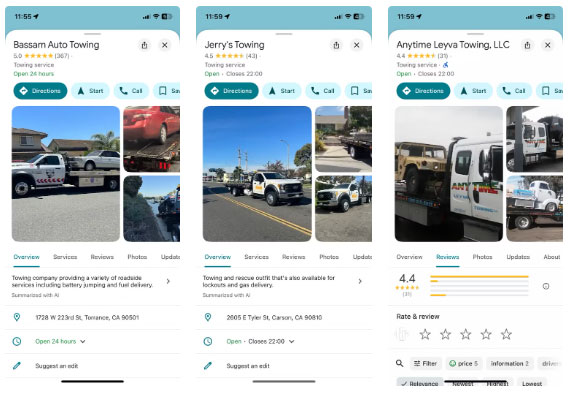
Still, some legitimate businesses will not have a website; instead, they may rely on word of mouth, including reviews on Google or Yelp.
Evaluate
Reviews are another way to rate a new service. Unfortunately, fake reviews are common, so a business with a 5-star rating may not be legitimate. Similar to fake Amazon reviews, some signs of fake Google Maps reviews include:
- Extremely positive but vague reviews, no specific information.
- All or many reviews of a business are posted within a very short period of time.
- Reviewers are either generically named or referred to as "Anonymous".
- Most of the reviews are just stars with no comments.
These characteristics alone may not necessarily signal a scam, but when combined with other factors, it is a different story.
Tip : Cross-check your Google reviews with another source, like Yelp.
Payment Method
One of the oldest scams is asking for money up front. If you've contacted a service that asks you to pay up front, It is best to at least check for these other warning signs before proceeding. Another suspicious move is if a business asks for unconventional payment, such as a wire transfer or gift card.
Mobile payment services like Zelle or PayPal aren't necessarily suspicious. Many legitimate vendors are businesses that use these apps.
Meanwhile, Google is doing everything it can to restore trust in its Maps ecosystem. The company recently recovered from a spate of malicious ads in its search results. According to a spokesperson who spoke to CBS News, Google has partnered with cybercrime support network ScamSpotter.org, which regularly updates its site with the latest scams to keep people on their toes.
FAQ
What should I prepare before I spot fake businesses on google maps?
Review the requirements and options in the guide first. Having the correct device, app version, account access, or materials ready helps prevent avoidable errors.
How long does it take to spot fake businesses on google maps?
The time depends on the task and your setup. Most basic steps can be completed quickly, while downloads, updates, scans, or troubleshooting may take longer.
What should I do if the steps do not work?
Repeat the instructions in order, confirm that your software or device is supported, and check permissions, connectivity, and available updates before trying again.
Related Articles
 Google My Maps Updated: Development Opportunities for Local4 minutes read
 8 Reasons Google Maps Is the Best Navigation App9 minutes read
 How to Integrate Google Maps into Your Website4 minutes read
 How to Message on Google Maps for Businesses5 minutes read
 Counterfeit Money: How to Spot Fake Bills7 minutes read
 This Man Easily Fooled Google Maps with 99 Phones3 minutes read
Reader Comments 0
Sign in with email or Google to join the discussion.