Table of Contents
This article provides a clear overview of Effective Excel Learning Method, with the main facts, useful context, and practical details organized for easy reading.
To master Excel, it is necessary to have certain learning methods.Along TipsMake share 'Effective method of learning Excel' below.
Excel has now become one of the most important and essential IT skills . Therefore to grasp
how to learn Excel effectively must understand the nature as well as the support tools on Excel to calculate and process data.
The quick and simple way, the most accurate.
The Effective Method of Learning Excel Is to Practice Perseverance
Any job needs perseverance and so does Excel. However, Excel does not simply apply to
a function that combines many functions to produce fast and accurate results. Therefore it is imperative to remember all functions in
Excel.
Excel Learning Method - Learn Carefully the Basic Functions
Excel functions are programmed functions used to calculate or perform a certain function. The proficient use
The functions will save time, and bring high accuracy.
* Math Functions in Excel
ABS function: get the absolute value of a certain number
Syntax
Syntax: ABS (number) number: the number you may need to get the absolute value.
Example
EXP function: exponentiation of base e = 2.718281828459
Syntax
Syntax: EXP (number) number: exponent of radix e.
Example
INT function: rounds a number down to the nearest integer
Syntax
Syntax: INT (number)
Example
=→ one day you will see how cool this INT function is!
ROUND: round a certain number in Excel
Syntax
Syntax: ROUND (number, num_digits) number: the number you may need to round. num_digits: the number of digits we want to round
Example
Example: ROUND (2.15,1) = 2.2 ROUND (21.5, -1) = 20
SUM function: sum numbers in a series of numbers. Syntax: SUM (number1, number2,.)
Example
* Date Functions:
DATE function: returns the full date value.
Syntax
Syntax: DATE (year, month, day)
For example, DATE (2014,2,14) returns January 14, 2014.
DAY function: returns date value Syntax: DAY (serial_number)
For example, DAY (A2) A2 is the 14th cell that returns 14. The same is true for the MONTH and YEAR functions.
TODAY function: returns the current date in the system
Syntax
Syntax: TODAY () VD Nay February 14, 2014. TODAY () = February 14, 2014.
* Logic Functions: AND, OR, IF Functions,.
* Statistical Function Group: MIN, MAX, AVERAGE, COUNT, SUM, SUMIF,.
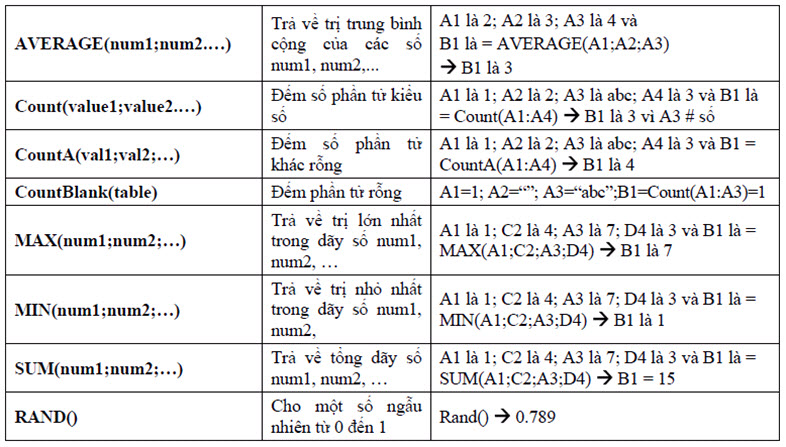
Above them are the most basic functions used in Excel. So you have to memorize and memorize like 'Multiplication Table'.
The quickest way to remember: first to learn the syntax of the function, then to the function's function, and in which case to use it, you can solve the problems in a specific way.
Method of Learning Excel - Practice Doing Exercises About Excel Regularly:
One of the extremely important factors in effective learning methods Excel. This will help you remember the formula, and adapt many types of math problems in Excel. However, you should first choose moderate exercises to manipulate and familiarize, memorize functions. Then move on to more difficult exercises. Avoid cases, memorize functions very detailed but do not know how to apply to problems and understand problems but not functions
Excel Learning Method - Knowing Errors and Handling Errors Quickly
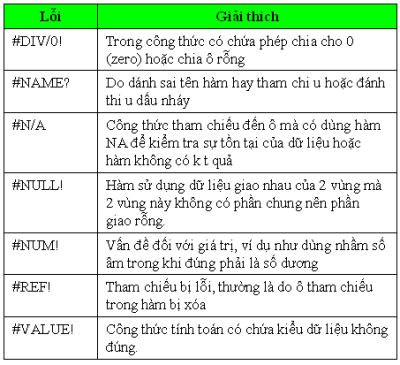
Basic mistakes in Excel, you have to understand and remember. If you encounter an error and don't understand what it is, you will never be able to fix it, such as common errors: #NA, ###, #NUM!......
FAQ
What is the main focus of Effective Excel Learning Method?
The article explains the most important facts, context, and practical details related to Effective Excel Learning Method.
Who may find this information useful?
It is useful for readers who want a clear overview, practical context, and a better understanding of the subject.
What should readers verify before taking action?
Check current product versions, official requirements, regional availability, and any details that may have changed since the original publication.
Related Articles
 If AI Can Do Everything, Why Do We Still Need to Learn?7 minutes read
 How to Create Vocabulary Learning Topics Using Twee3 minutes read
 Pomodoro Tomato Method: Working Focused, Highly Effective10 minutes read
 AI and Machine Learning in the Enterprise5 minutes read
 5 Effective Study Habits Need to Start Today8 minutes read
 Apply the Following Five Effective Ways to Increase Your Learning9 minutes read
Reader Comments 0
Sign in with email or Google to join the discussion.