Table of Contents
This article provides a clear overview of Edge Chromium Is Adding Many Useful New Features, with the main facts, useful context, and practical details organized for easy reading.
Collections Feature
Firstly, the Collections feature will be updated to Edge mobile version in the near future (in the second quarter of this year). Collections can be understood as 'warehouses' for you to organize, compare, store or share the content you find on the web in case you need it later. Collections will automatically sync between devices, so you can view, manage and add options to your collection from both iOS and Android devices.

Smart Copy
Another notable new feature is called Smart Copy, which allows you to copy and paste content in many different text formats. This means that when you copy and paste any text from the web, the links included in the text, the original font and many other elements will remain the same. This feature will be coming to Edge Insider channels next month.
Password Monitor Feature
The upcoming Password Monitor will let you know if your login information is exposed on malicious (dirty) websites. You will find a new panel in the Edge settings section, providing a list of all your compromised passwords. This feature will also be rolled out to Edge Insider channels within the next few months.
Vertical Presentation Tab
Another interesting visual change that needs to be mentioned is the 'vertical tab' (vertical tab), which makes switching between tabs more intuitive. With this feature, you will be provided with a list of open websites, with the name and icon of that website, significantly reducing the closing of the wrong tab. Vertical tabs will be tested on Edge Insider in the near future.
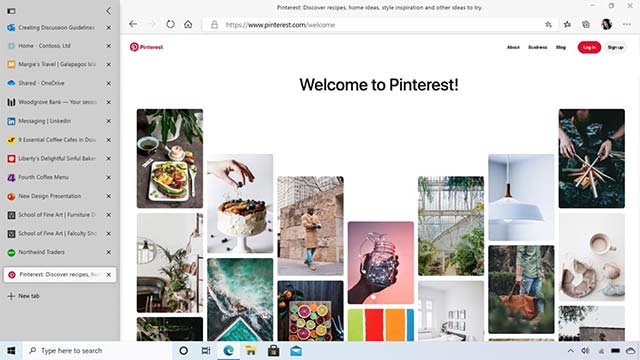
The last notable information are enhancements to InPrivate mode, enhancements with Immersive Reader, and the ability to stream Netflix content at 4K resolution.
FAQ
What is the main focus of Edge Chromium Is Adding Many Useful New Features?
The article explains the most important facts, context, and practical details related to Edge Chromium Is Adding Many Useful New Features.
Who may find this information useful?
It is useful for readers who want a clear overview, practical context, and a better understanding of the subject.
What should readers verify before taking action?
Check current product versions, official requirements, regional availability, and any details that may have changed since the original publication.
Related Articles
 How to Group Tabs on Microsoft Edge Chromium4 minutes read
 How to Use the Web Application in the New Chromium Edge Browser on4 minutes read
 The Newly Launched Edge Chromium Browser Has an Installation3 minutes read
 Microsoft Edge Is About to Add a Series of Features to4 minutes read
 How to See Which Tabs Consume RAM on Edge Chromium3 minutes read
 How to Adjust the Font on Microsoft Edge Chromium4 minutes read
Reader Comments 0
Sign in with email or Google to join the discussion.