Table of Contents
This updated guide examines The Newly Launched Edge Chromium Browser Has an Installation and organizes the essential facts, background, and practical takeaways in clear American English.
However, after only one day of launch and download permission, the browser appeared to be vulnerable. Specifically, some users reflect on the process of installing Edge Chromium on Windows, which displays a completely different language that they do not know, Spanish.
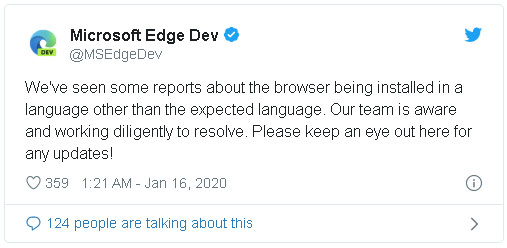
Today, Microsoft has admitted to language errors when installing Edge Chromium. The tech company said the technical team is looking to fix this error as quickly as possible so as not to affect the user experience.
Microsoft adds that this bug is not too serious and does not affect users much.
According to the Neowin site, the cause of this language setting error is that users download the Spanish version of Edge Chromium, so the language will appear in Spanish instead of English when installed.
Users in Vietnam are not affected by this error, so you can feel free to download and experience offline.
- Microsoft still supports Edge Chromium after the death of Windows 7
- Microsoft has released a critical update for Windows 10, users need to update now
- The Chromium Microsoft Edge browser has a new extension store
FAQ
What is The Newly Launched Edge Chromium Browser Has an Installation about?
It provides a structured overview of New Edge Chromium, explains the main context, and highlights practical takeaways for readers.
Why does this topic matter?
Understanding the main concepts helps readers evaluate the issue, avoid common mistakes, and make better-informed decisions.
How should readers use this information?
Use the guidance as a practical starting point, confirm details that may have changed, and follow current product, safety, or security recommendations.
Related Articles
 Microsoft Edge May Rise to Second Place, Behind Google Chrome3 minutes read
 How to Use the Web Application in the New Chromium Edge Browser on4 minutes read
 Edge Chromium Is Adding Many Useful New Features3 minutes read
 Microsoft Edge Chromium Has Added Support for Arm643 minutes read
 Microsoft Edge Is About to Add a Series of Features to4 minutes read
 How to Download the Edge Chromium Offline Installer4 minutes read
Reader Comments 0
Sign in with email or Google to join the discussion.