Table of Contents
Losing phone signal, especially in emergencies, is a serious problem. Nothing is more stressful than needing to make a call or send a message only to find the screen shows no signal bars. So, what should you do? This article will share the simplest ways to fix a smartphone losing signal.
Pay attention to Airplane mode
Sometimes your phone just needs a little time to reconnect to the network, but few people know that Airplane Mode actually works as a quick restart. It forces the phone to disconnect and search for the best available signal again, so it usually results in a faster response.
If you're using an iPhone, follow these steps:
- Unlock your phone and swipe down from the top right corner to open the Control Center.
- Tap the Airplane mode icon in the upper left corner.
- Wait for about 5-7 seconds.
- Tap the icon again to turn this mode off.
- Give your iPhone a few seconds to reconnect and check the signal.
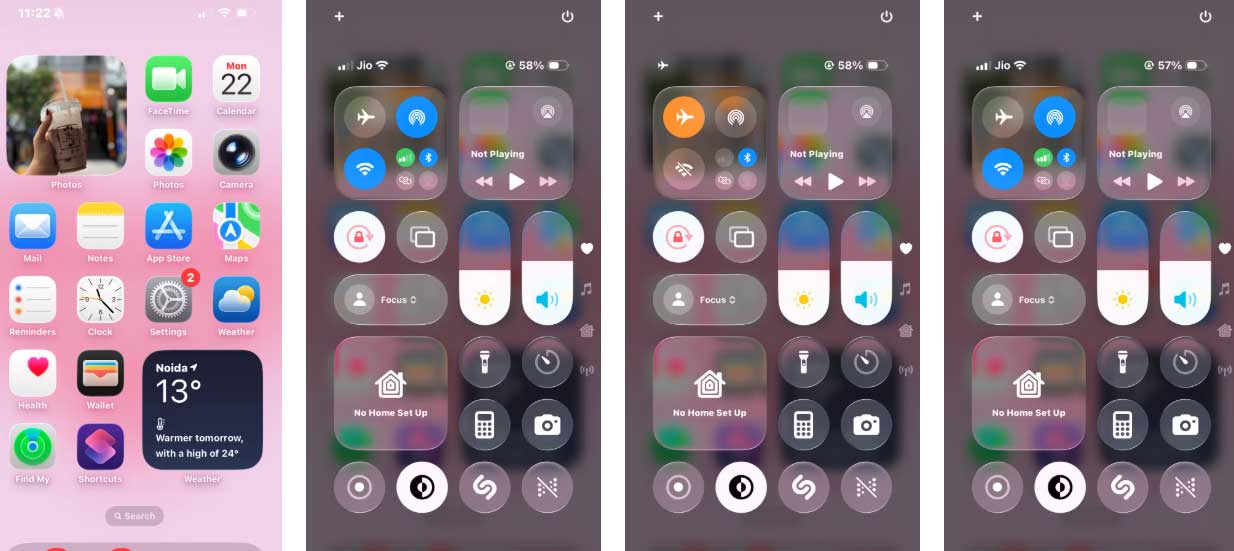
On an Android phone, do the following:
- Swipe down on the home screen to open the Quick Settings panel.
- Find the Airplane Mode icon.
- Tap it and wait 5-7 seconds.
- Tap it again to turn it off.
- Wait a moment for your phone to reconnect to the network.
Change network mode
When in an area with weak network coverage, switching network modes can really make a significant difference. Newer networks like 5G don't always work well in areas with weak signals, and your phone might struggle to maintain a connection. Switching to LTE can sometimes provide a more stable internet connection, even if it's not the fastest.
To make this change on your iPhone, open Settings > Mobile Services > SIM. Tap Voice & Data, switch from 5G to LTE, and wait a few seconds for your phone to reconnect. In many cases, you'll see the signal strength increase, or at least enough to make an emergency call or send a message.
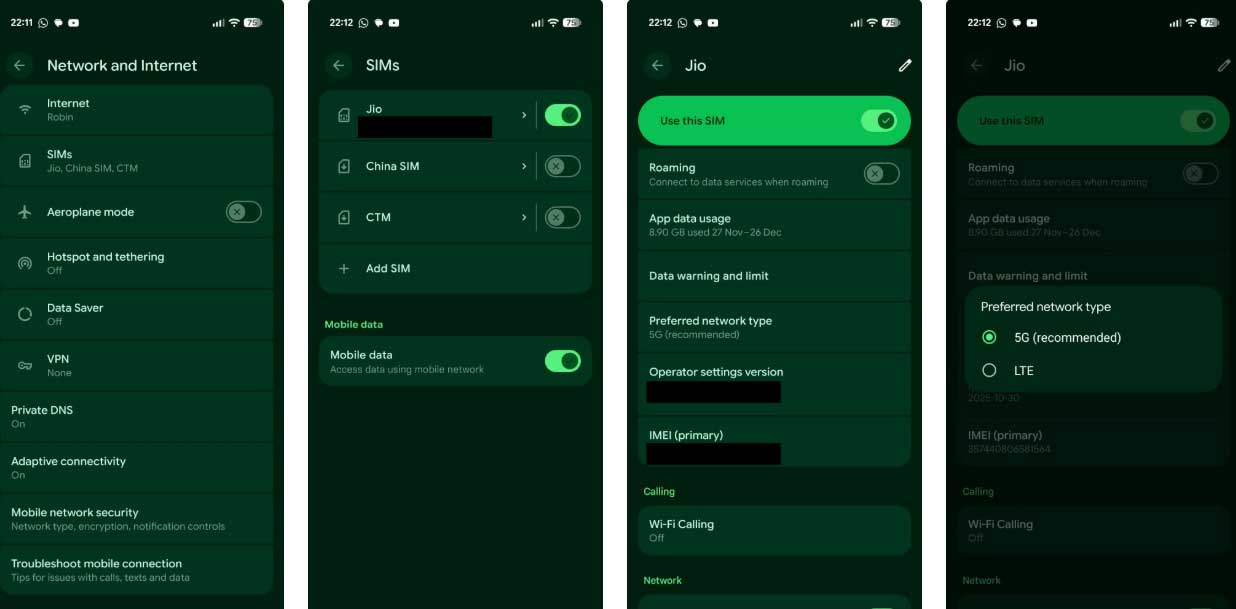
On Android, open Settings > Network and Internet, tap SIMs > Preferred Network Type, select LTE, and wait a moment. This usually helps your phone get a stable signal when the 5G network is experiencing problems.
Make calls over Wi-Fi
If switching to LTE still doesn't give you a good signal, turning on Wi-Fi will help a lot. It allows you to make calls and send messages for free, even when the cellular signal is weak or nonexistent.
On iPhone:
- Open Settings > Mobile Service.
- In the SIM section, select the SIM you are currently using.
- Tap Wi-Fi Calling and turn it on.
On Android:
- Open Settings > Network and Internet
- Tap on SIM and select the SIM you are currently using.
- In the Calling section, tap Wi-Fi Calling and turn it on.
Once enabled, simply connect your phone to any available Wi-Fi network. Then you can make calls and send messages as usual, even without a cellular signal.
Reset network settings
If none of the above troubleshooting steps work, resetting your network settings is usually the effective solution in most cases.
On your iPhone, open Settings > Network. Scroll down and tap Transfer or Reset iPhone. Tap Reset > select Reset Network Settings. Finally, follow the on-screen steps to complete the process.
On Android, open Settings > System. Select Reset Options > Reset mobile network settings. Here, tap Reset settings in the bottom right corner and follow the on-screen instructions.
Remove and reinsert the SIM card
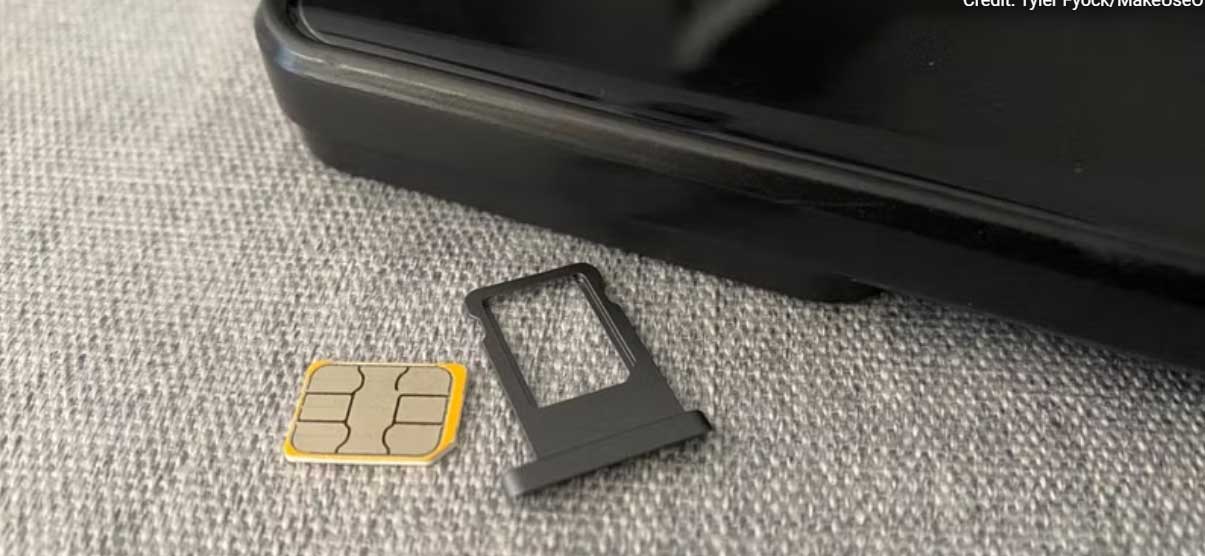
If none of the above methods work, try removing the SIM card. Take the SIM card out of the tray, gently wipe both the SIM card and the tray clean, then reinsert it correctly. Dirt or a loose SIM card can sometimes interfere with the connection, and reinserting the SIM card should help your phone re-establish its connection to the network.
After reassembling, wait a moment for the phone to reconnect to the network.
Related Articles
 How to Boost Wi-Fi Signal on Laptop?10 minutes read
 How to Use a Parametric Equalizer: Step-by-Step Guide4 minutes read
 How to Use Signal Messaging Application on Phone, PC6 minutes read
 The Simple Way to Boost Mobile Phone Signal Strength in Your Home10 minutes read
 Boost Mobile Prepaid SIM Plans9 minutes read
 What Color Is the Turn Signal Light? It's Easy to Think but 90%3 minutes read
Reader Comments 0
Sign in with email or Google to join the discussion.