Table of Contents
This guide provides a practical overview of Download Windows Product Key Finder 2020 Free, the Software That Stores the, including its main features, benefits, limitations, and important considerations.
Using the software license key will help you experience the full range of features without limitation. However, when you have a lot of software code, you find it difficult to remember them, you can use the Windows Product Key Finder to find the license key.
The software will search for the product key of programs such as MS Office, MS SQL Server, Adobe, Norton Anti-virus, VMWare, Winamp. The following article will guide you how to download the free Windows Product Key Finder on your computer.
Instructions for downloading Windows Product Key Finder free
Key features of the software:
- Recover and store keys for all Windows: Windows XP / 2003/2008/2012 / Vista / 7/8/10
- Recover and store keys for more than 500 software such as: All versions of Office (including Office 2019), SQL Server, Adobe, VMWare, Internet Download Manager.
- Recover and store keys for some games such as FIFA, NFS, Age of Empires, Quake, The Sims, Half-Life, IGI, Star Wars.
Step 1:
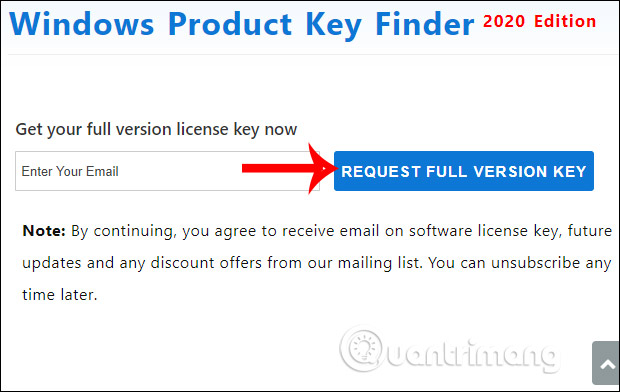
We visit the link here to join the free software download program. In this interface, you enter the email to receive the license key and then press Request full version key .
Step 2:
Then we will immediately receive the license key to activate Windows Product Key Finder, with the software download link right below. You can also open the registration email to get the key if you have not installed the software immediately. When installing the software you only need to enter the key to activate.

I wish you successful implementation!
FAQ
What should I know about Download Windows Product Key Finder 2020 Free, the Software That Stores the?
Focus on the key features, requirements, limitations, and practical use cases explained in this guide.
How do I get the best results with Download Windows Product Key Finder 2020 Free, the Software That Stores the?
Follow the recommended steps, use current software or information, confirm compatibility, and review settings before major changes.
Are there any risks or limitations?
Potential limitations depend on compatibility, data quality, cost, privacy, support, and how the product or method is used.
Related Articles
 Product Key: 21 Best Free Software Key Finders15 minutes read
 Here's How to Uninstall the Product Key on a Windows Computer1 minutes read
 How to Activate Windows XP Without a Genuine Product Key: Clear Instructions9 minutes read
 Installation Instructions AutoCAD 2020, 2021 License for Free4 minutes read
 How to View Product Key on Windows 106 minutes read
 Free Windows 10 Product Key for Windows 10 Home, Education,Pro Explained9 minutes read
Reader Comments 0
Sign in with email or Google to join the discussion.