Table of Contents
This guide provides a practical overview of Download the PDF Conversion Tool Windows 10 Application Is Free, including its main features, benefits, limitations, and important considerations.
Instructions for downloading the PDF Conversion Tool for free
Step 1:
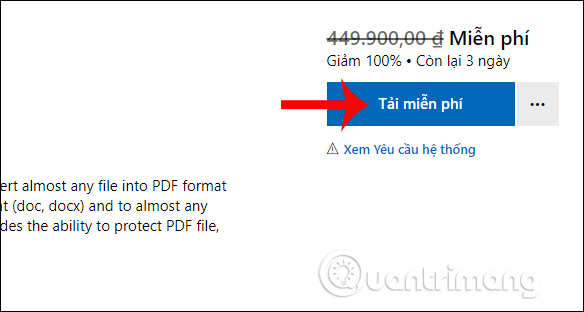
We visit the link below to go to the PDF Conversion Tool Windows 10 download page. Then click on Download for free .
Then you need to log in your personal Microsoft account and enter the verification code sent to the email is done. Finally, you download the free app to your computer.
Step 2:
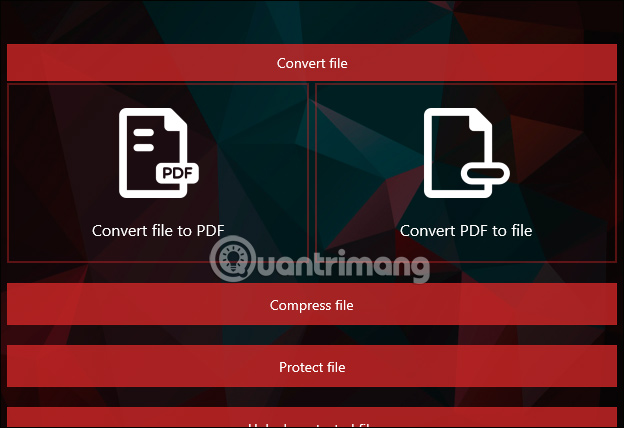
This is the main interface of the application with supported features, including file conversion, PDF protection, file size reduction and PDF file decryption.

List of formats that support PDF conversion
cad: dwg, dxf
- Text: abw, djvu, doc, docm, docx, html, lwp, md, odt, pages, pages. zip, pdf, rst, rtf, sdw, tex, txt, wpd, wps
- ebooks: azw, azw3, azw4, cbc, cbr, cbz, chm, epub, fb2, html, htmlz, lit, lrf, mobi, pdb, pml, prc, rb, snb, tcr, txtz
- Free images: 3fr, arw, bmp, cr2, crw, dcr, dng, erf, gif, ico, jpeg, jpg, mos, mrw, nef, odd, orf, pef, png, ppm, psd, raf, raw, tif, tiff, webp, x3f, xcf, xps
- Slideshow: dps, key, key. zip, odp, pps, ppsx, ppt, pptm, pptx, sda
- Statistics table file: csv, et, numbers, numbers. zip, ods, sdc, xls, xlsm, xlsx
- Vector: ai, cdr, cgm, emf, eps, ps, sk, sk1, svg, svgz, vsd, wmf
List of supported conversion formats from PDF files
- cad: dxf
- Text: doc, docx, html, odt, pdf, rtf, txt
- Ebooks: azw3, epub, lrf, mobi, oeb, pdb
- Images: bmp, gif, ico, jpg, odd, png, psd, tiff, webp
- Vector: emf, eps, ps, svg, wmf
FAQ
What should I know about Download the PDF Conversion Tool Windows 10 Application Is Free?
Focus on the key features, requirements, limitations, and practical use cases explained in this guide.
How do I get the best results with Download the PDF Conversion Tool Windows 10 Application Is Free?
Follow the recommended steps, use current software or information, confirm compatibility, and review settings before major changes.
Are there any risks or limitations?
Potential limitations depend on compatibility, data quality, cost, privacy, support, and how the product or method is used.
Related Articles
 Microsoft Launches VM Conversion Tool: Free Solution to Convert VMware3 minutes read
 Offer PDF Export Kit - a PDF Converter to Other Formats for $ 494 minutes read
 Free Copyright MP3 Toolkit Conversion Software4 minutes read
 Best Free Image Conversion Programs 20218 minutes read
 Download Offers, Unit Converter (Pega Pro), Application Converted3 minutes read
 Please Download Wi-Fi Analyzer Application3 minutes read
Reader Comments 0
Sign in with email or Google to join the discussion.