Table of Contents
This guide covers distinguish real and fake goods when buying 'Apple flaws' with practical context and easy-to-follow details. Use it to understand the subject and apply the information confidently.
To identify genuine Apple products, the buyer should note the product's stamp. Because genuine Apple products such as iPad, iPhone, iPod, MacBook. Distributed in Vietnam market must always ensure full 2 types of stamps: stamps of distributor of products, standard conformity stamps paste on the side of the product container.
In particular, the distributor's stamp clearly indicates the origin of the import. The standard conformity stamp is issued by Ministry of Information & Communications to affirm product quality in accordance with standards of IT products circulating in Vietnam. This certificate is only applicable for products with genuine origin after inspection.
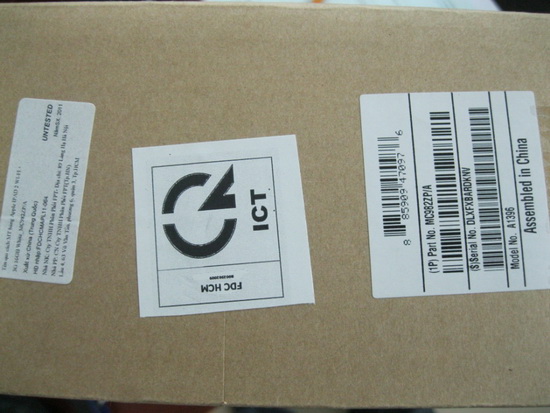 Genuine Apple products must have 2 stamps
In addition, buyers need to pay attention to check whether the product has intact seals and the distributor's warranty card. This will ensure consumers' rights when warranting product warranty later.
There are a lot of Apple products on the market that do not have clear origins. Due to the overconfidence of stores with the ' Apple ' logo and due to little technical knowledge, users can buy genuine air. Floating goods are not only of poor quality, but when the product has problems, consumers are not entitled to Apple's warranty policies.
Many Apple stores are ready to buy the Genuine 'Apple' box used to repackage old Apple products or refurbish out-of-warranty products sold to consumers.
Another way is that users can access the list of qualified stores that they have officially recognized on the website at HTTP: //store. Apple. Com/vn. After that, the buyer continues to select the ' Find a Reseller ' item and select the country (Vietnam) to find the store list.
FAQ
What should I check before following these steps?
Confirm device and software compatibility, save important data, and make sure you have the required permissions, files, and account access.
Why might the process not work?
Common causes include outdated software, missing permissions, incompatible hardware, an unstable connection, or completing a step in the wrong order.
Can I undo the changes if necessary?
That depends on the tool or setting. Use built-in restore options when available, keep a backup, and record the original configuration first.
Related Articles
 How to Accurately Distinguish iPhone 6 or iPhone 6s?8 minutes read
 Tips to Distinguish Real and Fake Canon Ink, Do You Know4 minutes read
 How to Distinguish Real iPhone X, Fake Company and Taiwan10 minutes read
 How to Identify the Most Accurate and Fake iPhone Headphones5 minutes read
 How to Distinguish 'Fake' USB from Real Goods2 minutes read
 Distinguish Old Technology Items, Phones Like New, Build Goods9 minutes read
Reader Comments 0
Sign in with email or Google to join the discussion.