Table of Contents
Convert PDF Format to EPUB, MOBI or HTML: Instructions covers the essential facts behind the topic, including what changed, why it mattered, and how it affected users.
Instructions Overview
Using Caliber:
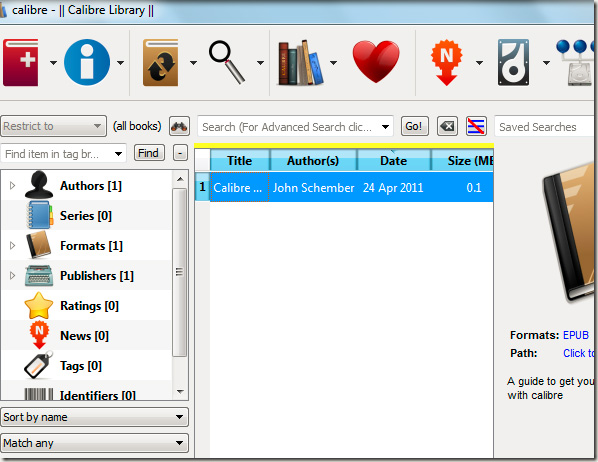
First, visit the Caliber website, download the latest version and install it on your computer. The main console of the program will look like the image below:
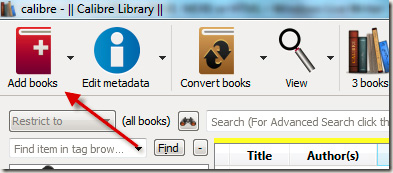
Here, you will see the Add Books button at the top left, click this button to assign a PDF file to convert the format:
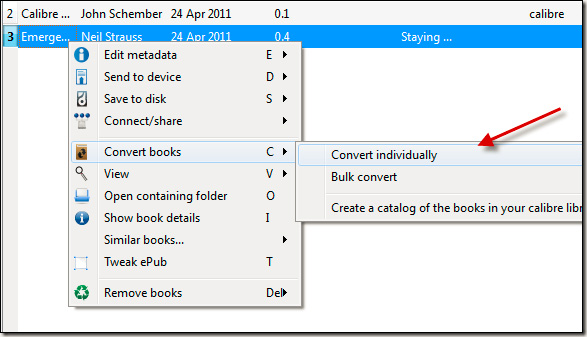
The next window displays, right-click on the file you just assigned in the previous step and choose Convert books> individually Convert:
In this Convert window, we have Input and Output options on both sides, choose the format that meets the requirements:

After clicking OK, and the format conversion process will begin. If you do not specify any other Output folder, the system will automatically save to the C: UsersUsername folder of the system, and this completion time depends on the size of the original file.
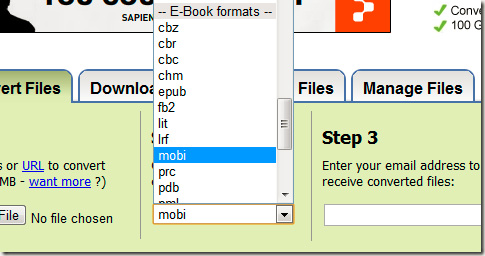
Use Zamzar: This is one of the most popular online text file conversion services today, supports a wide range of document formats, of course including PDF, EPUB, MOBI files. Main interface of This tool is very simple, all you need to do is select the file to convert, point the path, select the output file format, enter the email address and click the Convert button:
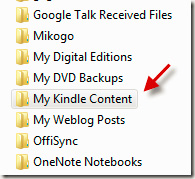
If you want to use this MOBI file on Kindle devices, save the document to the My Kindle Content folder, found in the My Documents section of Windows:
Good luck!
FAQ
What does Convert PDF Format to EPUB, MOBI or HTML: Instructions explain?
Convert PDF Format to EPUB, MOBI or HTML: Instructions covers the essential facts behind the topic, including what changed, why it mattered, and how it affected users.
Who is most affected by Instructions?
Instructions Overview Using Caliber: First, visit the Caliber website, download the latest version and install it on your computer.
What are the key takeaways from this topic?
The main console of the program will look like the image below: Here, you will see the Add Books button at the top left, click this button to assign a PDF file to convert the format: The next window displays, right-click on the file you just assigned in the.
Related Articles
 How to Convert EPUB to PDF - Convert EPUB to PDF4 minutes read
 Advantages and Disadvantages of Popular Ebook Formats: EPUB4 minutes read
 What's the Difference Between EPUB and PDF?5 minutes read
 What Is an EPUB File? How to Read EPUB File on Phone, Computer5 minutes read
 How to Convert a Word Document to Epub5 minutes read
 What Is MOBI File? How to Open a MOBI File?4 minutes read
Reader Comments 0
Sign in with email or Google to join the discussion.