Table of Contents
Explore arknights: endfield pc, including the key concepts, practical examples, important considerations, and useful guidance.
1. Check Arknights: Endfield system requirements before installation
Before you begin, make sure your computer meets the minimum specifications to avoid crashing during loading.
| Accessory | Minimum configuration | Recommended configuration |
| Operating system | Windows 10 (64-bit) | Windows 10/11 (64-bit) |
| CPU | Intel Core i5-9400F | Intel Core i7-10700K or higher |
| RAM | 16GB | 16GB or more |
| Graphics card | NVIDIA GTX 1060 | NVIDIA RTX 2060 or higher |
| Free space | 80GB (SSD recommended) | 100GB (SSD) |
2. Steps to install Arknights: Endfield on the Epic Games Store
Follow these 5 precise steps to download the game to your device:
Step 1: Launch Epic Games Launcher
- Open the Epic Games Launcher application on your computer.
- Log in to your personal account. If you don't have one yet, you can quickly register via Google or Facebook.
Step 2: Search for the game Arknights: Endfield
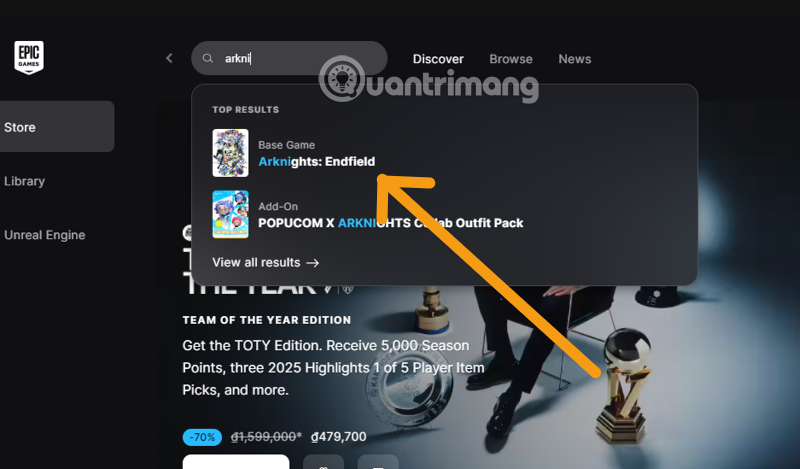
- On the main interface, look for the Search bar in the upper right corner.
- Enter the keyword: "Arknights: Endfield" and press Enter .
Step 3: Get the game
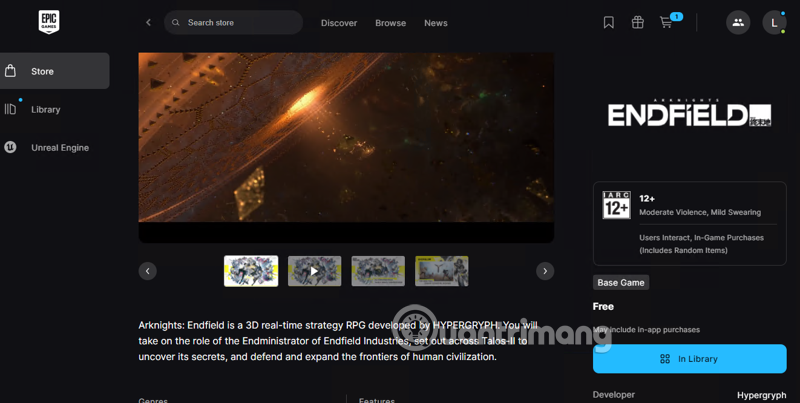
- Select the correct Arknights: Endfield game icon that appears in the search results.
- On the game information page, click the yellow GET button.
- A payment notification (0đ) will appear; press Place Order to confirm permanent ownership of the game in your account.
Step 4: Access the Library to install
- Click on the Library option in the left-hand menu column.
- Find Arknights: Endfield in your list of games you own (it will usually be at the top of the list if you just received it).
Step 5: Proceed with the installation (Install)
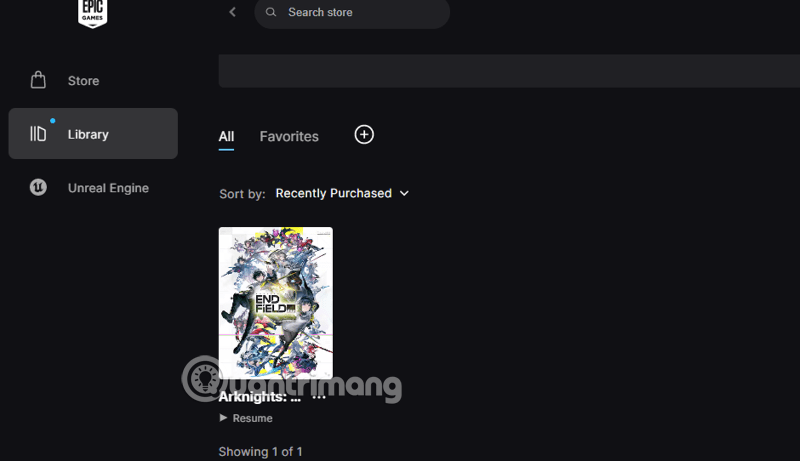
- Click on the game icon, and a settings window will appear.
- Choose a path: Click Browse to select the drive to save the game (SSD drive is recommended for faster map loading).
- Press INSTALL . The download process will begin.
3. Important notes during installation
- Network speed: The game has a compressed file size of nearly 80GB , so ensure a stable internet connection (use a LAN cable if possible).
- Driver Update: Always update your graphics card (NVIDIA/AMD) driver to the latest version to avoid black screen errors when starting games.
- Required space: Epic Games typically requests an additional 40GB of free space beyond the actual available space for the unpacking process.
4. FAQ (FAQ)
Is Arknights: Endfield free on Epic Games?
- Answer: Yes. This is a free-to-play game; you can get and play it completely free.
Can I play with my friends on my phone?
- Answer: Yes. Arknights: Endfield supports cross-play between PC, iOS, and Android.
Conclude
With stunning 3D graphics and unique base-building gameplay, Arknights: Endfield is sure to keep you glued to the screen. Follow the steps above to be one of the first to explore it!
Final Thoughts
Understanding arknights makes it easier to evaluate the information and apply the most relevant recommendations. Focus on the key points above and verify details that may change over time.
Related Articles
 How to Redeem Arknights: Endfield VN Codes and a List of Codes as of January 24, 20264 minutes read
 List of Newly Released and Complete Arknights Endfield Codes For 20266 minutes read
 Arknights Tips for Beginners4 minutes read
 How to Play Pokémon GO on a Computer6 minutes read
 How to Play Pokémon GO on a Smartphone6 minutes read
 26 Types of Poké Balls Explained: Part 25 minutes read
Reader Comments 0
Sign in with email or Google to join the discussion.