Table of Contents
Arc is a system-wide AI assistant that works seamlessly across all applications. With just a simple swipe from the floating sidebar, you can write, summarize, extract insights,...
While people love the power of artificial intelligence (AI), whether it's ChatGPT or Google Gemini, virtual assistants are always in your pocket. You can always ask them questions about anything (even stressful decisions). While that's convenient, constantly switching between apps is frustrating. For example, if you're reading a long article or trying to reply to an email, you have to copy the text, paste it into the AI app, type in the prompt to edit it, and then return to the original app.
People started looking for a better way to use AI on their phones without constantly switching between apps. That's when they found the Arc AI virtual assistant, which should have been built into the operating system.
For more context before choosing a tool, compare Claude and ChatGPT and review these practical AI tools for students.
What is Arc AI?
Arc is a system-wide AI assistant that works seamlessly across all applications. With just a simple swipe from the floating sidebar, you can write, summarize, extract insights, and automate tasks—without switching apps or interrupting your workflow.
Arc Assistant is a multi-purpose AI productivity tool that provides instant summarization, writing support, and content extraction directly within any Android application via a floating interface.
This is a system-wide AI sidebar!
Your AI resides in a hidden floating sidebar, ready for deployment.
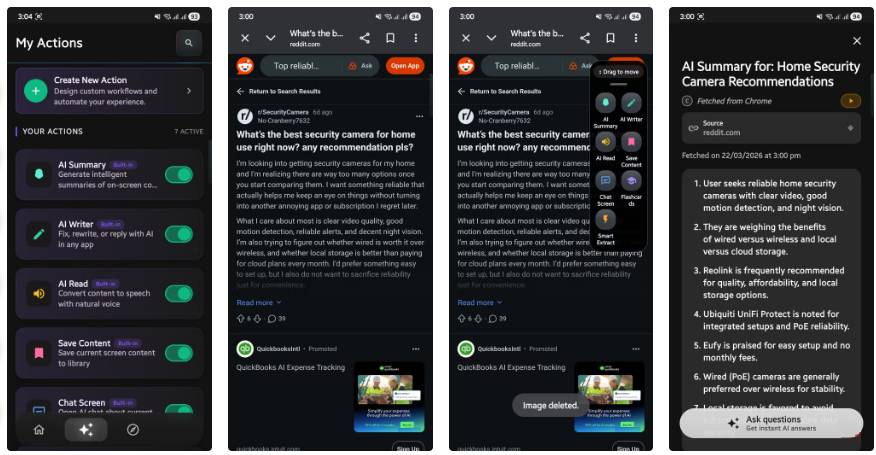
Arc isn't just another simple app bringing AI power to your phone or a combination of AI. It's a system-wide assistant hidden inside a floating sidebar. A quick swipe from the edge of the screen brings the sidebar up right above whatever app you're using. The Arc AI assistant looks like the Edge Panels you have on Samsung Galaxy phones.
The best part is there are no restrictions on the app you're using. Whether it's WhatsApp, Facebook, Instagram, Gmail, or X (formerly Twitter), you can call up Arc AI Assistant through the sidebar anytime. It's like instead of handing your tasks over to AI, Arc brings AI directly to your work.
Many people enjoy reading threads on Reddit, whether they're about general topics or actual product reviews. If you already have Arc AI Assistant on your phone, instead of scrolling through hundreds of comments and pasting URLs into another app, you can simply swipe from the edge of the screen, open Arc, and select Instant AI Summarizer.
Within seconds, Arc will read your screen and provide you with crucial information – the pros and cons of the brand you're searching for, and even a few better alternatives. It also tracks the source URL so you can find it later. It simply helps you overcome information overload and provides you with answers without leaving your browser. Please note that this feature does not work on Samsung Internet Browser.
Arc is a complete AI assistant.
You can ask it to compose a response, chat about the content on the screen, etc.
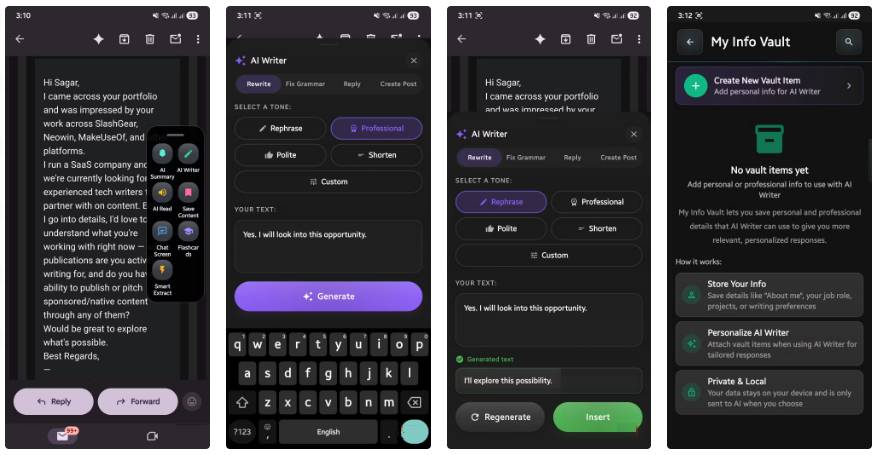
Some people receive a lot of Slack messages and emails every day. These messages arrive at any time of day, whether they're driving or just out for a walk. Typing a professional reply on a mobile keyboard is difficult, especially when you're busy doing other things.
With Arc's AI editor, simply open the sidebar and use the Context-Aware Suggestions feature. It understands the conversation taking place on your screen. Tapping on Polite or Professional will compose a contextually relevant reply, which you can send directly to Gmail or Slack.
There's another handy feature called My Info Vault, where you can store reusable personal information such as your biography, food preferences, or portfolio links. Based on this information, AI will generate highly personalized responses on demand without requiring you to re-enter the same information multiple times.
Next, the Chat With Your Screen feature is more than just a summary. When you receive a confusing message, such as an email from your utility company containing a usage chart, simply open Arc Assistant and use Chat With Your Screen. You can type "explain why there's a spike in the chart as if I were a 5-year-old," and Arc will analyze it and provide the results in an easy-to-understand format.
You can also use the Smart Extract feature, which automatically detects useful information on the screen. The app checks addresses and dates and gives you the option to add them to Google Calendar or open them in Google Maps with just one tap.
The app respects user privacy.
Arc requires Android Accessibility Services to read the screen. This might seem like a privacy violation, but Arc handles it very well. The app doesn't track the user's screen in the background and only reads the text on the screen when you tap a specific action like Summarize or Chat.
Your memories and history are also securely stored on your local device. Additionally, Arc automatically shuts down when you open more than 200 recognized banking, cryptocurrency, or password management apps. In this case, you should check if any of your financial apps are supported before using the Arc AI assistant.
Overall, since downloading Arc, other AI applications seem to have been left behind. People no longer need to search for the best AI app for each specific task, as Arc serves as a versatile tool.
Related Articles
 Samsung Revealed the Biggest Screen You Can Buy Today5 minutes read
 How Will Websites, YouTube and Apps Show up on This Super-wide Screen with This 32: 9 Ratio?3 minutes read
 Guide to Lock and Unlock Android Screen with Virtual Assistant4 minutes read
 Laptop: Broader, More 'Delicious'7 minutes read
 Utilize Old Computers to Build Home Assistant and a Free Smart Home System7 minutes read
 How to Turn Off Google Assistant on Lock Screen3 minutes read
Reader Comments 0
Sign in with email or Google to join the discussion.