Table of Contents
AI Hay's Mind Map tool can turn a topic or pasted notes into a branched visual outline. Open the tool, choose a map style, provide focused source material, and generate the map. The important final step is to compare every branch with the source, because an AI-generated structure can omit details or introduce unsupported connections.
Quick steps
- Open AI Hay on the web or in its mobile app.
- Select Mind Map.
- Choose a layout or style suitable for the material.
- Enter a clear topic and paste the notes to organize.
- Select the send arrow to generate the map.
- Review the result, then save it to your device if it is accurate.
Buttons and plan limits can change between app versions. If Mind Map is not visible on the home screen, update the app and check its tools menu.
How to create the mind map
1. Open AI Hay
Sign in to the AI Hay website or app. Before pasting material, remove personal, confidential, or copyrighted information that you are not permitted to submit to an external service.
2. Select Mind Map
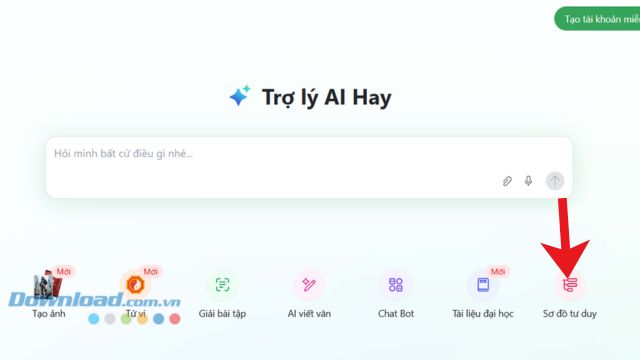
On the home screen, choose Mind Map. This opens the area where AI Hay accepts a topic or source text and organizes it into nodes.
3. Choose a layout
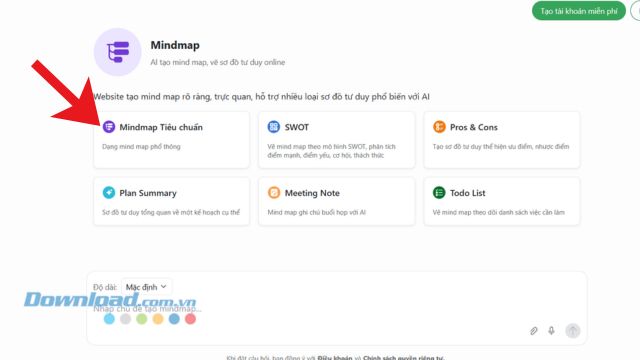
Select a map style that matches the information. A balanced radial map is useful for categories of equal importance, while a left-to-right hierarchy is easier to follow for a process or lesson sequence. The visual style should support the logic rather than dictate it.
4. Enter focused source material
Paste notes that cover one central subject. If the source is long, summarize it into headings and key facts first. A useful request identifies the purpose and limits, for example:
Create a mind map for a student reviewing [topic]. Use only the notes below. Put the topic in the center, create no more than five main branches, and limit each branch to four short subpoints. Preserve names, dates, formulas, and definitions exactly. If two points do not have a clear relationship, keep them separate rather than inventing a connection.
[Paste the approved notes]
Select the send arrow after checking that the topic and source text are complete.

5. Review and save the result
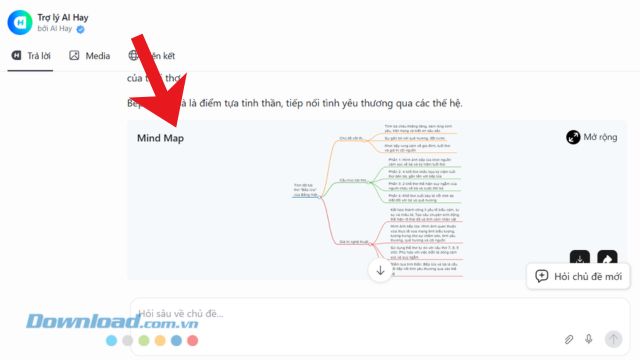
Wait for the map to be generated, then inspect the central topic, main branches, and supporting nodes. Save the image only after verifying the content.
How to improve an unclear result
| Problem | Better instruction |
|---|---|
| Too many branches | “Use a maximum of five main branches and three subpoints per branch.” |
| Labels are too long | “Keep every node under eight words without removing technical terms.” |
| Important facts are missing | List the required facts and tell the tool to reproduce them exactly |
| Relationships are wrong | Provide the desired parent and child headings in an outline |
| The map is hard to read | Split the material into two maps rather than shrinking the text |
Check accuracy before studying or sharing
- Compare definitions, numbers, dates, quotations, and formulas with the source.
- Make sure the hierarchy reflects real relationships, not just similar wording.
- Remove duplicate branches and unsupported examples.
- Check spelling and whether labels remain readable on a phone.
- If the downloaded map is an image, keep a text outline as an accessible alternative.
An AI mind map is best used as a first structured draft. Revising the branches yourself is part of the learning process and produces a more dependable study aid.
Related Articles
 How to Create Mind Maps for Lessons Using Gemini5 minutes read
 How to Create Mind Maps in NotebookLM3 minutes read
 How to Create Mind Maps Using Canva AI6 minutes read
 A Guide to Creating Mind Maps Quickly Using Napkin AI5 minutes read
 Best AI Tools for Creating Mind Maps7 minutes read
 Instructions on Creating a Mind Map for a Lesson Using Gemini5 minutes read
Reader Comments 0
Sign in with email or Google to join the discussion.