Table of Contents
Explore 6 best ways to protect your dropbox and learn what each option does well. The article focuses on practical details that can help you make a more informed decision.
The most interesting thing is that all files when stored in a folder named My Dropbox on a personal computer will be automatically synchronized with other computers with Dropbox pre-installed.
This software runs well on Windows , Mac , Linu X. At the same time, you can use DropBox on your phone like IPhone , Blackberry , Android , iPad.
But the problem is whether your Dropbox Account is being secured? There are many ways you can protect your account, against unauthorized access.
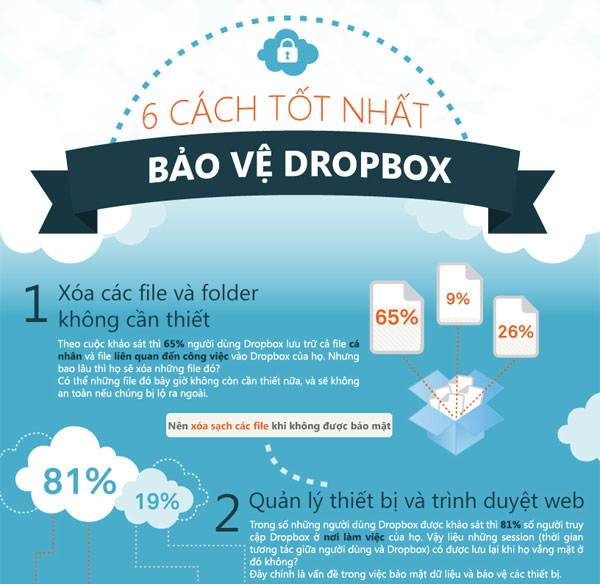
In this Infographic, we will introduce you to the 6 best ways to protect your Dropbox account:


FAQ
How were the 6 best ways to protect your dropbox options selected?
The options are compared by usefulness, ease of use, core features, and their fit for the situations described in the article.
Which option is best for beginners?
Choose the option with the simplest setup, clear documentation, and the features you actually need. A more advanced option is not always the better starting point.
What should I check before choosing?
Check compatibility, current availability, pricing or licensing, privacy requirements, and whether the product still receives updates and support.
Related Articles
 Set Password for Dropbox Application on Phone in 3 Steps2 minutes read
 Instructions for Changing Dropbox Password4 minutes read
 Use Multiple Dropbox Accounts on the Same Computer8 minutes read
 Instructions for Deleting Dropbox's Cache on iPhone and iPad4 minutes read
 Effective Support Services for Dropbox8 minutes read
 Dropbox Tips and Tricks8 minutes read
Reader Comments 0
Sign in with email or Google to join the discussion.