Table of Contents
This guide provides a clear overview of 3 apple visual intelligence alternatives for older iphones, including how it works, key details, and practical considerations that can help you use the information effectively.
Apple's Visual Intelligence in iOS 18.2 is impressive, but it's only available on iPhone 16 models (and later). If you have an older iPhone, don't worry — there are great Apple Visual Intelligence alternatives that offer similar features without requiring the latest hardware.
Google Lens
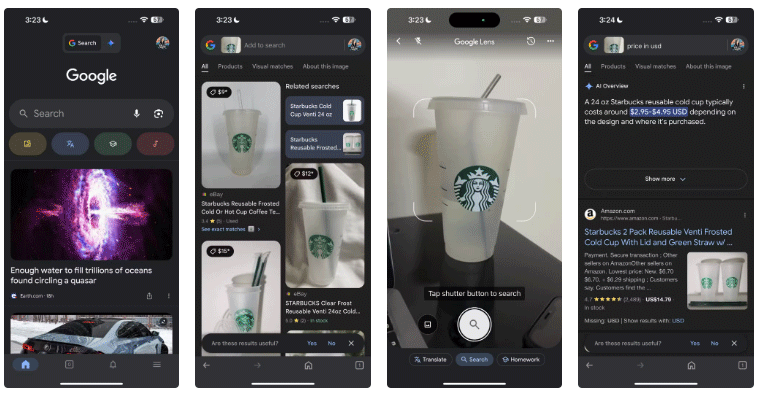
For those familiar with Google Lens, it should come as no surprise that it tops the list of best alternatives to Apple's Visual Intelligence. Google Lens helps you identify objects using your camera. Whether you're curious about the name of a beautiful flower you saw or need to translate a menu while traveling, Google Lens makes it incredibly easy.
The app's shopping assistant features have also been improved. Google added new AI-powered capabilities to Lens in November 2024, making it the perfect shopping companion. You can use Lens to find deals online by searching for similar items with just a photo.
If you have Google Photos on your iPhone, you're halfway there. For real-time searches, download the Google app and tap the Lens icon to instantly analyze what's in front of you.
ChatGPT
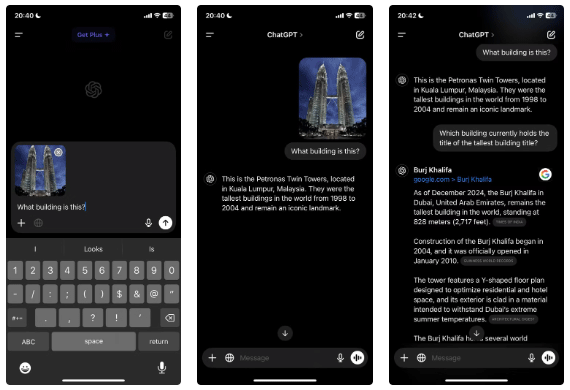
For those who like to dig deeper into information and get detailed responses, ChatGPT is a great companion for visual search tasks. While it doesn't have the same real-time image recognition features as Google Lens or Apple's Visual Intelligence, it shines when it comes to providing contextual understanding and follow-up information.
You can take a photo of a product and ask ChatGPT to explain its features, benefits, or alternatives in more depth. Unlike traditional visual search engines, ChatGPT lets you interact with the content you capture.
After answering, you can ask follow-up questions to get more details or provide context. Plus, ChatGPT works on a variety of iPhones, so you don't need the latest model to enjoy its features.
Claude
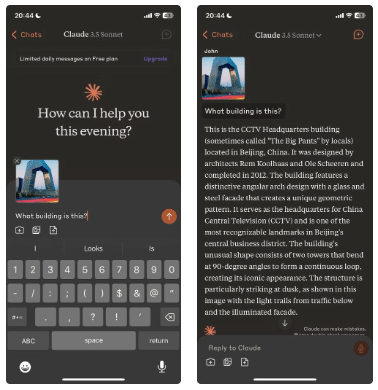
Claude, developed by Anthropic, is another powerful AI tool that could serve as an alternative to Apple's Visual Intelligence, especially when it comes to understanding and interpreting images. While Claude isn't specifically designed for visual search, its ability to process text and provide in-depth answers could still add value to the images you capture with your iPhone.
With Claude, you can upload a photo or describe what you've captured, and AI will give you thoughtful, contextual feedback. This is especially useful when you need to gain deeper understanding of things you encounter in your everyday life, like a piece of art, a complex product, or even a piece of text.
Instead of just giving you one-time feedback, Claude can engage in a back-and-forth conversation to clarify questions, provide additional information, or explore related topics. This makes it a great option if you're looking for a more comprehensive, interactive experience.
While Apple's Visual Intelligence is a powerful feature for the latest iPhone models, there are plenty of great alternatives available for those using older devices. From the tried-and-true Google Lens, which offers a comprehensive visual search experience, to interactive options like ChatGPT and Claude, you can still get the most out of your iPhone camera even without the latest hardware.
FAQ
What is Apple Visual Intelligence Alternatives for iPhones?
It is the main topic covered in this guide, including the relevant tools, settings, features, or steps connected with 3 Apple Visual Intelligence Alternatives for Older Iphones.
Why is Apple Visual Intelligence Alternatives for iPhones useful?
It can make 3 Apple Visual Intelligence Alternatives for Older Iphones easier to understand, compare, configure, or troubleshoot by organizing the most important information in one place.
What should I check before using this guide?
Confirm that the instructions match your device, software version, region, and intended use, then back up important data before making major changes.
Related Articles
 Apple Released iOS 12.4.2, Which Supports Older Iphones and Ipads2 minutes read
 Instructions to Turn Off Apple Intelligence2 minutes read
 Apple May Fix the iPhone 4S, MacBook Air and Older Devices3 minutes read
 Everything Apple users need to know about Siri AI on iPhone11 minutes read
 Future IPhones Can Better Guide People with Visual7 minutes read
 The Super Jailbreak Tool Cellebrite 'fails' with IPhones with iOS3 minutes read
Reader Comments 0
Sign in with email or Google to join the discussion.